 Joyrise
SEO Tools Extensions: Your 2026 Guide to Stack & Strategy
 By Alexi · · Updated · 13 min read

On this page
- Executive Summary: Why This Guide Goes Beyond a List
- What Are SEO Tools Extensions?
- Core Capabilities Every Extension Should Cover
- How to Choose Extensions: A Decision Framework
- Building Your SEO Extension Stack: Practical Implementation
- Common Mistakes and Myths About SEO Extensions
- The Limits of Extensions: When You Need More
- What’s Next for SEO Tooling: Beyond Browser Extensions
- FAQ: Quick Answers to Your SEO Extension Questions
- Conclusion: Build Your Stack, but Watch the Horizon
- Key Takeaways
Executive Summary: Why This Guide Goes Beyond a List
Most “best SEO Chrome extensions” roundups, like The 11 Best SEO Chrome Extensions in 2026, hand you a catalog of 20+ tools and leave you to figure out the rest. This guide to the best SEO browser extensions 2026 takes a different path. It equips you to build a lean, purpose-built SEO tools extension stack that fits your specific workflow—whether you’re a solo creator, an in-house marketer, or an agency lead. You’ll find a decision framework for picking extensions without permission bloat, browser slowdown, or overlapping features. More importantly, the article explains why the coming wave of browser-level AI automation—like the proposed WebMCP standard—and integrated platforms like Joyrise are rewriting the definition of what an “SEO tool” can be. By the end, you’ll know how to use SEO extensions effectively and which free SEO tools Chrome can provide. If you want to stop chasing feature lists and start building a stack that actually saves time and improves decisions, read on.
What Are SEO Tools Extensions?
SEO tools extensions are browser add-ons that surface on-page, technical, or search engine results page (SERP) data inside the browser, without forcing you to leave the page or log into a separate platform. They differ from standalone SEO platforms in scope: extensions provide quick, context-sensitive snapshots, while full platforms offer deep historical databases, site crawls, and consolidated reporting.
The 5 Types of SEO Extensions (On-Page, SERP Overlay, Link, Technical, Content)
- On-Page Extensions – Inspect meta titles, descriptions, heading hierarchy, schema markup, word count, and social tags directly from the current page.
- SERP Overlay Extensions – Add keyword search volume, CPC, competition, and domain metrics to Google results pages. Free options like Keyword Surfer make this accessible without an account.
- Link and Authority Extensions – Display Domain Authority, Page Authority, and backlink counts at a glance. MozBar and Ahrefs’ SEO Toolbar are common choices.
- Technical Extensions – Detect redirect chains, status codes, canonicals, hreflang, and rendered source differences. Redirect Path and Ayima’s Redirect Checker fit here.
- Content/Readability Extensions – Analyze on-page content for readability, grammar, or keyword density. These often overlap with dedicated writing tools and are the least essential of the five.
How They Differ from Standalone Tools and Platforms
Standalone platforms connect to databases that store crawled data from millions of sites, whereas extensions rely on on-the-fly API calls or page scraping. A technical SEO extension can tell you if a page uses a canonical tag, but it cannot crawl your entire 50,000-page site and generate a report. Extensions are immediate but shallow; platforms are deep but require navigation away from the browser context. The real value of extensions lies in reducing the friction of constant context-switching.
Core Capabilities Every Extension Should Cover
When building a lean stack, you don’t need 15 extensions all inspecting the same meta tags. Instead, aim for coverage across these four areas with as few tools as possible. A well-chosen pair of an on-page and a SERP extension, plus a technical checker, handles 90% of daily checks.
On-Page Audits: Titles, Meta, Headings, and Schema
A reliable on-page SEO extension must flag: missing or duplicate title tags, meta descriptions that are too long, heading hierarchy errors (e.g., skipping from H1 to H3), and schema presence. Some, like Detailed SEO Extension, also provide word count and social media tag previews. These checks prevent basic ranking problems from slipping through before a piece goes live.
SERP Data Overlays: Search Volume, CPC, and Featured Snippet Clues
SERP overlays turn a routine Google search into a competitive intelligence dashboard. Tools like Keyword Surfer display estimated monthly search volume and CPC for every term—without an API key. More advanced paid overlays can show historical trend data and featured snippet presence. For daily use, having search volume at a glance in the SERP is a massive time-saver.
Link and Authority Metrics at a Glance
For link prospecting or competitor analysis, seeing domain authority scores next to each result eliminates the need to open multiple tabs. Moz’s MozBar and Ahrefs’ extension do this well, though they typically require a free or paid account for advanced metrics.
Technical Health: Redirects, Canonicals, and Rendered Source
A technical SEO extension like Redirect Path highlights redirect chains, status codes, and conflicting canonicals. “View Rendered Source” extensions are critical for JavaScript-heavy sites: they show you what Google actually renders versus the static HTML. A quick check can reveal indexing gaps that full crawls might miss if not properly configured. A 2026 roundup from Aira on the best Chrome extensions for SEO audits confirms that rendering checks are one of the most underused technical capabilities of browser extensions.
How to Choose Extensions: A Decision Framework
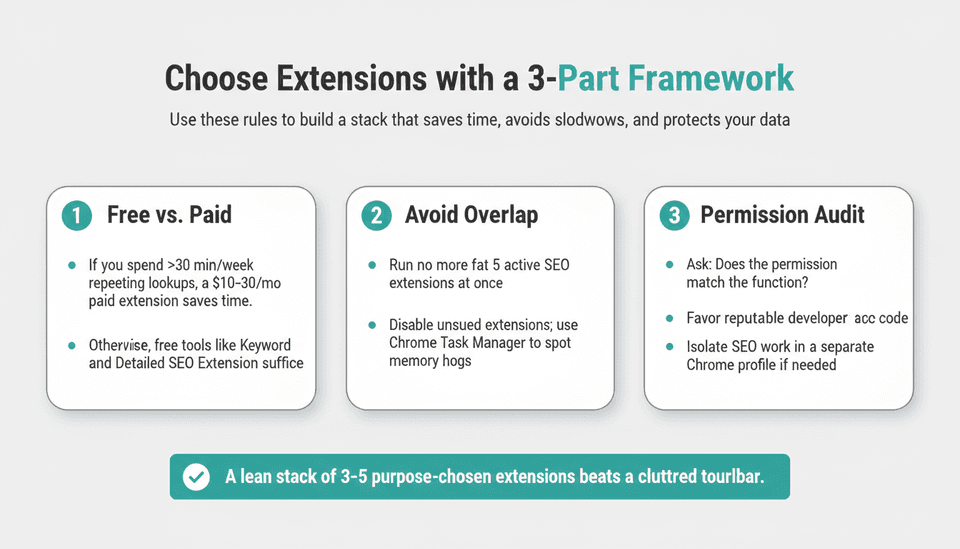
Most SEOs accumulate extensions out of curiosity, leading to Chrome sessions that eat memory and generate conflicting data overlays. Use this three-part framework to make choices that stick.
Free vs. Paid: When Investing Actually Saves Time
Free extensions cover a surprising amount of ground. Keyword Surfer, Detailed SEO Extension, and SEOQuake cost nothing and require no sign-up. Paid extensions—like Ahrefs’ SEO Toolbar (requires a plan) or MozBar (free tier with limited metrics)—offer higher accuracy, more frequent updates, and larger data pools.
Decision rule: If you spend more than 30 minutes per week looking up the same data points that a paid extension could display instantly, the $10–30/month cost is justified. For one-off checks or occasional use, stay with free tools. This rule keeps your stack right-sized and your budget aligned with actual time savings, a principle finance leads appreciate. For a deeper dive into what tools are genuinely free, see our Best Free SEO Tools in 2026: What's Actually Free guide.
Avoiding Overlap and Browser Performance Drains
Chrome extensions consume memory and processing cycles. Running more than 5 active SEO extensions at once often causes noticeable slowdowns—especially on lower-powered machines. Many extensions also interfere with each other’s script injections, causing duplicated data, broken overlays, or even page crashes.
To avoid this: keep only 3–5 extensions active at any time, disabling the rest via Chrome’s extension manager. Remove any extension you haven’t used in a week. Use Chrome’s built-in Task Manager (Window > Task Manager) to identify memory hogs; some extensions use 300MB+ of RAM.
The Permission Audit: Protecting Your Data and Accounts
SEO extensions often request sweeping permissions: “Read and change all your data on websites you visit” or “Access your browsing history.” Some need these for legitimate functionality—a SERP overlay must read the page to inject data. But that permission also allows the extension to collect your browsing behavior, form inputs, and in rare cases, authentication tokens.
Before installing, ask three questions:
- Does the permission match the extension’s function? A nofollow link highlighter should not need access to your browsing history.
- Who developed it? Install extensions from reputable companies with clear privacy policies; avoid anonymous or clone tools. Check the Chrome Web Store listing for a privacy practices disclosure.
- Is the code open-source or audited? Some extensions, like Detailed SEO Extension, are open-source on GitHub, allowing independent review. This reduces the chance of hidden data collection.
Warning: A malicious extension with broad permissions can intercept and exfiltrate sensitive data, including login credentials. When in doubt, use extensions in a separate Chrome profile set up for SEO work, isolating them from your primary accounts.
Building Your SEO Extension Stack: Practical Implementation
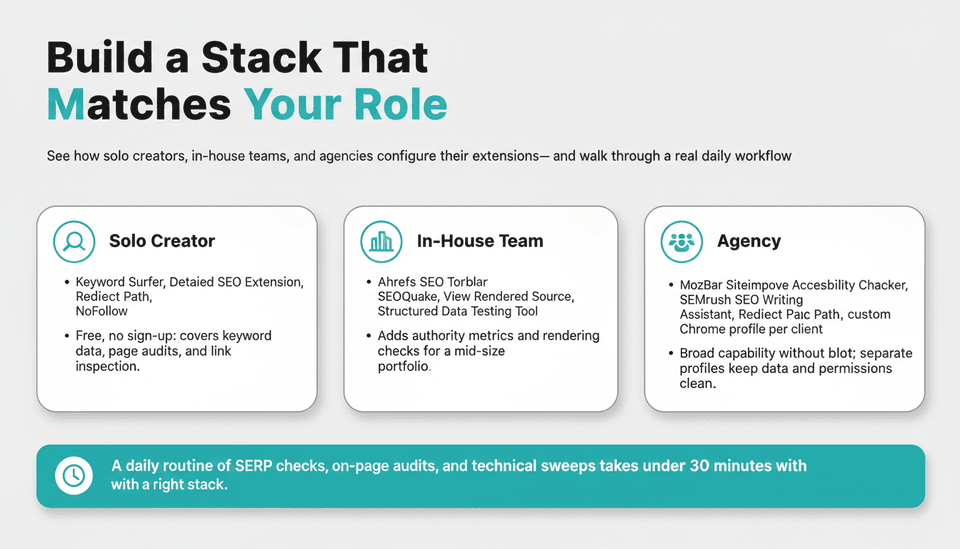
A stack that works for an agency might be overkill for a solo creator. Below are lean configurations tailored to three common personas, followed by a real-world daily workflow that shows these extensions in action.
Stacks for Solo Creators, In-House Teams, and Agencies
| Role | Recommended Extension Stack (3–5 active) | Rationale |
|---|---|---|
| Solo creator | Keyword Surfer (SERP overlay), Detailed SEO Extension (on-page), Redirect Path (technical), NoFollow (link highlighting) | Free, no sign-up needed, covers keyword data, page audits, and basic link inspection |
| In-house team | Ahrefs SEO Toolbar (authority + on-page), SEOQuake (SERP metrics), View Rendered Source (tech), Structured Data Testing Tool (schema) | Adds authority metrics and technical rendering checks for a mid-size portfolio |
| Agency | MozBar (authority), Siteimprove Accessibility Checker (compliance), SEMrush SEO Writing Assistant (content), Redirect Path, a custom Chrome profile per client | Broad capability minus bloat; agencies often use multiple Chrome profiles per client to keep data separate and prevent permission overlap |
These stacks avoid duplication: each extension covers a distinct capability, and none request overlapping permissions without purpose.
Real Workflow: From Morning SERP Check to Mid-Day Technical Deep-Dive
A deliberate SEO extension workflow turns random checking into a repeatable routine. Here’s one example.
8:00 AM – SERP monitoring. Open your top 5 target keywords in separate tabs. With Keyword Surfer active, you instantly see search volume and CPC estimates. MozBar adds domain authority numbers beside each result. You notice a new competitor with a DA 45 domain and a featured snippet; you log that for later content analysis.
9:30 AM – On-page article audit. You published a new post last night. Click the Detailed SEO Extension icon to scan the page. It confirms the title tag length is optimal, meta description is present, and headings are properly nested. The schema checker shows the Article schema is valid. No need to open Search Console; this 30-second audit catches any obvious mistakes before indexing.
1:00 PM – Technical health sweep. Your developer pushed a URL structure change yesterday. Run Redirect Path on the old URLs to ensure 301 redirects are in place. Then use View Rendered Source to check that the new JavaScript-powered content is appearing in the rendered DOM. You discover one template still serving a noindex tag; you alert the dev team.
3:00 PM – Link prospecting. While browsing industry resources, the NoFollow highlighter makes it easy to spot dofollow opportunities on resource pages. You build a quick outreach list without ever opening backlink software.
This routine takes under 30 minutes and covers monitoring, on-page, technical, and off-page signals—using only 4–5 extensions. If you’re building foundational skills alongside your tool stack, our SEO for Beginners: AI, Answer Engines & Your First 90 Days guide walks through a full 90-day plan.
Common Mistakes and Myths About SEO Extensions
Myth 1: More extensions equal more thorough SEO. In reality, data overload and conflicting overlays waste more time than they save. Stick to the minimum needed.
Myth 2: Free extensions are always as accurate as paid. Free tools often use estimated data or less frequently updated datasets. For high-stakes decisions, verify with a trusted standalone platform.
Myth 3: Extensions replace a full SEO audit. Extensions check one page at a time; they cannot crawl, detect site-wide patterns, or track ranking changes over time. A comprehensive audit still requires a dedicated tool.
Myth 4: Permissions don’t matter because the Chrome Web Store vets everything. The store’s review process is imperfect, and many benign-looking extensions have later been sold to companies that added data collection. Always perform your own permission audit.
The Limits of Extensions: When You Need More
Why Extensions Can’t Replace a Full SEO Platform
Extensions are fast, but they’re not deep. They cannot crawl an entire site to identify duplicate pages, internal linking issues, or thin content at scale. They don’t store historical data—so you can’t see how a page’s ranking has trended over 12 months. For these tasks, you need a platform like Ahrefs, Semrush, or Screaming Frog. A technical SEO extension might show that a page uses a canonical URL, but it won’t alert you to a mass canonicalization error affecting 3,000 product pages. The rule: extensions handle point-in-time, single-page tasks; platforms handle systemic analysis and reporting.
The Rise of AI Agents and Browser-Level Automation (WebMCP)
As reported by Semrush’s Carlos Silva on November 4, 2026, a new proposed standard called WebMCP (Web Model Context Protocol) could fundamentally change how SEO tools—and AI agents—interact with websites. Instead of scraping HTML or interpreting screenshots, WebMCP would let websites declare structured capabilities that AI agents can call directly. For SEO, this means that many tasks now performed manually via extensions—like checking a page’s meta tags, canonicals, or schema—could be executed automatically by an agent, at scale, without a human ever opening the browser.
Combined with usage-based pricing trends, like the SpeedyIndex rank tracker launched on November 5, 2026, that bills per keyword check from a non-expiring token balance, the old model of monthly subscription bloat is being challenged. Extensions that simply surface static metrics may soon be subsumed by browser-native agents and flexible, on-demand data services.
What’s Next for SEO Tooling: Beyond Browser Extensions
Integrated AI and Automated Workflows (e.g., Joyrise, WebMCP’s agent layer)
The logical endpoint of SEO automation isn’t a better extension—it’s the disappearance of the manual checking step entirely. Platforms like Joyrise already demonstrate this shift: they combine deep site scanning, keyword planning, content generation, and automated publishing into a single pipeline. Instead of using an on-page extension to verify meta tags, an AI system optimizes them automatically. Instead of checking rankings on a SERP overlay, a dashboard flags anomalies and lets you adjust strategy.
With WebMCP, AI agents might one day directly monitor your site’s SEO health, fix technical errors in real time, and adjust content based on performance signals—without needing a browser extension as the intermediary. For practitioners, this means the role of the AI SEO tools category will evolve from “manual inspection lens” to “orchestrator of automated agents.” For a deeper look at the coming wave of agent-driven search, read Which AI Agent Is Best for SEO? (2026 Decision Guide).
How to Stay Agile as Tools Evolve
Adopt a principle of loosely coupled tools. Avoid locking your core SEO data into a single extension or platform that won’t interoperate with others. Use AI features as they mature, but always maintain a solid understanding of the underlying SEO fundamentals so you can evaluate an AI’s output critically. Follow developments like WebMCP to anticipate how your workflow will change. The AI SEO Optimization: The Definitive Guide for 2026 provides a framework for evaluating AI-driven tools as they enter your stack.
FAQ: Quick Answers to Your SEO Extension Questions
What’s next for SEO extensions?
Extensions will gradually become AI-assisted dashboards rather than manual data viewers. Browser-level standards such as WebMCP (announced November 2026) could enable AI agents to interact directly with page data, making many extension functions native to the browser. Concurrently, pay-per-use pricing models—like the SpeedyIndex rank tracker launched November 5, 2026—challenge monthly subscriptions. Expect a future where you maintain fewer extensions but lean more on integrated platforms and browser agents.
Is there an SEO Chrome extension that highlights nofollow links?
Yes. The NoFollow extension highlights nofollow links with a dotted red border, distinguishing them from dofollow links. Other options include Link Miner and Detailed SEO Extension (which includes a nofollow/dofollow toggle in its on-page reports). These tools also often highlight UGC and sponsored attributes. A dedicated nofollow link highlighter Chrome extension keeps link prospecting efficient without additional clicks.
What SEO Chrome extensions are 100% free and don’t require signing up for a service?
Several: Keyword Surfer (SERP volumes), Detailed SEO Extension (on-page and schema), Redirect Path (technical redirects), and SEOQuake (multi-function, though some features need an API key). These install directly from the Chrome Web Store and work without account creation. Always verify the current permissions and privacy practices before installing, as extension policies can change.
How do I avoid conflicts between SEO extensions?
Conflicts usually stem from multiple extensions injecting scripts into the same page. Limit active extensions to 3–5 and disable others when not in use. If you see duplicated metrics or broken SERP overlays, disable all but one to isolate the culprit. Using separate Chrome profiles for different SEO tasks (e.g., one for on-page work, another for link research) also prevents conflicts and improves performance.
Can extensions replace a full SEO suite?
No. Extensions give you quick insights on individual pages but lack site-wide crawling, historical data, and reporting depth. A full suite like Ahrefs, Semrush, or Screaming Frog remains essential for systematic analysis. Even emerging AI-driven platforms that automate content and monitoring operate as integrated platforms, not standalone extensions.
Conclusion: Build Your Stack, but Watch the Horizon
The right set of extensions makes daily optimization work faster and less distracting. But the goal isn’t a long list of icons in your toolbar—it’s a deliberate, permission-audited, and performance-conscious stack that serves your actual workflow. Keep it lean, question every permission, and retire tools you don’t use.
At the same time, the landscape is shifting. Agentic SEO, driven by standards like WebMCP and integrated AI platforms, will reduce the need for manual, one-page-at-a-time inspection. Your current extension stack is a bridge to that future, not a permanent fixture. Build it knowing that within a few years, much of what an extension does today will be done autonomously.
Key Takeaways
- A lean stack of 3–5 purpose-chosen SEO extensions beats a cluttered toolbar; audit permissions and memory use to avoid security risks and slowdowns.
- Extensions are excellent for quick, context-sensitive checks but cannot replace full platforms for site-wide analysis, historical tracking, or reporting.
- Browser-level AI automation (WebMCP) and usage-based pricing signals (SpeedyIndex) point to a fundamental shift away from manual extension-driven checks toward agentic, integrated SEO.
- When choosing free extensions, favor those with no sign-up requirement and transparent privacy practices; always verify the actual permissions requested.
- Stay agile: learn to use AI-assisted tools, but maintain strong foundational SEO knowledge so you can evaluate automated decisions.
Ready to move from manual checks to automated publishing? Explore how Joyrise plans, writes, and publishes daily SEO articles directly to your Webflow blog at joyrise.ai.