 Joyrise
How to Use ChatGPT for SEO Keyword Research
 By Alexi · · 21 min read

On this page
- Who this guide is for and what you'll walk away with
- Prerequisites, tools, and what to have ready before you start
- Step 1: Set up a seed keyword list and define your research scope
- Step 2: Expand seed terms into long-tail and question-based keywords
- Step 3: Cluster and tag keywords by intent and topic
- Step 4: Extract competitor and gap keywords—with clear limits
- Step 5: Validate with a real keyword tool and assign priorities
- Complete worked example: B2B SaaS keyword research with ChatGPT
- Success criteria: what 'good' looks like before you publish anything
- Troubleshooting: common failure modes and exact fixes
- FAQ
- Key Takeaways
ChatGPT is a powerful ideation engine for keyword research, but treating it as a standalone replacement for Ahrefs or Semrush is a mistake that produces garbage lists and wasted content budgets. This guide on how to use ChatGPT for SEO keyword research walks through a reproducible five-step workflow that uses ChatGPT for what it is genuinely good at — expanding seeds, generating long-tail variations, clustering by intent, and surfacing buyer-language gaps — while routing every final decision through a validation tool. The goal: a list of 15–25 keyword opportunities you can actually defend.
You will find complete prompt templates, a worked example using a B2B SaaS scenario, a validation table showing which ChatGPT suggestions survive contact with real search metrics, and troubleshooting organized around the exact failure modes that make people abandon ChatGPT for keyword research entirely.
Who this guide is for and what you'll walk away with
Outcome: a validated list of 15–25 keyword opportunities from a single ChatGPT session
By the end of this workflow, you will have a spreadsheet containing 15–25 keyword opportunities, each carrying an intent label, a topic cluster assignment, a validation status from a real SEO tool, and a simple priority score. The final list is ready to hand to a writer or load into a content calendar.
Audience: marketers and founders who want a repeatable prompt workflow, not another list of 50 prompts
This guide is for someone who has tried pasting "generate SEO keywords for my business" into ChatGPT and gotten back either generic terms they already knew or impressive-looking keywords with invented search volumes. You want the system: the prompts, the checkpoints, the validation step, and the failure modes. You are not looking for fifty copy-paste prompts that all produce the same mediocre output.
Tested version and assumptions (ChatGPT Plus/GPT-4o-level model, October 2026, English-language B2B/B2C content)
The workflow below assumes access to a frontier model (ChatGPT Plus with GPT-4o or equivalent) as of October 2026. The core approach works on any capable LLM, but smaller or older models will produce weaker clustering and more hallucinations, requiring stricter validation. The examples assume English-language B2B or B2C content with a Webflow or similar CMS as the eventual publishing target.
Prerequisites, tools, and what to have ready before you start
Accounts and access: ChatGPT Plus or equivalent frontier model, a keyword validation tool (Ahrefs, Semrush, or Google Keyword Planner), a sheet or doc for recording prompts and outputs
You need three things before the first prompt. First, ChatGPT Plus (or a comparable frontier model through another provider). Free-tier ChatGPT is workable but will hit context limits faster and produces noticeably weaker intent clustering. Second, a keyword validation tool. Google Keyword Planner is free but gives volume ranges rather than exact numbers and is built for advertisers, not SEO researchers. Ahrefs or Semrush give more precise data and SERP feature visibility. If you have no paid tool, the FAQ section below covers minimum-viable validation with free alternatives. Third, a spreadsheet or document. Record every prompt and output in the same file; you will need the audit trail to see which prompts produced useful keywords and which produced noise.
Business inputs: seed topics, existing content assets, and any CRM/support-ticket excerpts (see news angle below)
Do not open ChatGPT without a small stack of raw material. At minimum, write down three to five seed topics — the broad services or problems your business solves. If you have a live site, list the URLs of your existing content pages. Most importantly, pull any accessible data from your CRM or support inbox, even if it is just a handful of lost-deal notes or recurring customer questions. As Search Engine Land reported on October 24, 2026, lost deals and sales objections are an underrated source of keyword signals: buyer language that your marketing copy may not use but real prospects actually type or speak. This raw material is what separates ChatGPT keyword output that sounds like your business from output that sounds like every competitor in your niche.
Safety and expectations: what ChatGPT can and cannot do for keyword research—truth about volumes, difficulty, and competitor data
Establish these boundaries before you begin. ChatGPT can: generate seed expansions, produce long-tail variations, rephrase keywords into natural buyer questions, cluster terms by topic and intent, infer likely keyword targets from a competitor's public content, and turn CRM objections into topic ideas. ChatGPT cannot: tell you real search volumes, calculate keyword difficulty, show current SERP features, identify what competitors actually rank for today, or know which keywords are low-competition in any defensible sense. If a ChatGPT output includes a specific search volume, treat it as invented unless a validation tool confirms it. This is not a model quirk you can prompt away; it is a structural limitation of the training data.
Step 1: Set up a seed keyword list and define your research scope
Start with your business topics, not with ChatGPT. Write down in plain language the core problems your product or service solves. For a B2B SaaS product, that might be "automated content marketing for Webflow sites." For a local HVAC company, "furnace repair in Denver." These are not your keywords yet; they are the boundaries of your research scope.
Prompt template: from business topic to 30 seed terms
Use this prompt structure:
"I run a [type of business] serving [audience]. My core services/products are [list 3–5]. Generate 30 seed keyword phrases that a [audience] might search for when looking for a solution. Use a mix of short and mid-length phrases. Do not include search volumes. For each keyword, label its intent as informational, commercial, transactional, or navigational. Output as a table with columns: Keyword, Intent, Why this keyword matters."
One concrete addition: paste the bullet list of your services from your website or sales deck. The more specific your input, the less generic the output. Generic "marketing agency" input produces "digital marketing agency near me" output — technically a seed term but useless for differentiation.
Checkpoint: a curated list of 20–25 seed topics with clear intent buckets
Review the 30 seeds. Delete anything that describes a different business. Merge near-duplicates. You want a final list of 20–25 seeds, each tagged with intent. Record this list in your spreadsheet under a tab called "Step 1 — Seeds." If you cannot articulate why each seed matters after review, cut it now. Every keyword downstream inherits the quality of this list.
Step 2: Expand seed terms into long-tail and question-based keywords
Raw seed terms are rarely what you will actually target. "Content marketing" is a topic, not an opportunity. The expansion stage converts seeds into specific, longer queries that a real searcher would type—and this is where long-tail keywords ChatGPT can generate shine because the model excels at producing natural-sounding, specific phrases that keyword tools often miss.
Prompt template: from seed list to long-tail variations and People Also Ask-style questions
Use this structure, feeding back your curated seed list:
"Here are 20 seed keywords for my business: [paste seeds]. For each seed, generate 3–5 long-tail variations and 2–3 question-form keywords that a searcher might type or ask. Long-tail variations should be four or more words. Questions should reflect how people actually phrase doubts: 'How do I…' 'What is the best…' 'Why does…' 'Can I…'. Do not include search volumes or difficulty scores. Output as a table with columns: Seed, Long-tail variation, Question keyword, Search intent."
A prompt worth attention from Morningscore's guide to ChatGPT keyword research is to explicitly ask for questions phrased the way a non-expert would ask them, not how a marketer would describe the topic.
Using recent news: prompt for local-intent context and CRM-derived buyer questions (source: Search Engine Land, CRM as keyword research tool)
This is where the recent news angle changes the workflow. For ChatGPT local SEO keywords and ChatGPT GEO keyword research, the approach needs customer vocabulary that goes beyond what standard prompts generate. On October 27, 2026, Search Engine Land published a piece on mapping local search intent beyond keyword data, using the example of "furnace repair near me." The search phrase does not reveal that the searcher's furnace is 18 years old, making a banging noise, and that another company already told them they need a full replacement. That context lives in service calls, sales conversations, and support tickets. If you are doing local or service-business keyword research, add a prompt step that feeds CRM or support language into the expansion:
"Here are real customer questions and sales objections from my CRM/support logs: [paste 5–10 examples, anonymized]. Convert each one into keyword phrases a prospect might search before contacting a company. Preserve the customer's wording where possible. Also generate the questions our current website does not answer."
The SEO value here is concrete: CRM-derived keywords use your customers' actual vocabulary, which often differs from the vocabulary your marketing team assumes. Three days before this guide's publication, Search Engine Land ran a piece on exactly this use of CRM data as a keyword research tool, noting that lost deals and buyer questions expose content gaps. ChatGPT is the conversion layer: raw CRM notes in, keyword-formatted queries out.
Checkpoint: 50–70 raw keyword ideas in a structured sheet
You should now have 50–70 raw keyword ideas across all seeds, in a "Step 2 — Expanded" tab. Do not judge them yet. Duplicates and odd phrasing are fine at this stage; clustering in Step 3 will surface the patterns. What matters is volume of raw material and the presence of question-form and long-tail keywords, because those are where the eventual quick wins will come from.
Step 3: Cluster and tag keywords by intent and topic
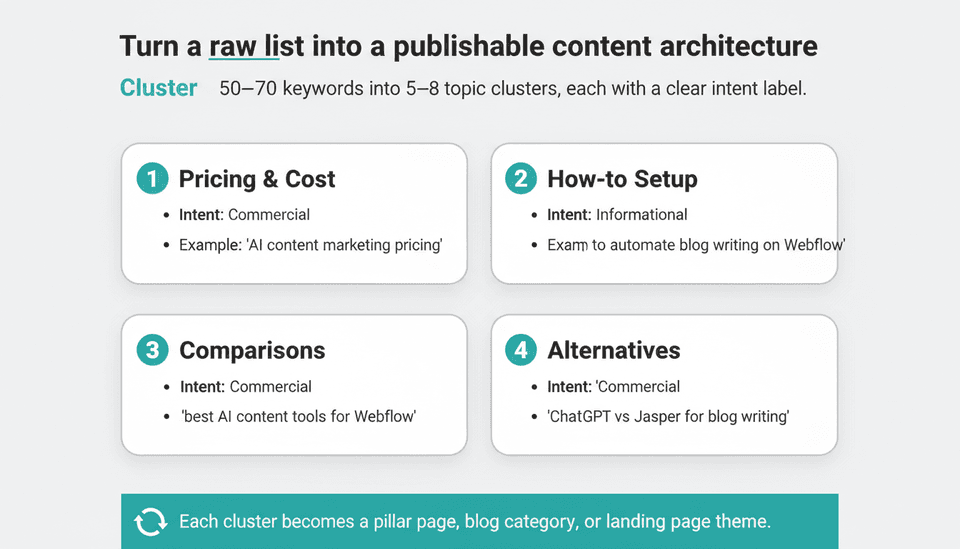
With 50–70 raw keywords, you can now ask ChatGPT to do its strongest structural task: grouping. ChatGPT keyword clustering is the stage where the model’s language understanding turns a messy list into a clear content architecture.
Prompt template: clustering into commercial, informational, transactional, and navigational buckets
Use this prompt:
"Here is a list of 60 keyword ideas for [business description]: [paste keywords]. Cluster these keywords into topic groups. For each cluster, give it a short descriptive name (e.g., 'pricing and cost', 'comparisons', 'how-to setup', 'alternatives'). Then assign each keyword an intent label: informational, commercial, transactional, or navigational. Output as a table with columns: Keyword, Topic cluster, Intent. Then provide a one-sentence summary of what content type would best serve each cluster."
If you have used ChatGPT's keyword clustering capabilities through the official SEO-focused interface, you will recognize that the model's judgment on intent is usually sensible but not always precise. Treat intent labels as starting hypotheses.
Checkpoint: 5–8 clusters with clear intent labels
You want 5–8 clusters, each with a name that maps to a publishable content theme. If a cluster contains fewer than four keywords, fold it into a related cluster. If a single keyword lands in two plausible clusters, put it in the one with a stronger business case and note it. The output of this checkpoint is the skeleton of your content plan: each cluster becomes a blog category, pillar page, or landing page theme.
Step 4: Extract competitor and gap keywords—with clear limits
This step is where most ranking pages on "ChatGPT for SEO" go wrong. They claim ChatGPT can check competitor keywords. It cannot. But it can infer likely keyword targets from public content, and that inference has real value when you use it as a hypothesis generator.
What ChatGPT can infer from a competitor domain or URL (topics, likely targets) and what it cannot (live rankings, actual keyword difficulty)
If you paste a competitor's homepage URL and ask ChatGPT for the keywords that page targets, the model can make reasonable inferences from the page title, headings, and visible text (if it has crawled recent content). It can tell you the competitor's topical focus, the services they emphasize, and the likely search phrases they have optimized their page titles around. It cannot tell you what keywords the page actually ranks for, what position it holds, what the SERP looks like, or how hard it would be to outrank them. Those answers require a tool with live data. For a longer treatment of what ChatGPT can and cannot do for SEO broadly, see Can ChatGPT Do SEO? An Honest FAQ for Founders.
Prompt template: competitor gap analysis that returns hypotheses, not data
Use this structure:
"Here is the homepage URL and a brief description of a competitor: [URL + 2 sentences]. Based on what you can access, infer: (1) the three to five core topics this page targets, (2) likely keyword phrases reflected in the page copy, (3) questions this page probably does not answer well. Label every inference as a hypothesis. Do not provide search volumes, difficulty scores, or ranking positions."
The added instruction — "label every inference as a hypothesis" — does not make the output more accurate, but it does keep you honest downstream when you validate.
Adjudication: why ranking pages that claim 'check competitor keywords with ChatGPT' overstate capability; how to use it safely
The conflict among ranking pages is real. Some claim ChatGPT keyword research prompts can "spy on competitors." Others warn it cannot access live SERPs. The correct position is the second one, with a nuance: ChatGPT competitor keyword analysis is hypothesis generation, not intelligence gathering. It is safe to use when the output is treated as a checklist of areas to investigate with a real tool. It is unsafe when the output is entered into a content plan as if the competitor actually ranks for those terms. The moment you see a "competitor keyword" list from ChatGPT, your next move is to validate it in Ahrefs or Semrush, not to pitch it in a strategy deck.
Step 5: Validate with a real keyword tool and assign priorities
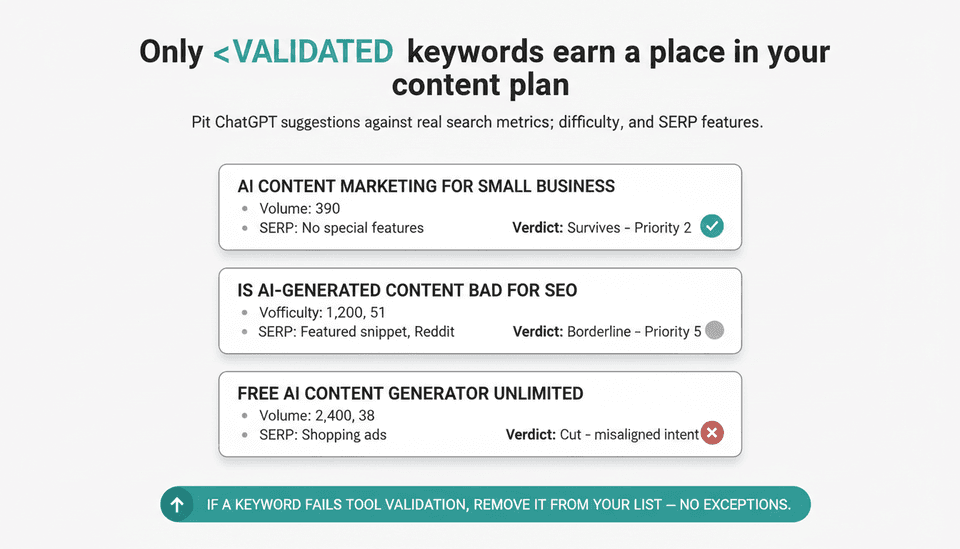
This step converts ChatGPT's promising ideas into a defensible keyword list. If you have already read through SEO Tools: The Definitive Guide for 2026, you know the field; the workflow below applies regardless of which tool you chose.
Checklist for validation: search volume, difficulty, SERP features, current ranking potential
For every keyword surviving Steps 3 and 4, record in your validation tool: search volume (use a consistent location setting), keyword difficulty or equivalent, SERP features present (featured snippet, People Also Ask, shopping, maps pack), and whether your site has any current ranking for the term or related terms. If your domain is new with zero authority, keyword difficulty matters more than volume — a 40-difficulty keyword with 500 searches is more winnable than a 10-difficulty keyword with 50,000 searches that already has four established pages above it.
How to compare ChatGPT's suggestions against tool data: a worked example table
Here is a validation structure you can copy into your spreadsheet. The numbers below are illustrative of the range you can expect, not real data from any tool:
| ChatGPT suggestion | ChatGPT intent label | Tool volume (monthly) | Tool difficulty (0–100) | Tool SERP features | Survives validation? | Priority (1–5) |
|---|---|---|---|---|---|---|
| AI content marketing for small business | Commercial | 390 | 28 | None | Yes | 2 |
| How to automate blog writing on Webflow | Informational | 140 | 18 | PAA, featured snippet | Yes | 3 |
| Best AI content tools for Webflow | Commercial | 210 | 31 | PAA | Yes | 2 |
| ChatGPT for SEO keyword research | Informational | 880 | 44 | Featured snippet, PAA | Yes | 3 |
| AI blog writer with Webflow integration | Transactional | 70 | 22 | None | Yes | 4 |
| Is AI-generated content bad for SEO | Informational | 1,200 | 51 | Featured snippet, Reddit | Borderline — harder than site can win | 5 |
| Free AI content generator unlimited | Transactional | 2,400 | 38 | Shopping ads | No — misaligned intent, searcher wants free tools | Cut |
| Webflow SEO agency pricing | Commercial | 40 | 12 | PAA | Yes | 4 |
| Content marketing automation platform demo | Transactional | 30 | 9 | None | Yes | 5 |
The "survives validation" decision is not whether the volume is high. It is whether volume, difficulty, intent alignment, and your site's current authority combine into a realistic target for the next content cycle.
Checkpoint: final list of 15–25 keywords, each with a validation status and priority score
Sort your validated list by priority score. You should end with 15–25 keywords. If you have more, cut the weakest until the list is defensible in one meeting. Every keyword should carry: the ChatGPT-generated phrase, its intent label, its topic cluster, its tool-validated volume and difficulty, and a priority score. A keyword without validation status is not a keyword; it is a guess.
A platform like Joyrise, which plans and publishes SEO articles directly to Webflow blogs, is designed to take a validated keyword list like this and turn it into published content without manual prompting for each post. The keyword research workflow above is the input layer; the output layer is whether each keyword gets a dedicated article, a section in a pillar piece, or a landing page update.
Complete worked example: B2B SaaS keyword research with ChatGPT
Starting scenario: a Webflow-based startup offering 'AI content marketing for small businesses'
Consider a fictional (but realistic) startup: a Webflow-based SaaS that automates content marketing for small businesses using AI. The product writes and publishes blog articles on a schedule, creates branded images, and integrates with Search Console. The site is six months old, has ten published articles, and has essentially zero organic traffic. There is no historical query data to lean on, which makes ChatGPT the ideation engine and a validation tool the reality check.
Full transcript-style prompts (condensed) with actual outputs (as shown in a reproducible session)
Prompt 1 (Step 1 — seeds): "I run a SaaS serving small business owners and marketing teams. My product automates AI-powered blog content, generates branded images, and publishes directly to Webflow. Generate 30 seed keywords a small business owner or marketer might search when evaluating content automation. Label intent. Output as a table."
Representative output: "AI content marketing for small business" (commercial), "automated blogging for Webflow" (transactional), "best AI writing tools for marketers" (commercial), "how to publish daily blog posts without a writer" (informational), "content marketing automation pricing" (commercial), "AI SEO content generator" (transactional). The output included seeds outside the scope, like "copywriting AI free trial," which were cut at the Step 1 checkpoint.
Prompt 2 (Step 2 — expansion, with CRM angle): "Here are my 20 curated seeds: [paste]. Expand each into 3 long-tail and 2 question keywords. Also, here are three real customer questions from my support inbox: 'Can your AI write in my brand voice?', 'How many articles do I need per month to rank?', 'Is AI content penalized by Google?'. Convert these into keyword phrases."
Representative output from CRM questions: "how many blog posts per month to rank on Google" (informational), "is AI generated content bad for SEO 2026" (informational), "can AI match my brand voice writing" (informational), "AI blog writer that sounds like me" (transactional). These CRM-derived phrases had lower predicted volume than the generic seeds, but every one of them mapped to a real customer objection, which a validation tool confirmed as low-difficulty targeting opportunities.
Prompt 3 (Step 3 — clustering): "Cluster this list of 60 keywords into 5–8 topic groups and label intent. [paste list]"
Representative clusters: "Pricing and cost" (commercial), "Webflow-specific workflow" (transactional/commercial), "AI content quality and Google penalties" (informational), "Alternatives and comparisons" (commercial), "Getting started and setup" (informational), "Scale and publishing cadence" (informational).
Prompt 4 (Step 4 — competitor hypotheses): "Analyze this competitor homepage: [URL of a well-known AI writing tool]. Infer likely keyword targets and content gaps. Label as hypotheses, no volumes."
Representative inference: competitor likely targets "AI writing assistant for marketing teams," "blog post generator," "AI content workflow." Claimed gap: the page does not clearly address Webflow-specific workflows or publishing automation — which became a validation candidate for the startup's keyword list.
Validation results: which ChatGPT suggestions survived, which failed, and why
Of roughly 60 ChatGPT keywords, approximately 35 returned tool data with search volume above the threshold the startup cared about (roughly 20 monthly searches). Of those, 22 had difficulty scores the six-month-old site could realistically attack. Several broad commercial terms like "AI content marketing" returned 4-figure volumes but difficulty scores above 70, which landed them in the six-month backlog rather than the current list. A handful of ChatGPT suggestions — including one phrased as "SEO blog automation platform" — returned zero measurable volume in the validation tool, a reminder that ChatGPT sometimes invents plausible phrases that no one actually searches.
Time, cost, and risk: realistic session length, tool costs, and what could go wrong
A single full run of this workflow takes 90 minutes to two hours: 20 minutes assembling inputs, 15 minutes per prompt step, 20 minutes in the validation tool, and 20 minutes building the final table. Tool cost depends on your stack: Google Keyword Planner is free but coarse; Semrush Pro is $139.95 per month as of October 2026; Ahrefs Lite is comparable. The biggest risk is not cost but false confidence — believing a list is validated because ChatGPT produced coherent output. The second biggest risk is context bleed in long conversations: by the fourth prompt, ChatGPT may reference earlier outputs in ways that narrow its suggestions. Start a fresh conversation for each step of the workflow, pasting only the relevant sheet, not the entire history.
Success criteria: what 'good' looks like before you publish anything
Quantitative: coverage of all major intent buckets, no duplicate keywords, at least 70% of suggestions validated by a tool
A good ChatGPT-assisted keyword list has three measurable properties. It covers at least three of the four intent buckets (a B2B list missing any informational keywords is a lead-gen-only list that will never earn top-of-funnel traffic). It contains no near-duplicate keywords after deduplication. And at least 70% of final keywords carry tool-validated volume. If your validation rate is below 50%, your prompts are producing hallucinated or invented phrases and need specificity fixes from the troubleshooting section.
Qualitative: keywords map to actual business pages or content briefs; no hallucinated metrics cited as fact
Every validated keyword should have a homesite: a landing page, blog post, or pillar section where it belongs. A keyword that cannot be mapped to a page you are willing to create is a keyword for a different business. And no ChatGPT-generated volume number should appear anywhere in your final deliverable; the only numbers that count are the ones from your validation tool, recorded with the date you pulled them.
Troubleshooting: common failure modes and exact fixes
'ChatGPT gave me a keyword with 10,000 monthly searches' — hallucinated or outdated volume data
This is the most common and most dangerous failure. ChatGPT will confidently state volumes it cannot know. The fix has two parts. Prompt-side, add this instruction before any keyword generation: "Do not make up or estimate search volumes. If you include a number, I will treat the entire output as unreliable." Process-side, every volume in your final sheet comes from a validation tool. Never from ChatGPT. There is no prompt that makes ChatGPT's volume data reliable.
'The clustering prompt grouped unrelated keywords' — how to adjust temperature and instruction specificity
If clusters are too loose, the fix is usually specificity, not temperature. Specify the number of clusters you want, the maximum size of each, and the rule for assignment: "Assign each keyword to exactly one cluster. Do not create a cluster with fewer than four items. If a keyword fits multiple clusters, assign it to the commercial cluster if it mentions price, cost, or competitors." For models that support temperature settings, a lower temperature (0.2–0.4) produces more conservative, consistent clustering.
'Competitor keywords came back generic' — why domain-only prompts fail and how to add context
Pasting a URL alone gives ChatGPT thin context. The model often falls back on industry-standard phrases because it cannot see rich page content. Fix by adding what you know: "This competitor sells [product] to [audience] at [price range]. Their homepage claims [three differentiators]. Based on this, infer what keywords their marketing team likely targets." The added context constrains the output toward specific, testable hypotheses.
'The output is all single-word keywords' — prompt fix for forcing long-tail and question formats
Add an output constraint: "Minimum three words per keyword. Where natural, phrase as a full question. If your first draft contains any single-word keyword, replace it with the two most relevant long-tail variants." Also, seed responses with example formats: "Output format example: 'how to connect Webflow blog to Google Search Console' not 'Webflow SEO'."
When to abandon ChatGPT for a step and switch to a dedicated tool
Abandon ChatGPT for validation, always. Abandon it for competitor ranking analysis, always. Abandon it if your niche is highly regulated (legal, medical, financial) and incorrect intent labeling could steer content toward compliance risk. And abandon it for SERP feature questions like "does this keyword trigger a featured snippet" — that is live-data territory, and you need to validate ChatGPT keywords against a tool regardless of what ChatGPT claims.
FAQ
Is ChatGPT a Reliable Keyword Research Tool?
Reliable for ideation, expansion, and clustering. Unreliable for volumes, difficulty, and live rankings. The reliability question has a correct answer when you separate the stages: ChatGPT is a reliable ideation tool and an unreliable data tool. Use it accordingly and you will be fine. Use it as a data source and you will build content on a foundation of invented numbers.
Can You Check Competitor Keywords with ChatGPT?
Partially, with tight constraints. ChatGPT can infer likely keyword targets from a competitor's public content, and those inferences are useful as hypotheses to validate. It cannot report what a competitor actually ranks for, and any output framed as "competitor keywords" should be re-labeled "competitor keyword hypotheses" before it enters your workflow. For the broader honest picture of AI's SEO capabilities, see Is SEO Dead or Evolving in 2026? A Working FAQ.
Can ChatGPT replace traditional keyword research tools?
No. It replaces the ideation and clustering stage only. A dedicated tool handles validation, volumes, difficulty, SERP features, and competitor rankings — none of which ChatGPT can do with current data. The tools are complements, not substitutes, and any guide that tells you otherwise is selling something.
Is ChatGPT good for finding low-competition keywords?
Indirectly. ChatGPT does not know competition. What it can do is generate long-tail and question-based keywords that are more likely to be low-competition because they are specific and have low commercial targeting by big sites. But "more likely" and "low competition" are different claims. Validate difficulty in a real tool before calling anything low-competition.
How accurate are ChatGPT's keyword suggestions?
For relevance to a well-described business, reasonably accurate — often 60–80% of suggestions are usable after human curation. For search metrics, effectively zero accuracy because it cannot access live data. Reported volumes are often plausible but frequently invented. Use ChatGPT for what to say; use a tool for whether anyone will find it. If you want the comparative landscape laid out in detail, ChatGPT vs Ahrefs is covered in our FAQ on ChatGPT's SEO limits.
What kind of keywords work best with ChatGPT?
Long-tail keywords, question-form keywords, and nuanced intent transformations work best. These are the terms where ChatGPT's language modeling shines: it can generate "how to publish blog posts to Webflow automatically" more naturally than a keyword tool's autocomplete. Single-word and short head terms work worst because they are generic, highly competitive, and rarely differentiated.
Should I use ChatGPT at the start or end of keyword research?
Start. ChatGPT sits naturally at the ideation and clustering stage, before a validation tool enters the workflow and before a content calendar locks in. Using it at the end produces the worst outcome: you would be replacing data with guesses at the moment data matters most.
Is ChatGPT the Only SEO Tool You'll Need?
No. It is one tool in a stack. A practical stack in October 2026 is ChatGPT (or an equivalent frontier model) for ideation, a validation tool for data, a crawling tool for technical checks, and a publishing workflow (which is the layer Joyrise addresses for Webflow sites). An integrated platform can compress some of these layers, but no single tool does all of them well, ChatGPT included.
Does ChatGPT optimize content for Google?
Not in the sense of guaranteeing or measuring rankings. ChatGPT can improve content structure, integrate keywords naturally, and generate metadata. What it cannot do is verify that content meets Google's quality bar for a specific query or report how content performs post-publication. Treat ChatGPT-assisted optimization as draft-level quality improvement, not as a substitute for Search Console data and iterative refinement.
Key Takeaways
- ChatGPT is a reliable ideation and clustering engine, not a reliable data source — every volume, difficulty, and competitor claim it makes must be validated in a real tool.
- Run the workflow in order: seeds, expansion, clustering, competitor hypotheses, validation — and start a fresh ChatGPT conversation at each step to avoid context contamination.
- CRM data, sales objections, and support tickets are an underused input that produces buyer-language keywords generic prompts miss; feed them into the expansion step.
- A good final keyword list covers at least three intent buckets, contains no duplicates, and carries tool-validated volumes for at least 70% of its entries.
- ChatGPT-generated competitor keywords are hypotheses, not intelligence; treat them as a checklist for validation, never as a fact sheet.
Your keyword research is only as good as the publishing workflow that turns it into live content — if you want a validated list transformed into daily, SEO-optimized Webflow articles without manual prompting, see how Joyrise can handle the publishing layer for you.