 Joyrise
Can I Do SEO on My Own? A DIY Decision Guide
 By Alexi · · 16 min read

On this page
Can I do SEO on my own? Yes, but only up to a clear breakpoint — when your time budget, content volume, or site complexity turns solo work from a good investment into a bottleneck that costs you more than you gain. This guide is for founders and marketing leads who want to know where that line sits, especially if you run a recurring content operation on Webflow, where you can’t afford to let week after week slip without publishing. If you’re asking “can you do SEO yourself,” the answer is the same — and this guide applies equally.
Direct answer: Can I do SEO on my own?
The yes-with-conditions answer
You can absolutely handle core SEO tasks yourself if you’re willing to learn a few fundamentals and invest consistent time. The Semrush DIY SEO guide outlines steps anyone can follow, and Google’s own documentation makes it clear: organize your site, make it interesting and useful, and help Google find your content. No degree required.
But “doing SEO” on your own isn’t a one-time project. It’s a recurring skill set — and if you’re also running the business, writing content, and managing a Webflow site, your attention splits fast. The DIY decision holds as long as your monthly content goal stays under about 8–10 articles, you have at least 6 hours a week for SEO work, and your site isn’t yet generating dozens of technical alerts in Search Console. Past that, the trade-off flips.
What “doing SEO” actually includes
Paring down the fluff, SEO boils down to five repeatable work streams:
- Strategy and research: choosing topics you can realistically rank for, mapping them to pages.
- On-page work: title tags, headings, internal linking, meta descriptions, and image alt text.
- Technical health: crawlability, indexation, sitemaps, page speed, mobile rendering, and (for Webflow) CMS collection pages that Google can digest cleanly.
- Content production: writing, illustrating, and formatting articles that answer real questions.
- Off-page and authority: earning links, mentions, and trust signals — the part most DIY efforts treat as an afterthought.
Ticking each box once is easy. Doing it every week as you publish new articles is what separates a short-lived bump from sustainable organic traffic.
The time-budget reality every founder should see
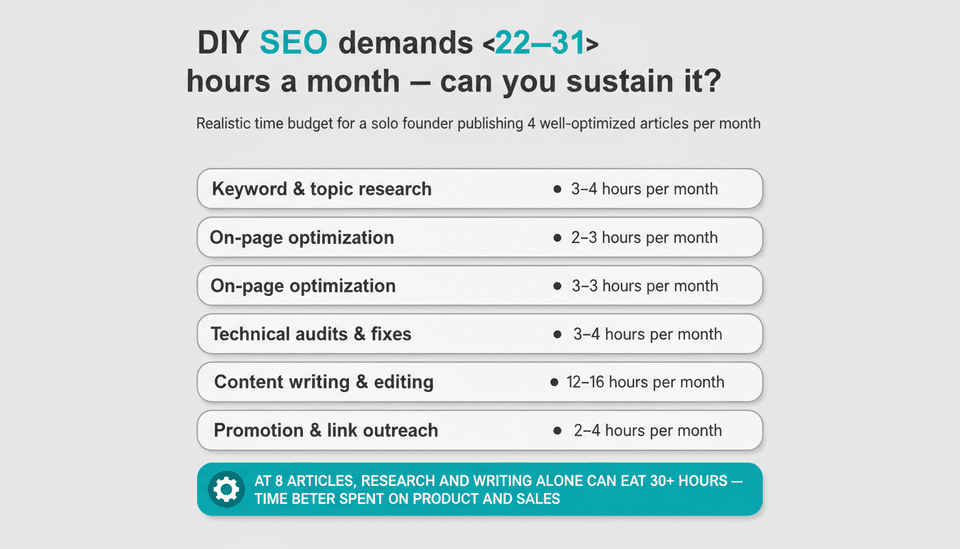
A realistic monthly time budget for someone doing all five work streams solo, publishing 4 well-optimized articles per month, looks like this:
| Task | Hours per month (4 articles) |
|---|---|
| Keyword and topic research | 3–4 |
| On-page optimization | 2–3 |
| Technical audits & fixes | 3–4 |
| Content writing & editing | 12–16 |
| Promotion & link outreach | 2–4 |
| Total (minimum) | 22–31 hours |
At 8 articles, the writing and research alone can eat 30+ hours. If you’re a founder, that’s time you’re not spending on product, sales, or support. The question isn’t “can I do SEO on my own?” — it’s “can I sustain this cadence for 6 months without dropping other critical work?”
Use this quick SEO basics checklist to gauge your capacity:
- I have a clear list of 10–20 target keywords tied to specific pages.
- My site passes Google’s mobile-friendly and Core Web Vitals checks.
- Every new article has a unique title tag, H1, and meta description I wrote myself.
- My sitemap includes only indexable pages and submits automatically.
- I can publish and optimize at least one article every two weeks without fail.
If three or more boxes stay unchecked for two months, you’re drifting into “do-it-yourself” territory where the cost is unmet growth, not just effort.
How Google Search Works and How Long Results Take
How does Google Search work?
Google Search operates in three broad steps: crawling, indexing, and ranking. Crawling means Googlebot discovers pages via links or sitemaps. Indexing stores a version of the page in Google’s database, determining what the page is about. Ranking decides the order pages appear for a query, using hundreds of signals including relevance, quality, and page experience.
You directly control: which URLs Google can crawl (robots.txt, your sitemap), what a page’s title and content says, and the internal link structure that distributes authority. You indirectly influence: how quickly people link to you, how users interact with your pages, and Google’s confidence in your site’s overall trustworthiness. That indirect part is why patience is mandatory.
How long does SEO take? A timeline for new sites
A realistic answer to “how long does SEO take” depends on your domain authority and publishing consistency. For a new or low-authority site, expect:
- 30 days: Most technical fixes (missing sitemaps, broken redirects) will be reflected. Newly published pages may get indexed, but rank for near-zero-competition terms only.
- 90 days: Your initial content cluster should be indexed. You’ll see impressions and maybe a trickle of clicks for long-tail queries. Ranking movements will still be small — a dozen positions up or down — as Google tests your pages.
- 180 days: If you’ve published consistently (at least weekly) and earned a few quality links, expect meaningful traffic from informational keywords, and possibly your first conversions. Pages that haven’t moved after 6 months likely need a content or authority rethink.
Any promise of ranking in weeks for a competitive term is a red flag. Expect visible, stable progress closer to the half-year mark.
What should I think about when choosing keywords?
Don’t start by hunting for the highest-volume keywords. Those are the hardest to rank, especially without a strong backlink profile. Instead, layer three keyword types:
- Low-competition long-tail phrases (how-to questions, “does x work with y”): these let you earn early clicks and build topical authority.
- Product-adjacent commercial-intent terms (“best tool for…”, “affordable… for startups”): these convert better even with lower volume.
- Topic clusters that reinforce each other: a pillar page linked to several supporting articles shows Google that you fully own a subject.
When you lack paid tools, combine Google’s “People also ask” box, the autocomplete search bar, and free SEO tools for small websites like Google Keyword Planner or AnswerThePublic. For a deeper workflow, how to use ChatGPT for SEO keyword research gives step-by-step prompts to uncover content gaps without a subscription.
Doing SEO Yourself: Task-by-Task Answers
How to do SEO on your own
At a tactical level, you apply three layers: make the site technically crawlable, make each page’s topic obvious, and signal authority through content quality and links. The following task breakdowns walk through what matters and what you can safely skip.
Keyword research: what to choose and what to skip when you lack paid tools
When you don’t have Ahrefs or Semrush, prioritize:
- Real customer questions from support tickets, sales calls, and community forums. These map directly to low-competition content opportunities.
- Google Search Console queries that already show impressions but low average position (positions 10–20). Improve those pages first.
- SERP features like “People also ask” to build FAQ sections within articles.
Skip: hammering exact-match keywords into every paragraph. Google’s guidance is clear: meta keywords and keyword density are not ranking factors. Use the target phrase in your title, one or two headings, and naturally in the body. Anything beyond that is noise.
On-page changes that matter most on any website
For every important page, address exactly these elements:
- Unique title tag that includes the primary phrase near the front and is under 60 characters.
- One H1 that matches the topic promise; don’t duplicate across pages.
- Descriptive alt text for images that explains the image content, not keyword stuffing.
- Internal links from existing relevant pages (not just navigation) pointing to the new page with descriptive anchor text.
- A meta description that expands on the title and gives a reason to click; 150–160 characters.
Forget meta keywords tags entirely — Google ignores them. And ignore any tool that urges a specific keyword density percentage; it’s a relic. Instead, this is where the 80/20 rule in SEO applies: perfecting these few on-page elements for your top 20 pages will yield more impact than chasing minor tweaks across your entire site.
How do I handle technical SEO on a Webflow site?
Webflow automates a lot, but not everything. For every Webflow project, do this once and verify monthly:
- Set up Search Console by adding the verification tag to Webflow’s custom code field (Project Settings > Custom Code > Head). Connect the property and submit your sitemap URL (e.g.,
/sitemap.xml). - Check your sitemap in Webflow’s SEO settings. Ensure it includes only indexable pages. Exclude CMS collection pages you’ve set to “noindex” or that aren’t user-facing. Webflow auto-generates the sitemap from all published pages — review it quarterly.
- Handle CMS collection slugs structurally. Use a pattern like
/blog/post-titlerather than/post/collection-item-id. Set clean slugs in the collection’s CMS settings. This avoids duplicate pages and URL chaos. - Manage indexation with the “Search engine indexing” toggle on each page. Use it to noindex paginated archive pages or thin tag pages that would be near-duplicates.
- 301 redirects for old URLs go under Project Settings > Hosting > Redirects. Always redirect changed slugs, especially after a redesign.
- Performance matters. Use Webflow’s built-in image optimization (lazy loading, WebP conversion) and keep custom code minimal above the fold.
Webflow SEO is not inherently harder, but many teams miss the sitemap audit and the CMS collection slug rules. A platform like Joyrise publishes directly to a Webflow CMS, updating the sitemap and collection structure automatically — but if you’re doing it manually, treat the CMS slug and sitemap review as a recurring calendar task.
Content: how much to publish, how often, and in what format
Publishing frequency matters less than consistency and depth. One comprehensive, well-structured article every two weeks beats four thin posts a month. A stable SEO content workflow that a solo operator can maintain is:
- Week 1: Research and outline the next article.
- Week 2: Write, add images, optimize, and publish.
- Week 3: Promote and build internal links, then repeat research for the next.
- Each month: 15 minutes reviewing Search Console for new query data to mine for content updates.
For Webflow teams targeting sustained traffic growth, 4–8 articles per month is a strong DIY range. Pushing past 10 without help often leads to lower quality, fewer internal links, and early burnout.
Links and promotion: where DIY attention is usually wasted
Sending cold email templates to 100 random blogs is a time sink with near-zero return for a small site. Instead, triage your promotion time:
- List 3–5 sites where your audience actually reads, and contribute a single guest post that links back (one quality link beats 20 irrelevant ones).
- Turn every new article into a short email to your list, with a clear next action.
- Respond helpfully on forums, Reddit, or social media where your topic appears — linking only when the article genuinely answers the question.
Avoid buying links, link swap rings, or DMs that ask for “collaboration.” Google penalizes those and a solo operator can’t afford a manual action.
When DIY SEO Stops Being Enough
When should I stop doing SEO alone and hire or automate?
The breakpoint for most Webflow-based content programs is 10+ articles per month and fewer than 10 dedicated hours per week for SEO. At that volume, the time required to research, write, optimize, and track properly exceeds one person’s bandwidth. You’ll either publish less than you planned, or quality will slip — and Google’s quality systems now detect thin content faster than ever.
Team size also matters. A solo founder with no marketing support hits the wall sooner than a small team with a writer and a part-time SEO reviewer. If you’re operating as a one-person show and your organic traffic is meant to drive revenue, the threshold to bring in help is when your publishing rhythm slips below one deep article per two weeks for more than two consecutive months.
What SEO tasks should I keep in-house even if I automate?
Even if you hire an agency, freelancer, or use an automated content platform, never fully outsource:
- Topic selection and final quality check: only someone who understands your product and customers can judge whether a draft truly serves them.
- Search Console monitoring and page-level troubleshooting: you need direct access to notice index bloat, sudden drops, or query shifts.
- Internal linking strategy: an external provider doesn’t know your content archive well enough to link new articles into existing clusters correctly.
Hold onto the editor seat. Let outside help or automation handle the drafting and initial optimization, but reserve the final "publish" button for someone who can say “this is good enough for our brand.”
DIY SEO vs hiring agency (and other options): cost and output
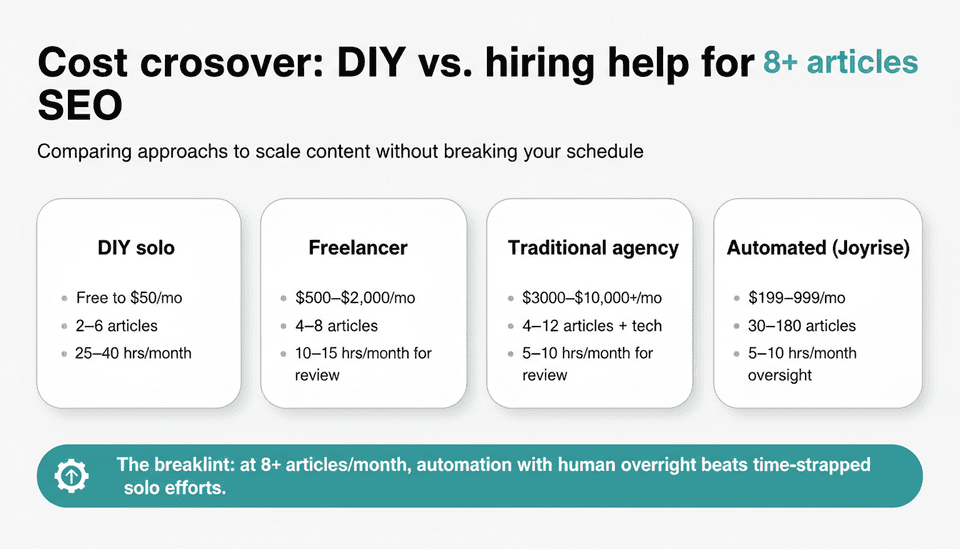
When deciding between DIY SEO vs hiring agency, it helps to see the concrete numbers. The table below compares the most common approaches.
| Approach | Monthly cost (approx.) | Monthly content output | Human time needed per month | Best for |
|---|---|---|---|---|
| DIY solo | Free (tools: $0–$50) | 2–6 articles | 25–40 hours | Sites under 50 pages, early-stage teams |
| Freelancer writer | $500–$2,000 | 4–8 articles | 10–15 hours for editing, SEO, review | Teams with a clear content brief and editor |
| Traditional SEO agency | $3,000–$10,000+ | 4–12 articles plus technical work | 5–10 hours for review | Established sites needing link building and advanced strategy |
| Automated content platform (e.g., Joyrise) | $199–$999/month | 30–180 articles | 5–10 hours for quality oversight and topic selection | Webflow teams scaling recurring content with a tight budget |
The cost crossover where automated workflows beat a freelancer or agency emerges at around 8+ articles a month, because you’re paying for volume without multiplying human review time linearly. However, automation without human oversight creates a spam risk — content that ranks briefly then gets demoted. The sustainable model is: let automation produce drafts and handle publishing, but keep an in-house layer to approve topics, spot-check outputs, and monitor performance.
AI-Assisted DIY SEO: What Changes and What Doesn’t
Does Google allow AI-generated SEO content?
Yes, with a hard condition. Google’s guidance since 2023 emphasizes that AI-generated content is not against its guidelines provided it demonstrates expertise, experience, authoritativeness, and trustworthiness (E-E-A-T). The line is crossed when content is produced at scale solely to manipulate rankings — what Google calls “scaled content abuse.” If your AI pipeline is pumping out hundreds of pages with no human editing, no editorial strategy, and no original insight, you’re on the wrong side of that line.
This means you can use AI to draft articles, but a human must still evaluate: does this page add original value? Is it accurate? Would a real person be better informed after reading it? If not, don’t publish.
Quality controls that keep automated publishing from becoming spam
A responsible AI-assisted SEO content workflow needs three checkpoints:
- Topic approval: a human selects clusters and sets the angle, not an automated keyword scraper.
- Draft quality review: spot-check factual claims, check for AI-generated fluff, and ensure the article sounds like your brand. Use ChatGPT’s own SEO prompts as a review assistant, not the sole author.
- Post-publish audit: revisit top pages at 90 days. If bounce rate is high or rankings dropped, rewrite the page with a stronger human perspective instead of regenerating another AI draft.
Platforms like Joyrise layer an extra AI quality-judge pass that acts as a secondary filter before publishing, but even that doesn’t replace a human reviewer who knows the product cold.
Setting up a Webflow content pipeline responsibly
For teams integrating automated publishing to Webflow, the sequence should be:
- Define your content brand voice and E-E-A-T signals (author bios, about page, editorial policy).
- Configure the AI tool to publish as drafts, not live — until you’ve validated the first 5 articles.
- After validation, allow direct publishing but set a monthly calendar for manual spot-checks on 10% of published articles.
- Use the platform’s Search Console dashboard to catch early indexing anomalies: a sudden spike in noindexed pages, for instance.
The AI SEO content guidelines are still evolving, but the principle holds: your workflow must include a human decision point before a piece reaches Google’s index.
Where automation helps and where it fails without a human review step
Automation excels at: keyword clustering, on-page technical optimization (titles, meta, internal link suggestions), image alt text generation, and scheduling daily posts without missing a beat.
It fails at: capturing nuanced product expertise, understanding industry-specific controversy, or recognizing when a topic is too sensitive for templated content. If you’re writing about financial regulations, medical advice, or legal compliance, do not let an AI publish unsupervised.
Troubleshooting by Symptom
Why are my pages indexed but not ranking?
An indexed page that fails to rank for its target terms typically suffers from one of three issues:
- Insufficient authority: your domain has few backlinks, and competitors have stronger link profiles. Fix: double down on internal linking from your most authoritative pages and earn one or two quality external links before expecting movement.
- Content isn’t meeting search intent: Google may have indexed the page but sees that users bounce back to search results. Fix: re-examine the page. Does it answer the query directly above the fold? Is it substantially different from what already ranks? Update it to provide a clearer, more complete answer.
- Internal competition: several pages target similar keywords. Google can’t decide which page to rank, so none rank well. Fix: consolidate thin pages into one authoritative resource and 301 redirect the others.
Check the page’s average position in Search Console; if it hovers around positions 30–50, the content might need a rewrite. Position 10–20? You’re close — a few more internal links and a quality backlink could push it to page one.
“I publish weekly and get no clicks”
This often means you’re either publishing on topics with zero search volume or your pages are indexed but not appearing for queries people actually type. Open Search Console’s performance report and filter for the last 3 months. If you see zero impressions on your articles, your keyword research missed real demand. Re-run topic selection using actual customer language, not industry jargon.
If impressions are high but clicks are near zero, your title tags and meta descriptions aren’t earning the click. Test variations with a clearer benefit.
“Traffic plateaued after a few months”
Plateaus are normal. They happen when your initial content stops growing because you’re no longer adding new target keywords or because your existing pages have saturated their potential for your current authority level. To break it:
- Identify pages ranking positions 4–15 (close to page one). Refresh them with new data, additional sections, or updated internal links.
- Expand your topic clusters: launch 3–5 new supporting articles linked to a pillar page you haven’t updated in 6 months.
- Ask whether your domain authority has stagnated. If it has, invest in a single high-quality digital PR link from a publication your audience reads.
“Google is ignoring my images or product pages”
For images: make sure each image has a meaningful file name (not “IMG_0321.jpg”) and alt text. Images should be discoverable via an image sitemap or included in your regular sitemap. Webflow automatically serves images from a CDN but doesn’t create a dedicated image sitemap; you can generate one via a third-party tool and submit it separately, though for most sites this is overkill — proper alt text and page context are enough.
For product pages that aren’t ranking, the culprit is usually thin content. If your product pages are identical except for the product name and price, Google sees them as near-duplicates. Add unique descriptive text, sizing guides, usage examples, or customer Q&A to each page. Then ensure they’re linked from category pages with descriptive anchor text.
“I want to remove a page from Google’s results without hurting the rest of the site”
Use Webflow’s page-level “Search engine indexing” toggle to set it to “noindex.” Then request a temporary removal in Google Search Console (Removals tool) to speed things up. Do not block the page via robots.txt, because that prevents Google from seeing the noindex tag. The removal will expire after about 6 months, but by then Google will have reprocessed the noindex rule and won’t re-list it.
For pages that you still need live but don’t want in search (like a thank-you page), this method is safe and doesn’t affect your other pages.
Keeping This Answer Accurate and Current
Owner, review cadence, and evidence gaps to close before publishing
This article is maintained by the Joyrise editorial team. It should be reviewed every 6 months — sooner if Google releases a major update to its content quality or Webmaster guidelines. The primary evidence gaps are that all time estimates assume a standard Webflow setup without complex custom code; sites with heavy JavaScript rendering or internationalization will require additional time. If you’re in that situation, increase the technical audit hours by 50%.
Sources to recheck when Google updates its guidance
When Google updates the Search Essentials or its AI content policy, revisit:
- The “Google’s guidance on AI-generated content” section above.
- The realistic timelines, as ranking delays may shift with algorithm changes.
- The Webflow-specific tech steps, to confirm no changes to sitemap or CMS collection handling.
Where to read deeper next: canonical SEO, Webflow, and Search Console resources
- Webflow’s SEO documentation
- Google Search Console Help
- Capterra’s “How To Do SEO Yourself” for a beginner-friendly walkthrough of on-page fundamentals.
Key Takeaways
- DIY SEO works, but only if you can commit 25+ hours a month and publish consistently — the decision flips when you need more than 10 articles a month and time runs short.
- Start with technical crawlability and on-page essentials on your Webflow site, then build a simple weekly content routine around customer questions, not keyword volume.
- AI and automation tools can scale your output dramatically, but they require a human quality checkpoint to avoid indexed spam that gets demoted later.
- When you hit a traffic plateau or indexing problem, diagnose with Search Console data, not guesswork — most plateaus break with content refreshes and targeted internal linking, not a complete overhaul.
Get your first AI-written, SEO-optimized article published to your Webflow blog and review it before committing — try Joyrise for free.