 Joyrise
YouTube SEO Tools: A Strategic Guide for 2026
 By Alexi · · 9 min read

On this page
- Executive Summary
- What Are YouTube SEO Tools?
- What Is YouTube SEO and How Does It Work?
- What Are the Best YouTube SEO Tools?
- How Do I Choose the Right YouTube SEO Tool?
- How Do I Actually Rank YouTube Videos?
- Are Free YouTube SEO Tools Enough?
- How Has YouTube SEO Changed in 2026?
- Common Mistakes and Myths
- Limitations of YouTube SEO Tools
- Next Steps: Building a Sustainable YouTube SEO Workflow
- Key Takeaways
Executive Summary
YouTube SEO success in 2026 isn’t about racking up views—it’s about generating meaningful engagement that drives leads, sales, and channel growth. YouTube’s latest view metrics, reported by Social Media Examiner on October 30, 2026, shift the focus from raw view counts to signals like viewer satisfaction and conversion actions. This guide helps founders and marketing operators move beyond shallow free-tool lists. You’ll get a concrete framework for building a repeatable YouTube SEO strategy and workflow using multiple tools, including when to upgrade from free to paid and how to adapt your tool stack to YouTube’s new engagement-first priorities.
What Are YouTube SEO Tools?
YouTube SEO tools are software, browser extensions, and platforms that help you optimize videos to rank higher in YouTube search and suggested feeds. They cover YouTube keyword research, tag generation, competitor analysis, metadata scoring, thumbnail A/B testing, and in-depth YouTube analytics tools—all crucial aspects of video SEO. Unlike Google web SEO, YouTube optimization relies heavily on viewer interaction data—watch time, click-through rate (CTR), and retention. Tools surface this data and give you actionable ways to improve it.
What Is YouTube SEO and How Does It Work?
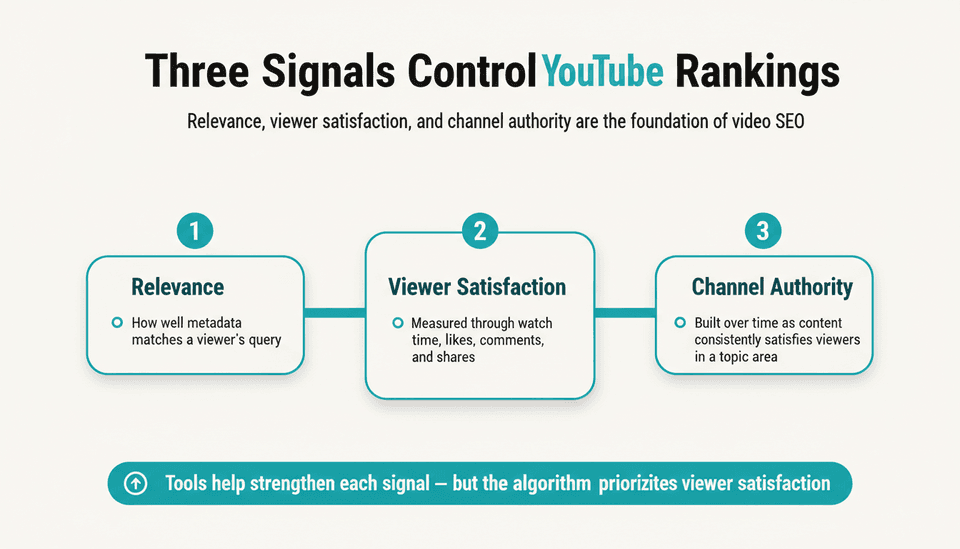 YouTube’s ranking algorithm evaluates three core signal groups:
- Relevance: how well your video metadata (title, description, tags) matches a viewer’s query.
- Viewer satisfaction: measured through watch time, average view duration, likes, comments, and shares—engagement, not just a click.
- Channel authority: built over time as your content consistently satisfies viewers in a topic area.
YouTube SEO tools help you strengthen all three. Keyword tools improve relevance. Optimization tools nudge better CTR and retention. Analytics tools quantify satisfaction so you can iterate.
What Are the Best YouTube SEO Tools?
There’s no single best tool. The right combination depends on your channel goals, budget, and the stage of your workflow. Below is a table of tool categories and representative options, many with free tiers.
| Category | Representative tools | Primary function | Free tier available? |
|---|---|---|---|
| Keyword research | TubeBuddy, vidIQ, TubeRanker, Keyword Tool | Discover search volume, competition, related keywords | Yes (limited queries) |
| Competitor analysis | TubeBuddy’s competitor score, vidIQ’s channel audit | Compare tags, ranked videos, and performance gaps | Often limited in free plans |
| Video optimization | TubeBuddy’s SEO studio, vidIQ’s optimization checklist, YouTube Studio’s tag suggestions | Score metadata, suggest tags, evaluate thumbnails | Basic scoring free |
| Analytics & performance | YouTube Studio, vidIQ advanced analytics, TubeBuddy retention reports | Track CTR, watch time, subscriber conversion, drop‑off points | YouTube Studio is free; advanced tiers paid |
| Automation & AI | AI title generators (integrated in TubeBuddy/vidIQ), external AI writing assistants | Generate title variations, descriptions, and tags using AI | Usually part of paid tiers |
These tools, many of which serve as YouTube ranking tools, are effective when combined, not used in isolation. For example, a keyword research tool feeds ideas into a metadata optimization tool; analytics then validate the result.
How Do I Choose the Right YouTube SEO Tool?
 Start by defining what you need right now. If you’re publishing your first 20 videos, a free keyword tool and YouTube Studio analytics are enough to learn the basics. Upgrade once you hit a concrete limitation:
Upgrade when free keyword data becomes too broad, when you can’t track enough competitors to spot content gaps, or when your channel consistently generates leads and needs conversion-tracking analytics.
Trade-offs to weigh:
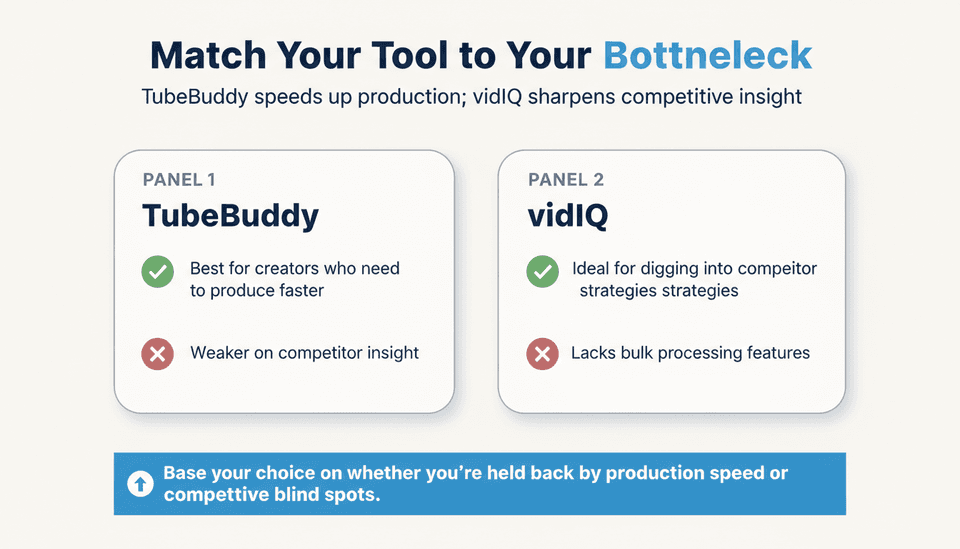
- TubeBuddy vs. vidIQ: both offer robust keyword and optimization features. TubeBuddy leans into bulk processing and A/B testing; vidIQ emphasizes competitor benchmarking and trend alerts. Pick based on whether your bottleneck is production speed (TubeBuddy) or competitive insight (vidIQ).
- Browser extension vs. web platform: extensions are lean and integrated into YouTube’s interface. Standalone web tools can offer deeper keyword databases but require tab-switching. Most creators use a browser extension as their daily driver and a web tool for deep-dive research.
- Free vs. paid: free tools cap daily queries and hide historical data. If you need to see how search volume trends over a quarter or analyze more than three competitors, a paid plan pays for itself quickly.
Also consider how the tool handles YouTube’s new view metrics (more on that below). A tool that only reports view counts is less valuable today than one that surfaces viewer retention curves and click source breakdowns.
How Do I Actually Rank YouTube Videos?
Ranking requires more than installing an extension. Use tools inside a systematic, repeatable workflow. Here’s a four-step framework for video content optimization.
Step 1: Research Keywords and Topics
Use a keyword tool to validate ideas before filming. In TubeBuddy or vidIQ, enter a broad topic. Look for phrases with decent monthly search volume and low competition scores—high volume isn’t always better. Target keywords where you can realistically outperform existing videos on title relevance and thumbnail appeal. Export your list. Cross-check with YouTube’s auto-suggest and the “people also search for” boxes to uncover long-tail variations. If you use AI for idea generation, be careful: AI-generated keyword lists often include irrelevant terms. For a deeper approach, combine AI assistance with your own competitor gap analysis; see How to Use ChatGPT for SEO Keyword Research.
Step 2: Optimize Your Video Metadata
Before uploading, prepare your title, description, and tags using your primary keyword naturally in the title and within the first 200 characters of the description. An optimization tool like TubeBuddy’s SEO Studio scores your metadata and flags missing elements. Don’t stuff tags—15 to 20 tightly related tags work better than 50 generic ones. The tool will suggest tags based on what’s working for top-ranking videos. Include a compelling custom thumbnail that reinforces the title; many optimization tools now offer thumbnail previews next to competitor thumbnails.
Step 3: Analyze Competitors and Fill Gaps
After publishing, don’t stop. Use a competitor analysis tool to pull the tags and top-performing videos from channels ranking above you for your target keyword. Look at their video structure: length, editing style, hook timing. Tools like vidIQ’s channel audit can show you where they get most of their views. Identify gaps—topics they haven’t covered, questions they didn’t answer—and create follow-up videos. This step turns tools from “checklist checkers” into strategy engines.
Step 4: Track Performance and Adjust
Wait 48 to 72 hours, then check YouTube Studio analytics. Focus on CTR and average view duration. If CTR is below 5%, test a different thumbnail. If retention drops sharply at 30 seconds, rework your intro. Tools with retention graphs (YouTube Studio is free and sufficient for this) pinpoint exactly where viewers leave. Advanced tools can also show click sources, helping you see whether traffic comes from search or suggested, and tailor future optimizations accordingly. Set a monthly review to track aggregated metrics per video topic cluster.
Are Free YouTube SEO Tools Enough?
Free tools cover basic keyword suggestions, tag generation, and elementary analytics. They’re adequate if your channel is small, you’re testing content-market fit, or you have zero budget. But they have sharp limits:
- Keyword data often lacks monthly search volume estimates or competition metrics; you get only broad “high/medium/low” labels.
- Competitor analysis is either missing or restricted to a handful of channels.
- Historical trend data and retention deep-dives are absent.
If your channel revenue or lead generation justifies spending $50/month, pay for a tool—the granularity you gain saves hours of guesswork and improves content decisions. Many creators stay on free plans too long, wasting time on unvalidated topics. Move up when data gaps are costing you video performance.
How Has YouTube SEO Changed in 2026?
The biggest shift is YouTube’s new view metrics, which emphasize engagement and lead generation over raw view counts. As Social Media Examiner reported on October 30, 2026, these changes mean marketers must now track “meaningful views,” conversion actions (like link clicks in descriptions), and other signals of actual viewer satisfaction. Views alone no longer tell you whether a video moves the needle for your business.
This alters which tool metrics matter most:
- Raw view count is less actionable. Instead, prioritize average view duration, subscriber conversion rate, and traffic source breakdowns.
- Tools that only log view milestones with no context become insufficient. You need analytics that overlay conversions on audience behavior.
- Optimizing for “clickbait” views backfires; the algorithm rewards viewer-satisfaction signals. Tools that help you craft honest, engaging thumbnails and intros (not just a high-CTR title) are more valuable.
Additionally, be aware of data quality issues elsewhere. Search Engine Land reported on October 28, 2026, that Semrush confirmed Google is returning “poisoned” results to some automated ranking tools. While this primarily affects web SEO tools that scrape Google SERPs, it serves as a reminder: tool data is never perfectly accurate. YouTube-specific tools that rely on YouTube’s official API are less affected, but you should still triangulate insights with your own YouTube Studio analytics.
Common Mistakes and Myths
- Mistake: Treating tools as a magic ranking button. A high SEO score in a tool won’t guarantee views if your video’s actual content doesn’t hold attention.
- Mistake: Tag stuffing based on tool suggestions without looking at intent. Tools suggest tags by volume, not by whether your video truly fits them.
- Myth: “Free YouTube SEO tools aren’t worth using.” Free tools that tap the YouTube API give reliable keyword data; their limits are in depth and history, not falsehood.
- Mistake: Ignoring thumbnails. Thumbnail CTR is a ranking factor; use split testing tools (available in TubeBuddy) early.
- Myth: “You need a huge channel to rank.” Small channels can outrank larger ones on specific long-tail keywords if the content better satisfies the query—tools help find those opportunities.
- Mistake: Relying on a single metric. Some creators obsess over keyword search volume and neglect watch time. The 80/20 rule in SEO applies here: focus on the few optimizations that drive the majority of algorithm signals—usually CTR and retention.
Limitations of YouTube SEO Tools
No tool is a crystal ball. Recognize these limitations:
- Data freshness: Keyword volumes update periodically; trending topics may not appear in time.
- Ranking projections are estimates: A tool’s “rank probability” is based on historical correlations, not guarantees.
- Competitor data is partial: Tools can’t see private analytics like exact watch time, only what YouTube exposes through APIs or scrapes.
- Google search keyword tools can be inaccurate: The “poisoned” results incident (Search Engine Land, October 28, 2026) underscores that external data can be wrong. Always validate suspicious figures against YouTube’s own search suggestions.
- Tool bloat: Excessive features can distract from the fundamentals of making good videos. A simple stack often outperforms a complex one.
Next Steps: Building a Sustainable YouTube SEO Workflow
Don’t chase a new tool every month. Build a stack and a process you’ll use consistently:
- Core stack: Choose one keyword research tool (free or paid), one metadata optimization extension, and YouTube Studio analytics. For many creators, pairing vidIQ’s free tier with TubeBuddy’s SEO Studio creates a solid, low-cost combination.
- Publish checklist (use every upload):
- Keyword validated (volume + competition)
- Title includes primary keyword in first 60 characters
- Description contains keyword in first two lines, with a link to a relevant resource
- 15–20 specific tags applied
- Custom thumbnail tested against alternative using split testing
- Post-publish review: After 72 hours, review CTR and retention via YouTube Studio. If retention dips before 30 seconds, record a new intro. If CTR is low, test a thumbnail swap.
- Monthly audit: Use your tool’s channel-wide analytics to see which topics drive the most subscriber growth and highest average view duration. Double down on those themes.
Treat the tools as an assembly line, not a collection of fixes. Each plays a role at a specific stage of the video’s lifecycle. Automate what you can—AI-assisted title and tag generation can speed up routine work—but keep human judgment at the decision points. (For written blog SEO, platforms like Joyrise automate the entire content production pipeline for Webflow sites; YouTube, however, still demands hands-on video creation.)
Key Takeaways
- Upgrade from free tools when the data gaps are costing you content decisions—typically when limited keyword depth or missing competitor analysis prevents you from finding an edge.
- YouTube’s 2026 view metrics reward engagement signals like retention and conversions, so shift your tool usage toward analytics that measure satisfaction, not just vanity views.
- A repeatable four-step workflow—keyword research, metadata optimization, competitor gap analysis, and performance tracking—turns a tool list into an actual ranking system.
- Tool data isn’t perfect; validate keyword volumes and ranking estimates against YouTube Studio and real viewer behavior, especially as external data sources face accuracy risks.
- Combine a browser extension with YouTube Studio to create a low-cost, high-impact stack, adding paid capabilities only when your channel’s revenue justifies it.
If you’re ready to automate your written SEO content strategy, sign up for Joyrise to get your first article free.