 Joyrise
What Are the Top 3 SEO Tools? (2026 Shortlist)
 By Alexi · · 11 min read

On this page
- Best Choices at a Glance – The Top 3 SEO Tools
- Why Only 3? Our Selection Method (Candidate Set, Criteria, and Exclusions)
- The 3 SEO Tools That Actually Deliver (Evidence-Backed Analysis)
- Tools We Considered (But Didn’t Make the Top 3)
- What are SEO tools?
- How do I consider the best SEO tools?
- Do I really need to pay for an SEO tool?
- How do I find keywords for my website?
- How often should I check my SEO progress?
- Why prioritize content creation over off-page SEO?
- How long until I see impact in search results?
- How to Choose Your Own SEO Toolkit (Buyer’s Checklist)
- When the Top 3 Become 1: The Joyrise Automated SEO Alternative
- Key Takeaways
What are the top 3 SEO tools? If you're asking because you need a stack that actually works—not a 30-tool wish list—you're in the right place. Most articles answer the question with a wall of logos. We’ll give you a concrete opinion: a SEO tool comparison that cuts to the core: one paid all-in-one, one freemium technical crawler, and one free monitoring tool—the best SEO tools 2026 for practitioners. Together, they cover the full SEO workflow from keyword discovery to published content, without the bloat. And we’ll explain exactly when that stack becomes overhead and you should consolidate into a single automated platform like Joyrise.
Best Choices at a Glance – The Top 3 SEO Tools
- Semrush — Best for all-in-one SEO management (paid)
- Screaming Frog SEO Spider — Best for technical SEO audits (freemium, limited to 500 URLs free)
- Google Search Console — Best for monitoring and insights (free)
These three tools form a practitioner-grade toolkit that can handle keyword research, competitive analysis, site auditing, rank tracking, and technical diagnostics—without locking you into a single vendor ecosystem unnecessarily.
Why Only 3? Our Selection Method (Candidate Set, Criteria, and Exclusions)
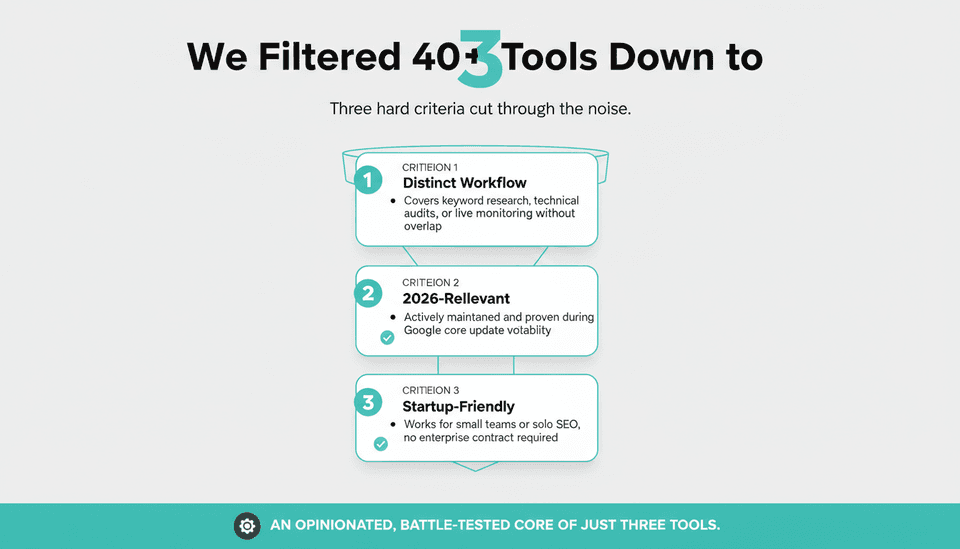
We started with a universe of over 40 tools mentioned in recent SEO software shortlists, including roundups from Zapier, Marketer Milk, and Behind Rankings. From that candidate list, we applied three hard criteria:
- Must handle a distinct but essential SEO workflow (keyword research, technical audits, or live monitoring) with no significant overlap.
- Must be actively maintained and relevant in 2026, with demonstrated utility during recent Google core update volatility.
- Must cover the needs of a small marketing team or solo SEO without requiring an enterprise contract—ideal as top SEO tools for startups.
We excluded tools that duplicate a core function of another selection (e.g., Ahrefs vs. Semrush—both all-in-ones), tools that are exclusively enterprise (like Botify or seoClarity), and point-solution tools that don’t form a complete stack alone. This shortlist isn’t a “best overall” trophy list—it’s an opinionated, battle-tested core.
The 3 SEO Tools That Actually Deliver (Evidence-Backed Analysis)
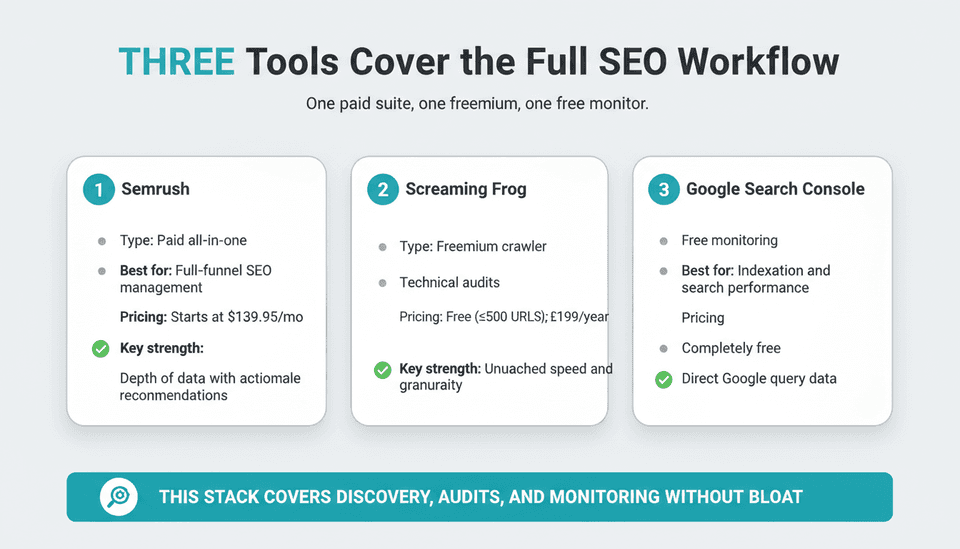
Semrush — Best for All-in-One SEO Management
Semrush is the paid anchor of the stack. It bundles keyword research, competitive domain analysis, site audits, rank tracking, backlink analysis, and content optimization into a single dashboard. For any business that’s serious about organic traffic, this tool replaces at least 4–5 standalone products.
According to Zapier’s 2026 roundup of the 11 best SEO tools, Semrush’s Pro plan starts at $139.95 per month (as of November 2026). That price gets you 500 keywords to track, 10,000 crawl pages per audit, and access to the Keyword Magic Tool—its core differentiator—which surfaces long-tail variants and question-based queries that competitors miss.
During the Google November 2026 Core Update, which began on November 10 and has caused widespread ranking flux (reported by Search Engine Roundtable just 16 hours before this writing), Semrush’s Position Tracking with historical snapshots becomes critical. You can compare pre-update and post-update rankings, overlay volatility scores, and spot the specific pages Google is testing. No free core update ranking tools give you that diagnostic depth.
Key capabilities:
- Domain Analytics shows exactly which keywords competitors are winning on.
- Site Audit flags 140+ technical issues, prioritized by severity.
- On Page SEO Checker gives actionable content recommendations, not just scores—making it one of the best content optimization tools in an all-in-one.
- Content Marketing Toolkit helps plan topic clusters that actually match search intent.
The trade-off: Semrush’s interface is dense, and the learning curve is real. But for the price of one freelance writer per month, you get a full command center.
Screaming Frog — Best for Technical SEO Audits
Screaming Frog SEO Spider is the freemium technical SEO audit tool that technical SEOs reach for when they need to understand exactly how search engines see a site. It crawls every URL, image, script, and stylesheet, then presents the data in a way that makes broken redirects, duplicate titles, thin content, and crawl budget waste immediately obvious.
The free version covers up to 500 URLs—enough for most small businesses and startups. For larger sites, as highlighted in Marketer Milk’s 2026 tools list, a paid license costs £199 per year (approximately $259/year), making it one of the lowest-cost technical SEO audit tools per URL.
Why Screaming Frog makes the top 3 instead of an all-in-one’s built-in crawler: no online suite matches its speed and granularity. For example, after a site migration or a platform change, you can confirm every redirect chain, canonical tag, and hreflang annotation across thousands of pages in minutes. It also integrates with Google Analytics and Search Console to pull click and impression data directly into the crawl, so you can prioritize fixes by traffic impact.
Core use cases:
- Identifying orphaned pages (no internal links) that can’t be indexed.
- Spotting pages that block crawling via robots.txt or meta tags.
- Auditing structured data for errors, especially during schema changes.
- Checking page depth to ensure important pages are within a few clicks of the homepage.
With the November 2026 update still rolling, sites that are losing visibility often have underlying technical problems that only a dedicated crawler exposes—like accidentally noindexed content or slow server responses during Googlebot visits. Screaming Frog is the first place to look.
Google Search Console — Best for Monitoring & Insights (Free)
Google Search Console (GSC) is the non-negotiable free tool every site owner must use. It’s the only source that tells you which queries people typed to see your site, how many impressions you got, which pages are indexed, and whether Google is sending you any manual action notifications.
Unlike third-party tools that estimate traffic and rankings, GSC provides observed, real data from Google itself. During a core update, the Performance report’s comparison view (16-month historical window, rolling) shows exactly which queries lost or gained clicks after the update rolled out. That’s data you can’t get anywhere else.
The recently enhanced Core Web Vitals report inside GSC now breaks down field data by URL group, helping you prioritize fixes for Largest Contentful Paint and Interaction to Next Paint—factors that have become more important in mobile rankings in 2026. Combined with the URL Inspection tool’s live test (which shows the rendered HTML Googlebot sees), GSC is your direct line to what the index considers.
Pricing: completely free, no URL limits. No excuse not to set it up.
What GSC doesn’t do: keyword research, competitive analysis, or content optimization. That’s why it’s part of a stack, not a standalone solution.
Comparison table—the three tools at a glance:
| Tool | Type | Best For | Pricing (November 2026) | Key Strength |
|---|---|---|---|---|
| Semrush | Paid all-in-one | Full-funnel SEO management, rank tracking, competitor intelligence | Starts at $139.95/month (Zapier) | Depth of data with actionable recommendations |
| Screaming Frog SEO Spider | Freemium crawler | Technical audits, crawl analysis, structured data validation | Free for ≤500 URLs; paid license £199/year (Marketer Milk) | Speed and precision unmatched by cloud-based crawlers |
| Google Search Console | Free monitoring | Indexation status, search performance, Core Web Vitals | Free | Only direct source of Google query data |
Tools We Considered (But Didn’t Make the Top 3)
We omitted several strong contenders because they either duplicate a selected tool’s function or aren’t truly standalone enough for a minimal stack.
- Ahrefs: the closest competitor to Semrush. Its Site Audit and Content Explorer are excellent, but including both would be redundant for a lean toolkit. For teams that prefer Ahrefs’ UX, swap it in—but drop Semrush to keep the stack lean.
- SE Ranking: a capable all-in-one at a lower price point, appealing for startups. It didn’t make the cut because it lacks the data depth and market share of Semrush, making it a decent alternative, not a core tool.
- Yoast SEO / Rank Math: on-page WordPress plugins. They’re useful for real-time content tweaks, but they don’t replace the strategic gap analysis or technical audits that the top 3 cover. Use them alongside, not instead of, this core stack.
- Moz Pro: historically influential but has lost ground in data freshness and interface speed. It remains a reasonable choice for local SEO, but it’s not essential for a general toolkit.
- Enterprise-only tools: Botify, seoClarity, and Conductor, covered in Search Engine Land’s recent enterprise SEO comparison (published 5 days ago), are indispensable for sites with millions of pages but overkill—and overpriced—for the audience of this shortlist.
What are SEO tools?
SEO tools are software platforms that help you optimize a website to appear more prominently in organic search results. They do things like find keywords people search for, audit a site for technical problems, track rankings over time, analyze competitors’ backlinks, and suggest content improvements. Without them, you’re guessing.
How do I consider the best SEO tools?
Start with what your site actually needs today—not a feature checklist you might use eventually. If you don’t have search traffic yet, you need keyword research and content planning first. If traffic recently dropped, you need auditing and diagnostics. Match the tool to the immediate job, then expand only when the existing stack can’t answer a new question. Budget, team skill level, and the CMS you’re on (e.g., Webflow SEO tools integration) all matter, but function over form is the rule.
Do I really need to pay for an SEO tool?
For a brand-new site with fewer than 20 pages and minimal competition, Google Search Console plus Screaming Frog’s free mode can be enough. The moment you need to track more than a handful of keywords, analyze competitors, or detect patterns in ranking data, a paid tool like Semrush pays for itself by preventing you from optimizing for the wrong terms. In competitive niches, the cost of not having a paid tool is higher than the subscription.
How do I find keywords for my website?
Use Semrush’s Keyword Magic Tool to enter a broad topic and filter by search volume, keyword difficulty, and intent (informational vs. commercial). Compare those with the “Queries” report in Google Search Console to see what you’re already showing up for—often your best near-term opportunities. For adjacent ideas, look at competitors’ top pages in Semrush’s Domain Analytics. AI SEO content optimization later will help you incorporate those keywords naturally, but the discovery phase starts with these two tools.
How often should I check my SEO progress?
At minimum, monthly. During a Google core update like the one rolling out this November 2026, checking daily is warranted. Google Search Console lets you compare 16 months of data; set a recurring calendar task to pull the Performance report and compare click-through rates and average position. For rank tracking, a weekly cadence inside Semrush catches early dips before they become disasters.
Why prioritize content creation over off-page SEO?
Links are still a ranking factor, but great content earns links without manual outreach, and search engines increasingly reward sites that consistently publish helpful, original material. Off-page tactics without a content backbone lead to high bounce rates and thin authority. Start with content that solves problems for your audience; then amplify it. That’s the reliable sequence.
How long until I see impact in search results?
For a new domain, expect 3–6 months before steady organic traffic arrives, assuming you publish frequently. For established sites, content improvements can show movement in as little as a few weeks. But with the ongoing November 2026 core update, many sites are seeing ranking reshuffles that take up to two weeks to stabilize. Patience is part of the game—tools give you the data; they don’t accelerate Google’s evaluation.
How to Choose Your Own SEO Toolkit (Buyer’s Checklist)
If the top 3 don’t fit your exact situation, use this checklist to evaluate alternatives. It’s built for founders and marketing leads who want to avoid vendor lock-in and tool bloat.
- Is there a single tool that covers 80% of what you do? Start there. You can always bolt on a specialist later.
- Does the tool show historical data, not just current snapshots? After a core update ranking change, you need to know what changed and when.
- Can it integrate with your CMS? For Webflow users, GSC is a native fit; some tools offer direct Webflow SEO tools connections for audits and content push.
- What’s the real total cost when you add required add-ons or per-user fees?
- How many hours of manual work will the tool save each month? If the answer is less than two hours, reconsider the subscription.
- Will the tool still be usable as your site scales to 1,000 or 10,000 pages? Many tools break or get prohibitively expensive at that inflection point.
When the Top 3 Become 1: The Joyrise Automated SEO Alternative
A three-tool stack works brilliantly—until it doesn’t. The breaking point usually comes when content production overtakes manual tooling. If you’re spending hours moving keyword research from Semrush into a content brief, then writing and optimizing the article, then checking its performance in GSC, then repeating, you’re doing tool management, not SEO.
That’s the moment an automated SEO platform like Joyrise becomes the smarter investment. Joyrise is not a tool you use alongside others; it replaces the fragmented workflow entirely. It handles keyword planning based on your site’s gaps and competitor data, writes researched articles with original branded images, handles internal linking and meta descriptions, and publishes directly to your Webflow blog. It even integrates a Search Console dashboard so you monitor clicks and impressions without leaving the platform.
For teams using the top 3 tools above, Joyrise effectively collapses Semrush’s content planning, Screaming Frog’s crawl data (via its deep site scans that learn your brand voice), and GSC’s performance monitoring into a single subscription. The pricing starts at $199/month for 30 articles—roughly the cost of one freelance article—and scales to 180 articles/month on the Max plan.
You keep the top 3 if you need hands-on control over every detail—making it a dependable Joyrise alternative when automation isn't your speed. You move to Joyrise when you’re ready to trade manual precision for volume, consistency, and speed—and when your time is better spent on strategy, not on operating tools. For founders and lean teams, that trade-off often unlocks growth that a fragmented stack can’t match. A deeper dive into this approach is in our guide on how to build an automated content pipeline with AI.
Key Takeaways
- The only three tools you need to cover the full SEO workflow are Semrush (paid research and tracking), Screaming Frog (freemium technical crawler), and Google Search Console (free monitoring).
- During the November 2026 core update volatility, historical ranking data from Semrush and actual query data from GSC are non-negotiable for diagnosing traffic changes.
- You can start with free tools alone, but once you’re in a competitive market, a paid tool is a cost-saver, not an expense.
- When content production becomes your bottleneck, an automated platform like Joyrise replaces the multi-tool stack entirely, turning planning, writing, and publishing into a single system.
- The right question isn’t “which tool is best?” but “which combination of tools solves my current bottleneck without creating three new ones?”
To see how an automated platform eliminates the need for multiple SEO tools while publishing daily content to your blog, try Joyrise and read your first article before you pay.