 Joyrise
How to Use AI in SEO: Build an Automated Content Pipeline
 By Alexi · · 20 min read

On this page
- What You’ll Get From This Guide
- Prerequisites and Tools You’ll Need
- Step 1: Perform a Deep Site Scan and Keyword Gap Analysis
- Step 2: Generate an SEO Content Plan with Topic Clusters
- Step 3: Configure Your AI Writing Parameters (Voice, Quality Checks)
- Step 4: Produce Your First Batch of AI-Optimized Articles
- Step 5: Review, Edit, and Publish (Automatically or With Approval)
- Step 6: Monitor Performance in Search Console and AI Search Surfaces
- Complete Worked Example: From Zero to 30 Published Articles in One Month
- Success Criteria: How to Know Your Automation Is Working
- Common Pitfalls and Troubleshooting
- FAQ
- The Next Step: Scaling and Staying Ahead
- Key Takeaways
If you run a marketing team or a startup, you’ve probably asked a version of “how to use AI in SEO” and gotten a flood of vague advice about tools and prompts. This guide is different. You’ll walk away with a concrete, step-by-step pipeline that goes from an automated site audit to daily published articles — and then tracks performance not just in Google, but in AI-driven search surfaces like ChatGPT and Google AI Overviews.
By the end, you’ll have a repeatable workflow that a single person can run. You’ll also understand the prerequisites, the real costs, the safety switches, and the numbers behind a 30‑day build‑up. No hype, just operations.
What You’ll Get From This Guide
This is a complete execution playbook for building an automated content pipeline that replaces the manual parts of content SEO. The pipeline uses a single platform, Joyrise, to handle site scanning, keyword planning, article generation, image creation, on‑page optimization, and Webflow publishing — but the decisions, configuration, and quality control you make are what determine success. Along the way, you’ll see how AI SEO automation and AI on-page optimization plug into the pipeline, and we’ll point you to the best AI SEO tools for each task.
Who this is for:
- A founder or finance lead who wants to understand the real workload and risk before committing.
- An SEO manager who needs to scale content production from 4 articles a month to 30+ without hiring.
- A content marketer who’s been asked to “just use AI” and needs a responsible way to do it.
What you’ll have by the end of the walkthrough: a live, automated blog that publishes daily articles, with a feedback loop that uses Search Console and AI‑referral data to sharpen the AI’s output over time.
The core trade‑off upfront: you’ll trade a monthly platform fee (starting at $199) for what would otherwise cost $3,000–$8,000 in agency retainers or a full‑time writer. In return, you accept that some articles will need light editing, and you must invest about 2–3 hours per week in monitoring and tuning. This is not a set‑and‑forget machine; it’s a supervised assembly line.
Prerequisites and Tools You’ll Need
Before you start automating, make sure these are in place:
1. A live Webflow blog with CMS publishing access The pipeline publishes directly to Webflow. If you’re on another CMS, you’ll need to use the draft mode and publish manually, which adds a step. A clean site structure with a dedicated blog collection is ideal.
2. Google Search Console access (owner level) You’ll connect it for indexation tracking and keyword performance data. The AI Search Console tracking dashboards inside the platform pull directly from this connection.
3. A clear brand voice document or 3–5 example articles AI writes generic copy by default. To train it, you need concrete examples of your tone, vocabulary, and formatting choices. If you don’t have a formal style guide, pick the three blog posts that best represent how you want to sound.
4. A list of priority products, services, or topics The AI can find keyword opportunities, but you must tell it what not to write about. Feed it a list of your core offerings and any topics you won’t cover (e.g., “We never write about competitor comparisons”).
5. A backup of your existing blog (if any) Export your current posts before automation touches anything. Webflow’s export function works. This is your rollback if you need to revert after publishing AI‑generated content.
Tools summary:
- Joyrise (automated content pipeline, $199–$999/month)
- Webflow (CMS hosting)
- Google Search Console
- Optional: Ahrefs, Semrush, or SE Ranking for manual keyword validation if you want to independently verify AI‑generated plans. For a more detailed look at the AI‑powered tools landscape, see the Definitive Guide to AI SEO Services (2026). For a curated list of the best tools, 13 best SEO automation tools I'm using in 2026 is a practical starting point.
Security note: The platform will request read‑only API access to Webflow and Search Console. Review the scopes; you should never grant write access beyond the blog collection unless you intend to automate full‑site changes.
Step 1: Perform a Deep Site Scan and Keyword Gap Analysis
Most SEO tools can crawl your site. The difference here is that the crawl feeds directly into the content generation engine — it doesn’t just produce a spreadsheet; it absorbs your site’s structure, product language, and existing authority to teach the AI how to write.
Run an automated site crawl to extract brand voice and current content
Action: Inside the platform, navigate to the site setup and initiate a full crawl. Provide your domain and any subdomains to exclude.
What happens: The scanner reads every page — headings, meta descriptions, product names, internal link structure, and existing blog articles. It builds a model of your brand’s vocabulary and topical footprint. This step usually takes 15–30 minutes for a site with fewer than 100 pages.
Checkpoint: After the crawl, review the generated “brand voice summary.” It should contain:
- Frequently used phrases and terminology.
- Sentence structure patterns (e.g., direct and short vs. long and descriptive).
- A list of core topics the AI believes your site covers. Compare it against your known product areas. If it misidentifies a major topic, you’ll correct that in Step 3 when you provide explicit examples.
Identify quick-win keyword opportunities against competitors
From the same dashboard, the platform surfaces a list of keywords where your site already ranks on page 2 or page 3 — and where competitors are outranking you with thin content.
Action: Select the “low‑hanging fruit” filter, which typically returns terms with a keyword difficulty below 30 and your site ranking between positions 8 and 20. For many B2B blogs, this delivers 20–40 keyword targets that need only a well‑optimized article to push into the top 5.
The AI cross‑references competitor content and flags gaps like missing subtopics or lack of original data. This is SEO keyword research AI done automatically — without toggling between three different tools. If you want a deeper technical take on what AI can and can’t do in audits, the article Can ChatGPT Do an SEO Audit? Yes — But Only Up to a Point is worth reading first, so you know where automation stops being reliable. If you’re new to the concept of automating SEO workflows, What is SEO automation? Complete 2026 guide breaks down the entire process.
At this stage, you should export the list and spend 15 minutes crossing off any keywords that don’t match your ICP or that target audiences who can’t buy. The AI doesn’t know your business model; that’s your job.
Step 2: Generate an SEO Content Plan with Topic Clusters
Review the AI-generated keyword map and editorial calendar
The platform now builds a topic cluster map — groups of semantically related keywords organized around pillar pages — and proposes an editorial calendar for the next 30–90 days. It sequences articles so that supporting cluster content publishes before or alongside pillar pieces, which strengthens internal linking and helps Google understand topic authority faster.
Action: Open the content plan, which looks like a timeline with article slots, each tied to a primary keyword and a set of secondary keywords. For each article, you’ll see:
- Target keyword and monthly search volume.
- Competitor ranking for that term.
- Suggested article type (list, guide, comparison, etc.).
- Any news‑driven or seasonal hooks if you’re on Pro or Max.
Mark down the articles you want to publish in the first two weeks. The key decision is whether to start with high‑volume but competitive terms or build a base of long‑tail content first. In the worked example later, we’ll use a long‑tail strategy to reduce initial risk.
Adjust for business priorities and seasonal trends
The calendar isn’t sacred. Drag articles to reorder. The platform will re‑optimize internal linking forecasts if you shift the sequence. If you’re launching a product in March, pull that topic cluster forward, even if the AI originally scheduled it for June.
For seasonal content, the system can automatically schedule holiday‑related articles (Black Friday, year‑end checklists) if you flag those events. Competitors who manually plan often miss those small windows; this is where automation gives you speed without last‑minute scramble.
Step 3: Configure Your AI Writing Parameters (Voice, Quality Checks)
The difference between an automated blog that sounds like a machine and one that sounds like your team is entirely in the configuration you do here.
Input brand-specific examples and style guidelines
Action: Upload your 3–5 best blog posts. Label which sections you want the AI to emulate — not just copy, but understand structurally. For each example, note:
- Average sentence length (the platform will calculate this, but verify).
- Use of first‑person vs. third‑person.
- Whether you use case studies, statistics, or anecdotes to open.
Then provide explicit rules:
“Do NOT use words like ‘revolutionize’ or ‘game‑changer.’” “Always cite a source when making a data claim.” “End every post with one concrete, actionable takeaway.”
These rules become part of the AI’s generation prompts. The platform’s custom voice feature (Pro and Max tiers) trains on your examples to replicate your phrasing without hallucinating.
Set up the quality-judgment pass and review cycles
On Pro and Max plans, a quality‑judgment pass runs a second AI model over each draft to flag weak intros, factual claims that lack a source, and paragraphs that sound generic. You can set thresholds:
- If a draft scores below 80/100 on the internal quality score, it gets held back for manual review.
- You can decide how many review cycles to allow. More cycles slow output but raise quality; fewer cycles mean you’ll do more manual editing.
My recommendation: start with a single automated pass and a manual review of the first 5 articles. Once you trust the output, you can let more articles flow through to draft or direct publish. This is exactly the balance that search‑focused teams are tuning as AI execution gets easier — Search Engine Land (Nov. 16, 2026) recently noted that as AI lowers the bar for execution, testing and change tracking become even more critical to know what drives wins.
Step 4: Produce Your First Batch of AI-Optimized Articles
Initiate the generation queue and validate one article fully
Action: In the dashboard, select the first 5 articles from your calendar and hit “Generate.” The queue runs asynchronously; a typical 1,500‑word article with header image and infographic takes about 10–15 minutes to produce.
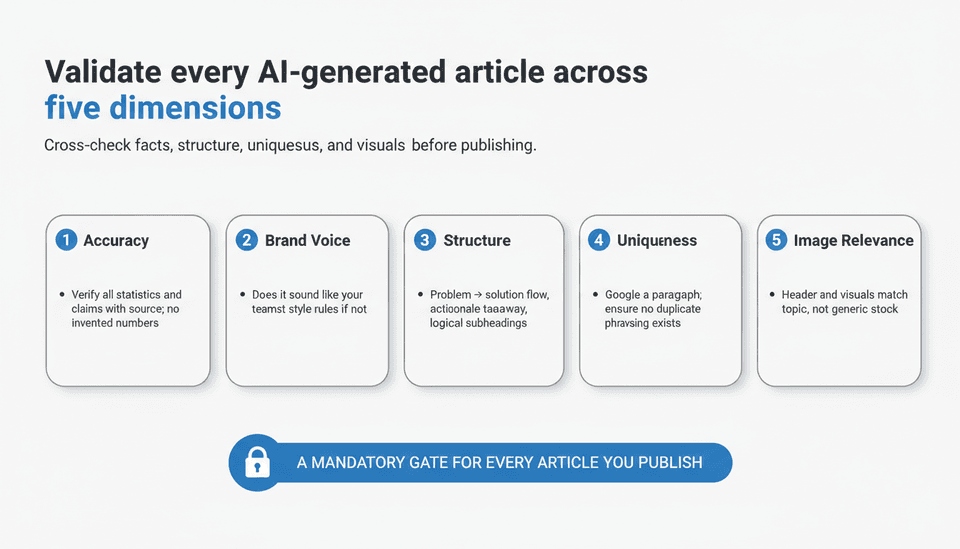
While others are generating, open the first completed article in the draft editor. Validate it across five dimensions:
- Accuracy: Any factual claims? If the article says “42% of marketers…,” you need a source. The AI sometimes invents statistics. Cross‑check any number with a quick search. This is the single biggest risk with AI content generation SEO at scale.
- Brand voice: Does it sound like you? If not, go back to Step 3 and tighten your style rules.
- Structure: Is there a logical flow from problem to solution? Is the conclusion actionable?
- Uniqueness: Paste a paragraph into Google. No ranking article should mirror the exact same phrasing.
- Image relevance: The auto‑generated header image and infographic must match the article topic, not just be generic stock. The platform creates original branded visuals, but occasionally an abstract topic yields a weak illustration; you can regenerate or replace.
Check on-page elements: headings, meta, alt text, internal links
Before any article goes live, confirm the on‑page optimization:
- H1 contains the primary keyword, and H2s break topics clearly.
- Meta title is under 60 characters and descriptive, not formulaic.
- Meta description includes a natural call to action and core term.
- Alt text on all images is meaningful, not keyword‑stuffed.
- Internal links point to at least 2–3 other relevant articles on your blog, with descriptive anchor text.
Joyrise builds all of these as part of generation, but the automation can occasionally miss nuance — like linking to a page that doesn’t exist yet because you reordered the calendar. Treat this five‑point check as a mandatory gate for every article you publish. For a deeper dive into automating on-page tasks, Surfer AI's guide to SEO Automation for 9 Manual Tasks covers techniques from meta tags to internal linking. For a full breakdown of optimizing AI‑generated content, the AI SEO Content Optimization: The Definitive Guide walks through each element with a checklist you can share with your team.
Step 5: Review, Edit, and Publish (Automatically or With Approval)
Choose between draft mode and direct-to-Webflow publishing
The platform offers two paths:
- Draft mode: All articles save as drafts in Webflow. You or an editor approve each one manually. This is slower but safer.
- Direct publish: Approved articles go live immediately on the schedule you set. You can still set a “review required” flag for new topics or high‑traffic keywords.
Start with draft mode for the first two weeks. Once you’ve verified that fewer than 10% of articles need substantial edits, you can switch to direct publish with a weekly spot‑check.
For automated blog publishing Webflow, the direct integration means you don’t log into Webflow to publish — the platform pushes the article, sets the slug, assigns the author, and triggers any connected workflows. If you have a CDN cache, the new page may take a few minutes to appear; the system pings Google’s indexing API automatically.
Apply final human touches where the AI falls short
Even with quality passes, there are three places where human editing consistently lifts content quality:
- Opening hooks: AI can be formulaic. Rewrite the first 2–3 sentences to grip the reader with a specific pain point, stat, or statement that’s unique to your audience.
- Transitions: AI paragraphs sometimes jump from topic to topic. A one‑sentence bridge between major sections improves flow.
- Personal anecdotes: AI cannot have “your experience.” Add one relevant example from a customer call or team discussion to make the article defensibly human.
If you need to edit more than 25% of the article, flag that keyword or topic. The AI’s model for that cluster may need retuning — you can adjust the style prompts or provide a better example article.
Step 6: Monitor Performance in Search Console and AI Search Surfaces
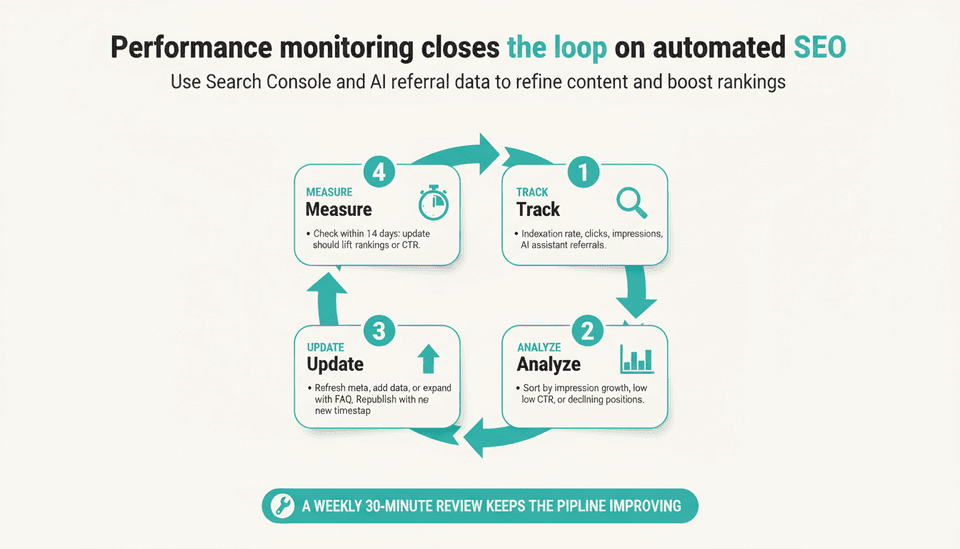
This is where most AI content pipelines fail: they publish and forget. You need a closed‑loop system where performance data feeds back into your content decisions.
Track indexation, clicks, impressions, and AI referral traffic
The integrated Search Console dashboard shows:
- Indexation rate: how quickly each article gets indexed after publishing. A delay beyond 48 hours usually points to a site‑wide quality problem or crawl budget issue.
- Clicks and impressions over 7, 14, and 30 days tied to each article’s primary keyword.
- Average position and CTR by article, so you can spot poorly performing meta elements.
The new frontier is AI referral traffic. As more than 170 GEO and AI SEO agencies in 40+ countries now partner with OtterlyAI to monitor visibility in ChatGPT, Google AI Overviews, and Claude (Yahoo Finance, Nov. 12, 2026), tracking how often your content appears as a source for AI‑generated answers is no longer optional. In your dashboard, look for the “AI assistant referrals” metric, which logs times your domain was surfaced in an AI‑driven search response. This is early‑stage data, but ignoring it now means playing catch‑up later.
Generative Engine Optimization, or GEO, operates on different signals than classic SEO: citing sources, using structured summaries, and writing definitions that an LLM can parse reliably. When you see an article getting AI referral clicks, analyze why: it probably contains a clear, citation‑worthy statement or a statistic that AI models can quote. Double down on that format in your content plan.
Correlate article updates with ranking changes
Set a calendar reminder every two weeks. In the dashboard, sort articles by impression growth but low click‑through rate. Those are candidates for a meta‑description refresh. Sort by declining positions — they need a content update, either adding new data or addressing newer competitor articles that have surpassed you.
When you update an article through the platform, it republishes with a new timestamp and re‑submits to Google. Track whether the update lifts rankings within 14 days. If not, the page may need more structural change than a light edit. This testing loop is what Search Engine Land’s piece from Nov. 16, 2026 emphasized: your next SEO win may come from understanding your last, using change tracking and performance data to make smarter decisions.
| Pipeline Stage | Key Tool/Action | Time Required | Decision Gate |
|---|---|---|---|
| Site Audit & Gap Analysis | Automated crawl, keyword gap report | 30 minutes setup + 15 minutes human review | Keyword list approved, off‑topic terms removed |
| Content Plan & Clusters | AI topic cluster map, editorial calendar | 20 minutes review and reorder | Calendar aligned with business priorities |
| Voice & Quality Configuration | Upload style examples, set quality thresholds | 60 minutes initial setup, 10 min/week tuning | First 5 articles pass 80/100 quality score |
| Article Generation & Validation | Batch generation, 5‑point article check | 10 min per article validation | Article meets accuracy, voice, and on‑page standards |
| Publish & Approval Flow | Draft mode or direct publish | 5 min per batch approval (draft mode) | No critical errors in batch; direct publish after 2 weeks |
| Performance Monitoring | Search Console dashboard, AI referral tracking | 30 minutes per week | Indexation <48h, CTR above 2% for primary keywords; flag declines |
Complete Worked Example: From Zero to 30 Published Articles in One Month
Here’s a realistic build‑out, using the platform for a hypothetical B2B SaaS company selling compliance software. This isn’t a testimonial; it’s a modeled scenario based on the tool’s documented capabilities.
Pre‑launch baseline:
- Existing blog: 12 articles, last published 4 months ago.
- Organic traffic: ~800 clicks/month.
- Domain Rating (Ahrefs): 28.
- Main competitors posting 2–3 articles weekly.
Tool configuration (Week 0):
- Sign up for the Pro plan ($499/month) to get deep research and quality judge.
- Connect Webflow and Search Console.
- Run site crawl. Brand voice summary recognizes compliance terms like “GDPR framework,” “audit trail,” and “SOC 2 report.” Confirm.
- Upload three best articles: product announcement, how‑to guide, industry trends.
- Style rules: “Use plain English. No jargon without explanation. Always reference a regulation or framework where applicable.”
- Keyword gap analysis surfaces 140+ terms with difficulty ≤30 and current rankings pages 2–4.
- Select 45 keywords across 5 topic clusters: SOC 2, GDPR, HIPAA, vendor risk, internal audits. The calendar proposes 30 articles over 30 days, starting with long‑tail “how to” queries.
Daily routine (Week 1–4):
- Each morning, 3–5 articles queue up. Articles for next day generate overnight.
- Editor (one person, 40 min/day) reviews each article’s first two paragraphs, checks any statistics for source, and ensures internal links are valid.
- Articles published in draft mode at 8 a.m., editor approves batch by 9:30 a.m.
- Every Friday, check the Search Console dashboard: 7‑day impressions, new keywords, indexation errors.
30‑day results (model projection):
- 30 articles published, average 1,600 words.
- Indexation: 28 of 30 articles indexed within 48 hours; 2 needed a forced fetch.
- Organic clicks rose from 800/month baseline to ~1,950/month in week 4 (not all articles ranked; most were newly indexed and climbing).
- 4 articles reached page 1 within 30 days for long‑tail terms (e.g., “SOC 2 audit checklist internal”).
- AI referral traffic: 12 clicks from AI Overviews (small, but a new channel to monitor).
- Time cost: editor spent ~13 hours total over the month.
- Financial cost: $499 platform + 13 hours of salary (approx. $650 if outsourced editor time) = $1,149. Equivalent agency content cost for 30 high‑quality articles would be $6,000–$15,000.
The numbers aren’t magic; they’re a function of targeting low‑competition keywords and publishing consistently. Automation doesn’t make bad keywords rank; it makes fast execution on good keywords possible.
Success Criteria: How to Know Your Automation Is Working
Your automated pipeline is healthy when:
- Indexation rate >90% within 48 hours. Lower than that and Google is hesitant about your site’s quality or the content looks thin.
- At least 30% of new articles generate at least one click within 14 days of publication. If they don’t, your keyword selection is too ambitious or your on‑page optimization is weak.
- Editing time stays below 20% of article length. If you’re rewriting large sections, your voice configuration is off.
- Organic clicks trend upward month over month without sharp drops. A temporary dip after a Google update is normal; a steady decline means the content isn’t resonating or is getting flagged.
- AI referral clicks grow, even slowly. If you see zero after 2 months, revisit whether your content includes the kinds of clear, structured answers that LLMs extract.
Common Pitfalls and Troubleshooting
Symptom: Articles not indexing
Check your robots.txt and ensure your blog section isn’t blocked. If the crawl is fine, look at the content: duplicate or near‑duplicate intros across articles can trigger canonicalization issues. Use the platform’s “uniqueness score” to flag articles that are too similar to existing ones. Turn off direct publish and manually edit the intro of each unindexed article to add distinct, valuable opening statements.
If Google is crawling but not indexing, check for thin content. Articles under 800 words with few unique data points often stay in “Crawled – currently not indexed.” Lengthen them by adding a checklist or FAQ section using the platform’s expand function.
Symptom: AI content sounds generic or off-brand
The platform’s voice model needs better examples. Provide 2–3 additional articles that heavily use your brand’s specific vocabulary. Also, tighten your style instructions: “Don’t start paragraphs with ‘In today’s fast‑paced world’” is more effective than just saying “be unique.” Run the quality‑judge pass on the current batch and manually rewrite the most generic sections; then feed those rewrites back as examples.
If tone is wildly inconsistent, you might be overriding the voice settings with per‑article prompts that introduce contradictory instructions. Standardize the base prompt and only vary by topic, not tone.
Symptom: Traffic dips after switching to AI content
A cliff‑like drop suggests that the new articles displaced older, ranking pages inadvertently. Check your sitemap: did you change URL structures or delete old posts during migration? If you kept old content but stopped maintaining it, the loss of freshness signals could hurt.
If the dip is gradual, your automated content might be cannibalizing existing pages. The platform’s topic cluster view can show if two articles target semantically identical queries. Merge them or add a clear canonical tag. Also, look at CTR: if AI‑generated meta descriptions are less compelling than your old ones, rewrite them manually for high‑impact pages. Then wait a full 14‑day crawl cycle.
FAQ
How are marketers using AI for SEO?
Most use it as a force multiplier, not a replacement. AI handles the repetitive parts: keyword clustering, first drafts, meta tag suggestions, and internal link recommendations. Marketers then edit for brand voice, add original data, and make strategic decisions about topic selection. It’s also used for technical audits at scale — scanning thousands of pages for broken links, missing alt text, or duplicate content — and for content refreshing by identifying outdated statistics or sections to update.
How can AI improve keyword research?
AI goes beyond search volume and difficulty. It can analyze the top 20 SERP results for a query and identify common subtopics, question formats, and content gaps your competitors missed. It can cluster hundreds of keywords into topic groups in minutes, revealing pillar‑page opportunities that manual research would take days to spot. AI also surfaces real‑time trends from news and forums, giving you timely keyword targets that other tools lag on. The key is that AI finds correlations humans might miss, but you still have to filter for commercial intent and audience fit.
How can AI help with SEO content creation?
AI tools can produce a structurally sound article with proper headings, meta data, and internal links faster than a writer can outline. The best use is as a starting point for a human to refine — adding lived experience, unique data, and sharp editorial perspective. Some platforms also generate original images, infographics, and data visualizations, which reduces the design bottleneck. For high‑volume blogs, AI content generation SEO turns a 4‑hour writing task into a 45‑minute editing task per article.
How does AI help with on-page optimization?
Automated on‑page optimization includes generating meta titles that fit character limits, crafting descriptions with CTAs, assigning alt text to images, and suggesting internal links to related articles. AI on‑page optimization tools can also check for keyword usage in headings, readability scores, and mobile‑friendliness at scale. On platforms with quality‑judgment passes, the AI can flag pages where the primary keyword isn’t used in the first 100 words or where the H1 doesn’t match the target query.
Can AI replace human SEO specialists?
No. AI can execute a large share of the tactical work — research, drafting, basic optimization — but it cannot set strategy, understand nuanced industry context, or make judgment calls about what content will build brand authority over time. An SEO specialist makes the decisions that the AI then operationalizes: which topics to pursue, how to angle content for a specific buyer persona, when to pivot because a competitor shifted strategy. The specialist also monitors edge cases where AI fails, like when a generated article inadvertently creates legal risk by misstating a regulation. For a more direct answer on this, see Is SEO Being Replaced by AI? (A No‑Bull 2026‑2027 Answer).
What is answer engine optimization, and why should enterprise marketers care?
Answer engine optimization (AEO) or Generative Engine Optimization (GEO) is the practice of structuring content so AI‑powered search tools like ChatGPT, Google AI Overviews, and Claude can extract it as a direct answer. This matters because an increasing share of search interactions never lead to a click on a website — the AI summarizes the answer and the user moves on. Enterprise marketers need to optimize for visibility in these summaries, or they lose brand exposure and referral traffic. This involves writing clear definitions, citing authoritative sources, and using formats like numbered lists and tables that LLMs can parse. As OtterlyAI’s global partner network of 170+ GEO agencies shows (Yahoo Finance, Nov. 12, 2026), tracking AI visibility is now a dedicated agency discipline, not a side project.
How will AI influence SEO moving forward?
Expect two shifts: first, SEO execution will become more of a configuration and oversight role than a manual production one. Algorithms will get better at understanding content quality, so the gap between average and excellent will widen — and AI will expose anyone who publishes content without adding unique insight. Second, the rise of AI‑generated search results will force content teams to produce both traditional ranked articles and “AI‑ready” structured content. Websites that don’t appear in AI answers will lose traffic even if they rank on page 1. The competitive edge will come from tight integration of search data with content creation, not from any single tool.
The Next Step: Scaling and Staying Ahead
Once your 30‑day pipeline is stable, add two dimensions: production volume and content type diversity. If your industry moves fast, enable news‑driven articles on the Pro or Max plan to capture timely keyword surges within 24 hours. Diversify into long‑form guides, data‑driven roundups, and interactive content — any format that earns backlinks and AI citations. Finally, set up a monthly executive dashboard that pulls clicks, AI referrals, and cost per click versus the agency alternative. When you can show that content marketing AI is producing organic traffic at one‑tenth the cost with measurable growth, you’ll have the numbers to justify expanding the pipeline.
Key Takeaways
- A supervised AI pipeline can produce 30 well‑optimized articles per month for roughly the cost of a single agency retainer, but it demands 2–3 hours of editorial oversight per week.
- The most neglected step is voice configuration: feeding the AI specific style rules and examples prevents generic output and reduces editing time.
- Treat every article as a hypothesis — use the integrated Search Console and AI referral dashboards to test whether updates and new content lift performance, and feed those findings back into the machine.
- GEO for AI‑driven search surfaces isn’t optional; if you’re not being cited in AI answers, you’re invisible to a growing segment of searchers.
- Before canceling your agency retainer, run a full month of AI‑assisted production and compare traffic, cost, and brand quality side‑by‑side with the old workflow.
Start your automated content pipeline with a free trial article at Joyrise to see how your first piece reads before committing a dollar.