 Joyrise
SEO for YouTube Shorts: A Definitive Guide
 By Alexi · · 19 min read

On this page
- What Is SEO for YouTube Shorts?
- What is YouTube SEO and how does it work?
- Why are my YouTube videos not getting views?
- How does YouTube SEO work for Shorts?
- Core Concepts: How YouTube Ranks Shorts vs. Long-Form Videos
- How the Shorts SEO System Works: From Metadata to Discovery
- Options, Approaches, and Tradeoffs in Shorts SEO
- A Practical Framework to Optimize Your Shorts for Search and Discovery
- How to Align YouTube Shorts With Your Website Content Strategy
- Common Mistakes, Myths, and Limitations of Shorts SEO
- Next Steps: Building a Content Engine That Feeds Itself
- Key Takeaways
SEO for YouTube Shorts: turn views into site traffic and leads. This guide shows you how to optimize YouTube Shorts for search and discovery.
What Is SEO for YouTube Shorts?
SEO for YouTube Shorts means optimizing your vertical videos so they appear in both YouTube’s Shorts feed and search results, and increasingly in Google’s video snippets, with the explicit goal of driving measurable action—like a click to your website, a newsletter signup, or a product visit. For marketers and business owners, not just creators, it’s a deliberate practice of structuring titles, descriptions, on-screen text, and hashtags so the Short works as a discovery asset that feeds your owned content.
This matters because Shorts now generate tens of billions of daily views, and organic reach on most other platforms has tightened. Unlike typical social media, YouTube videos have a long shelf life and can rank in Google search results for months. A well-optimized Short can pull in relevant traffic long after its first 48 hours.
How SEO for Shorts Differs from Traditional YouTube SEO and Web Page SEO
Traditional YouTube SEO relies heavily on search query matching—viewers type a phrase into YouTube’s search bar, and you rank by matching that phrase in your title, description, and tags, backed by watch time and engagement. SEO for Shorts operates in a feed-first world. The Shorts feed is a vertical swipe environment where YouTube’s recommendation algorithm decides whether to show your video to users who didn’t search for it. That makes signals like swipe-away rate and short-term retention far more influential than keyword density.
Web page SEO, by contrast, is built on backlinks, page authority, and crawlable HTML content. Shorts have no backlink profiles and very little indexable text. Yet, because Google surfaces YouTube Shorts in mobile search results and Discover, optimizing that thin text layer—title, description, captions file—becomes outsized in importance.
What is YouTube SEO and how does it work?
YouTube SEO is the process of optimizing videos, playlists, and channel pages to increase visibility in YouTube’s search results, suggested videos, and the broader Google ecosystem. It works by aligning video metadata (titles, descriptions, tags) with user intent, then reinforcing relevance through viewer behavior signals: click-through rate, watch time, likes, comments, and shares. YouTube’s systems then decide whether to rank a video for a specific query or recommend it to a lookalike audience.
For long-form content, search dominates discovery. For Shorts, discovery is mostly feed-driven, but search still plays a meaningful role—especially for how-to, tutorial, and niche topics where someone explicitly looks for a solution. Ignoring YouTube SEO for Shorts means leaving that search-driven traffic on the table.
Why are my YouTube videos not getting views?
When a video gets no traction, the problem usually falls into one of three buckets: nobody’s seeing it, people see it and swipe away immediately, or the platform hasn’t yet identified who should see it.
For Shorts, the most common killers are:
- A weak hook in the first second: If retention drops before the video has even communicated its premise, the algorithm stops recommending it.
- Poor topic-audience fit: The Short is broadly interesting but not precisely matched to a viewer group that YouTube’s model can profile.
- Missing or misleading metadata: Without a clear, keyword-informed title and description, YouTube can’t associate your Short with search queries or interest categories.
- No content-silo connection: When Shorts aren’t linked to a channel’s long-form videos or external site, YouTube lacks signals about topical authority.
Views don’t come from uploading alone. They come from signaling exactly who should care, and then keeping them.
How does YouTube SEO work for Shorts?
Shorts SEO merges traditional YouTube SEO with a feed-first discovery layer. Your title, description, hashtags, and closed captions tell YouTube what your Short is about. Viewer behavior (swipe vs. watch, re-watches, comments) tells YouTube whether it should keep showing it. Together, these signals determine whether you rank for keyword searches and how widely the Short is recommended in the Shorts feed.
Unlike long-form SEO, you cannot rely solely on search queries to drive traffic. You must optimize for both search intent (people looking for a specific answer) and recommendation signals (people scrolling a feed). This dual-track approach is the core of effective Shorts SEO, and it’s what most surface-level guides miss.
Core Concepts: How YouTube Ranks Shorts vs. Long-Form Videos
Understanding the YouTube Shorts Algorithm in 2026: Swipe Signals, Watch Time, and Engagement
The Shorts recommendation system in 2026 evaluates whether to show your video to a user based primarily on swipe-away rate and completion rate in the first few exposures. If an initial test audience swipes away quickly, reach stalls. If they watch most or all of it—and especially if they re-watch—YouTube expands distribution. This is why the metric that matters most for early Shorts is not total views but retention through the first 3 seconds, and then through the full loop.
Comments, likes, and shares still matter, but they act as secondary accelerators, not primary gatekeepers. A Short can go viral with minimal engagement if its completion rate is exceptionally high. Conversely, high engagement cannot salvage a Short that gets swiped away.
YouTube also pays attention to a channel’s content consistency: if a channel posts Shorts on a narrow topic repeatedly, the algorithm gets better at matching it to interested viewers, which helps with both feed and search discovery. As one analysis from Metricool notes, the algorithm prioritizes videos that fit a clear viewer interest pattern over one-off viral hits. YouTube Shorts Algorithm Explained + Tips to Grow in 2026 documents that consistent thematic posting correlates with more stable reach.
Commonly Confused Terms: Views vs. Impressions, Retention vs. Engagement, Rank vs. Recommendation
- Views vs. Impressions: An impression is counted when a Short thumbnail appears on screen, even if the viewer scrolls past without watching. A view is typically counted after a viewer watches for a couple of seconds. High impressions with low views signal weak thumbnails or poor initial hooks.
- Retention vs. Engagement: Retention is the percentage of the Short watched. Engagement covers likes, comments, shares. You can have high retention with low engagement (a good video people simply watch through) or high engagement with poor retention (people commenting early and leaving). For Shorts, retention is the heavier signal.
- Rank vs. Recommendation: Ranking means your Short appears when someone types a query into search. Recommendation means it appears in the Shorts feed, suggested sidebar, or Google Discover. Your Short can be heavily recommended while ranking for almost nothing, or it can rank for a niche query with little feed distribution. Smart Shorts SEO targets both.
The Separation (and Connection) Between YouTube Search and the Shorts Feed
YouTube search and the Shorts feed run on different systems. Search is query-driven; it looks at metadata and, to a lesser degree, past viewer satisfaction signals. The Shorts feed is a discovery engine that tries to predict what a user will stop to watch without a query.
But they connect. A Short that performs well in the feed can start ranking for its target keyword in search, because the behavioral signals (completion rate, watch time) feed back into the search ranking model. Conversely, a Short that ranks for a search term can get tested in the feed. Treating them as separate silos is a mistake; they influence each other continuously.
How the Shorts SEO System Works: From Metadata to Discovery
How Titles, Descriptions, and Hashtags Influence Ranking
YouTube uses your title and description text to understand the topic of your Short. While it also interprets visual and audio content via machine learning, text remains the most reliable signal for matching a video to a search query or interest category. A title that includes a clear keyword—like “how to rank YouTube Shorts”—tells the system exactly what the video is about.
Descriptions, though truncated in the Shorts feed, still get indexed. The first 1-2 lines are critical, because they often appear in search results and Google snippets. A source like YouTube Shorts SEO Checklist (2026) | HypeNest emphasizes that including a primary keyword in the first sentence of the description, plus a link to your related long-form content, directly impacts both platform and off-platform discovery.
Hashtags serve as category tags. Using #shorts is no longer required for classification, but relevant niche hashtags (e.g., #seotips, #contentmarketing) help YouTube place your Short in the right topic cluster. Overusing broad hashtags can dilute this signal.
Indexing Your Shorts on Google: What Works and What Doesn’t
Google indexes YouTube Shorts and sometimes displays them directly in mobile search results as a vertical video carousel. For a Short to be indexed, it needs a clean, keyword-relevant title, a description with context, and—crucially—a transcript or captions file. Google can pull text from auto-generated captions, but accuracy varies. Providing your own .srt captions or using on-screen text that matches the spoken word greatly improves indexability.
One stubborn fact: Google does not treat Shorts descriptions as heavily as web page text. So you cannot rely on a description paragraph to rank for long-tail queries the way you would a blog post. The lift comes from the combination of title optimization and the text inside the video itself—closed captions and on-screen text are an underused SEO lever that we’ll examine later.
The Interplay Between User Behavior Signals and YouTube’s Recommendation Engine
After metadata sets the initial target, user behavior takes over. If viewers in the target cohort watch your Short all the way through, YouTube will test it with a larger, similar audience. If they swipe away, distribution stalls. This means metadata cannot save a video that fails to hook viewers quickly, and a great video can underperform if its title and description are too vague to seed the right test audience. The two must work together.
Options, Approaches, and Tradeoffs in Shorts SEO
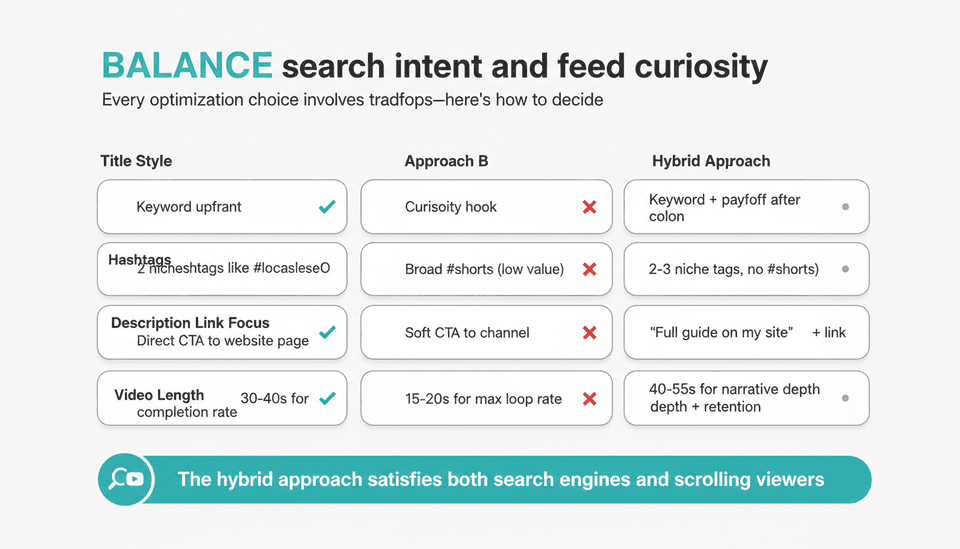
Every optimization choice involves a tradeoff. Understanding these lets you make deliberate decisions instead of copying tactics that worked for a channel with a different goal.
Optimizing for Search vs. Recommendation: Where to Place Your Bets
If your primary goal is to drive website traffic and leads, prioritize search optimization. You need to rank for queries where someone actively wants a solution you can link to. This requires keyword-rich titles, clearly structured descriptions with a call-to-action link, and captions that match the query. The tradeoff: you may sacrifice some feed virality because feed viewers often prefer curiosity-driven, open-loop titles.
If your goal is maximum broad reach and brand awareness, prioritize recommendation optimization with pattern-interrupt hooks and emotional payoffs that don’t rely on a specific search term. But then you must accept that most feed viewers will not click through to your site.
A hybrid approach works: use a search-optimized title and description, but structure the first second of the video to hook feed scrollers. That way you compete for both.
Keyword-Rich Titles vs. Creative, Curiosity-Driven Titles—What Wins?
For search ranking, a keyword-rich title wins. A Short titled “YouTube shorts keyword research” will outrank “This tiny change doubled my Shorts views” for that query. But in the feed, the curiosity title often gets more initial clicks.
The compromise: front-load the title with the target keyword, then add a curiosity element after a colon or dash. E.g., “YouTube Shorts Keyword Research: The Tool I Use in 60 Seconds.” This satisfies the algorithm’s need for topic clarity while still being clickable in a feed.
YouTube Shorts Hashtags: Strategy for Broad vs. Niche, How Many to Use, and When to Skip #shorts
Broad hashtags like #shorts, #youtubeshorts, or #viral cast too wide a net. They don’t help YouTube understand your topic; at worst, they associate your video with unrelated, low-quality content. Niche hashtags like #b2bmarketing or #productivityhacks provide a tighter relevance signal.
Use 2-3 specific hashtags that precisely describe your video’s topic, audience, or category. Skip #shorts entirely—this has been unnecessary since YouTube auto-classifies vertical videos under 60 seconds. If your Short is longer than 60 seconds (the limit was raised), don’t use #shorts at all, because it may confuse the system.
A summary table of these tradeoffs for quick reference:
| Decision | Best for Search | Best for Feed | Hybrid Approach |
|---|---|---|---|
| Title style | Keyword upfront (“SEO for YouTube Shorts tutorial”) | Curiosity hook (“I stopped doing this and views doubled”) | Keyword + payoff (“SEO for YouTube Shorts: The 80/20 Rule”) |
| Hashtags | 2 niche hashtags (#localseo, #leadgeneration) | Broad #shorts (low value) or none | 2-3 niche tags, no #shorts |
| Description link focus | Direct CTA to website page | Soft CTA to channel | “Full guide on my site + link” |
| Video length | ~30-40s for completion + enough keyword density | 15-20s for max loop rate | 40-55s for narrative depth with retention |
Length of Shorts: Shorter for Completion Rate vs. Longer for Narrative Depth
Shorts under 30 seconds tend to have higher completion rates, which feeds the algorithm. But they rarely provide enough depth to convince someone to click a link. Videos in the 40-55 second range can deliver a complete idea and a call to action, while still maintaining strong retention if paced fast. For SEO-driven Shorts that aim to send traffic to your site, lean toward the longer end of the Shorts spectrum—just ensure the first 3 seconds deliver the core promise immediately.
Posting Frequency vs. Production Quality: Daily Raw Clips or Polished Episodes?
Daily low-effort Shorts can generate spikes in views, but they rarely build sustainable website traffic because they lack topical depth and consistent keyword targeting. A more effective pattern for SEO is 2-3 high-intent Shorts per week, each laser-targeted to a keyword and aligned with a blog post or landing page. This cadence allows you to maintain quality while feeding a growing library of search assets.
A Practical Framework to Optimize Your Shorts for Search and Discovery
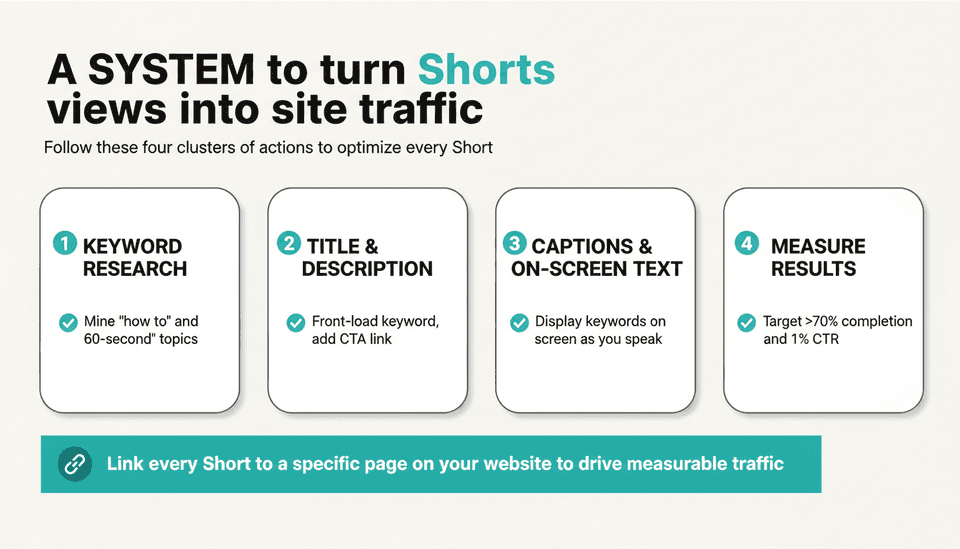
This six-step framework covers everything from research to measurement, with an emphasis on driving traffic beyond the view count.
Step 1: Keyword Research for Shorts—Tools and Methods That Actually Work
Traditional YouTube keyword research (using TubeBuddy, vidIQ, or the YouTube search suggest bar) still works for Shorts, but with a twist: you need to target quick-answer queries where a 60-second video can satisfy intent. Queries that start with “how to,” “what is,” “quick tip,” or “in 60 seconds” are prime candidates.
One underused method: mine Google’s “People also ask” and featured snippet results for your topic. These represent search queries where a concise visual answer would perform well. Then check if any YouTube Shorts already rank for those queries. If few or none exist, you’ve found a gap.
For more detailed keyword planning, our SEO YouTube Keywords: The 2026 Definitive Guide breaks down the full process for long-form and short-form videos alike.
A practical workflow: Each week, pull 3-5 short-answer keyword opportunities from your site’s existing content. Map each to a single Short idea. This ensures every Short you create is tied directly to a keyword you already want to rank for on your website.
Step 2: Crafting Titles and Descriptions That Rank and Compel Clicks
Titles: Include your primary keyword in the first 60 characters. If you’re targeting “YouTube shorts description SEO,” lead with it. After a colon or dash, add the benefit or emotional hook. Keep total title under 100 characters so it displays cleanly in mobile search.
Descriptions: The first sentence must repeat the primary keyword and state what the viewer will learn. Then write 1-2 more sentences adding context and a link. Example: “YouTube shorts description SEO matters because the description text gets indexed by Google. This 60-second tip shows you how to write one that brings traffic. Full guide: [your link].”
Do not stuff keywords into the description; write for a human who is skimming search results. Include a clear CTA and your link early, before the “see more” fold.
Step 3: Leveraging Hashtags and Categories for Maximum Reach
As noted, use 2-3 niche hashtags directly tied to your topic. If the Short is part of a series, add a branded series hashtag to link them together. In the YouTube upload flow, also select the most specific category available (e.g., “Education” or “Science & Technology” rather than “Entertainment”). Category signals are subtle but help initial classification.
Step 4: Creating Thumbnails That Grab Attention in the Vertical Feed
Though many Shorts auto-generate a thumbnail from a frame, you can upload a custom thumbnail in YouTube Studio that appears in search and on your channel page. While the feed often shows a full-frame video preview, search results rely on your thumbnail. Use a high-contrast image with a short text overlay (3-5 words) that reinforces your title keyword. Avoid clickbait; make sure the thumbnail matches exactly what the Short delivers, because mismatches harm retention signals.
Step 5: Using Closed Captions and On-Screen Text as an Overlooked SEO Lever
This is where most Shorts SEO guides fall short. YouTube’s automatic captions are decent, but they can mishear industry terms, names, or brand names. Uploading a manually corrected .srt file or using a service to generate accurate captions gives Google a clean transcript to index. This directly influences whether your Short surfaces for voice and text queries off-platform.
Additionally, incorporating on-screen text that spells out your core message—keyword included—creates a visible text layer that Google can analyze even without captions. For example, if your Short explains “YouTube Shorts traffic” strategies, having those words appear on screen as you say them doubles as an accessibility feature and an indexable signal. One source that highlights this is How to Optimise YouTube Shorts for SEO (2026), which points out that on-screen text can function as a “video alt text” of sorts. This is a low-effort change with high SEO potential.
Step 6: Measuring What Matters—Analytics Beyond Views
YouTube Studio’s Shorts analytics now include website click-through data if you have an associated link in your description or use the linked product feature. Focus on these metrics, not just views:
- Click-through rate from Short to your site — the ultimate success metric for traffic-driven Shorts SEO.
- Retention curve — look at the 3-second drop-off; if it’s over 30%, your hook needs work before any SEO effort matters.
- Traffic source: YouTube search vs. Shorts feed — this tells you whether your SEO is actually pulling search clicks, or if discovery is doing the heavy lifting.
- Average view duration vs. video length — if more than 70% of viewers finish your Short, it’s algorithm-friendly.
Monitor these weekly. If a Short drives site visits but low retention, replicate the topic and title format but fix the hook. If retention is stellar but no one clicks, test a stronger call to action or a more relevant link destination.
Below is a quick-reference table of steps for skimming readers:
| Step | Action | Concrete example |
|---|---|---|
| 1. Keyword research | Find short-answer queries where a 60s video wins | “What is short video SEO” from People also ask |
| 2. Title & description | Keyword in first 60 characters, CTA in description | “Short video SEO explained in 60 seconds – full guide linked below” |
| 3. Hashtags | 2-3 niche tags, no #shorts | #shortvideoSEO #contentmarketing |
| 4. Thumbnail | Custom upload with 3-5 word text overlay | Bold text: “60s Short SEO” |
| 5. Captions & text | .srt upload + on-screen keyword text | On-screen: “YouTube Shorts Traffic = Site Visits” |
| 6. Metrics | Track site clicks, retention, search vs. feed | Aim for >70% completion and at least 1% CTR to site |
How to Align YouTube Shorts With Your Website Content Strategy
Most creators treat Shorts as isolated content. The real power comes when Shorts systematically feed your website traffic and your website provides an endless source of Shorts ideas.
Turning Shorts Views into Website Traffic and Email Subscribers
Every Short you publish should link to a specific, related page on your site—not just your homepage. That page should contain the full article, tool, or offer the Short promised. Use a dedicated landing page for each Short cluster to track conversions cleanly. In the Short’s description, use a shortened URL (through your own domain) to keep it clean. The first comment can also hold the link, pinned to the top.
Add a “link in description” visual cue in the last 3 seconds of the video itself. Audio-only CTAs are easy to ignore; on-screen text with an arrow pointing down works better.
Repurposing Blog Content into Shorts Ideas to Save Time and Boost Consistency
Instead of brainstorming Shorts from scratch, pull from your existing blog posts. Identify the top tip, stat, or “how to” micro-step from a post, and turn that into a 45-second Short. Then embed or link that Short into the same blog post. This creates a virtuous loop: blog content gives you Shorts scripts, and the Short sends viewers back to the full article. This approach aligns with a broader YouTube shorts content strategy that balances video and written content.
Measuring Cross-Platform SEO Synergy: From Shorts Impression to On-Site Conversion
Set up UTM parameters for every link you place in a Short description. Track the flow: Shorts impression → click to site → time on page → conversion (lead, trial, purchase). In Google Analytics, create a segment for users arriving from your YouTube Shorts links. This lets you see whether those visitors behave differently—do they bounce, or do they read more and convert? Over time, this data tells you which Shorts topics attract site visitors with high intent, so you can double down on that keyword cluster.
Common Mistakes, Myths, and Limitations of Shorts SEO
Myths: ‘Shorts Don’t Need SEO Because They’re Short-Lived’ and Similar Misconceptions
Short-form videos can feel ephemeral, but YouTube Shorts are not Stories that vanish. They remain on your channel, in search, and in Google’s index indefinitely. A well-optimized Short can pick up steady search traffic months after upload. The idea that SEO doesn’t matter for Shorts is flat wrong—it’s just that the tactics shift from the long-form playbook.
Mistakes: Hashtag Overstuffing, Ignoring Google Indexing, Neglecting Captions
I see channels load up 10+ hashtags, hoping for broad exposure. This confuses the algorithm and looks spammy. Similarly, ignoring the description’s SEO value by leaving it blank or writing only emojis wastes prime indexable real estate. Finally, neglecting captions and on-screen text leaves a major SEO lever untouched; you’re essentially hiding half your content from search engines.
Limitations: Algorithm Unpredictability, Limited Analytics, and the Challenge of Direct ROI Attribution
Even with perfect SEO, the Shorts feed can be fickle. A solid video may get stuck at a few hundred views because the initial test audience was slightly off. Analytics still lag behind what you’d get for a website page; you can’t easily see keyword-by-keyword ranking data for Shorts within YouTube Studio. And tying a site conversion directly to a Short view is messy—viewers often don’t click the link right away, so attribution windows can undercount the real impact. Accept these limitations and focus on the metrics you can measure: site clicks, engagement on the linked page, and search ranking improvements for the topic in Google overall.
Next Steps: Building a Content Engine That Feeds Itself
The endgame is a system where each piece of content—blog post or Short—strengthens the other.
Using Shorts to Fuel Your Blog, and Your Blog to Fuel Shorts—a Flywheel Approach
- Start with a high-value blog post targeting a keyword you want to own.
- Extract three micro-insights or quick tips; each becomes a Short script.
- Produce the Shorts with proper YouTube shorts SEO tips applied: keyword titles, captions, links.
- Embed the Shorts into the original blog post, adding a transcript where possible.
- As the Shorts drive traffic to the post, the blog page’s authority grows, which helps it rank better in Google. This ranking, in turn, increases the blog’s visibility, which gives you more ideas for future Shorts.
This flywheel makes SEO for YouTube Shorts a growth loop, not a one-off tactic. It’s the single most important concept in this guide. Platforms like Joyrise can automate the blog side of this equation, turning your Shorts topic clusters into daily illustrated articles that publish directly to your Webflow site, so you maintain consistency without spending hours writing. The key is to start with the article that matches your highest-value Short, not to produce volume for its own sake.
How Platforms Like Joyrise Can Automate Supporting Blog Content for Your Shorts Campaigns
If you’re running multiple Shorts series, you can use a platform like Joyrise to scan your site’s existing content, identify keyword gaps your Shorts are targeting, and generate SEO-optimized blog posts that house the full-length version of each Short’s topic. This ensures your Shorts always have a destination page that’s fully optimized for search, with proper internal linking, meta descriptions, and headings—without manual article writing. It’s a pragmatic way to scale the “Shorts-to-blog” flywheel when time is limited.
Key Takeaways
- To optimize YouTube Shorts successfully, combine keyword-focused titles, accurate captions, and a linked destination page.
- The most underused Shorts SEO lever is closed captions and on-screen text, which give Google indexable text that extends your reach far beyond the Shorts feed.
- Instead of chasing daily viral spikes, publish 2-3 high-intent Shorts per week tied to website content, and measure success by site clicks and conversions, not just views.
- A practical flywheel—blog to Shorts, Shorts back to blog—turns your video traffic into an organic growth engine for your site.
- Accept the limitations of Shorts analytics and focus on the metrics you can control: retention through 3 seconds, CTR to your site, and search ranking improvement for your target keyword cluster.
Ready to turn your Shorts views into a consistent source of website traffic? See how Joyrise can write and publish the supporting blog content your Shorts need every day, by visiting Joyrise.