 Joyrise
YouTube SEO for Beginners: A Practical 2026 Guide
 By Alexi · · 16 min read

On this page
- Executive Summary: What YouTube SEO for Beginners Actually Covers
- How YouTube Search and Discovery Works
- Core Concepts and Commonly Confused Terms
- Step 1: Choose a Niche You Can Sustain Without Burning Out
- Step 2: Find Beginner-Level Keywords Without Paid Tools
- Step 3: Optimize Your Video Before You Publish
- Step 4: The First 48 Hours After Publishing
- Step 5: Read YouTube Studio Analytics as a Beginner
- YouTube SEO Myths, Mistakes, and Limitations
- Next Steps: From Beginner Playbook to Repeatable System
- Key Takeaways
If you’re searching for YouTube SEO for beginners, you’re likely staring at an empty channel, wondering whether all that talk about keywords and retention actually applies when you have zero subscribers. And if you’re specifically looking for how to rank YouTube videos without subscribers, this guide is built for that. It does—but the workflow most guides describe assumes a level of gear, budget, and data that beginners simply don’t have. This guide walks through what YouTube SEO looks like when you’re starting from scratch in November 2026, using only free methods and a production-light approach. No paid tools required. No editing experience needed.
Executive Summary: What YouTube SEO for Beginners Actually Covers
A plain-language definition of YouTube SEO
YouTube SEO is the practice of making your videos discoverable to viewers who search for topics on YouTube (and, increasingly, Google) by aligning your content with what the platform’s algorithm interprets as relevant, engaging, and authoritative. It’s not tricking the system; it’s removing friction between the viewer’s intent and your video.
What this guide will and will not teach
This guide will teach you a beginner-friendly, repeatable framework to get your first videos seen without spending money on tools or relying on an existing subscriber base. It covers choosing a sustainable niche, doing free keyword research, preparing a video’s metadata before publish, executing a critical 48-hour launch checklist, and reading YouTube Studio analytics to decide your next move. It will not teach you how to guarantee viral hits, hack watch time, or replace genuine creative work. The goal is to build a channel that compounds over months, not one that spikes and dies.
Quick-Reference Overview
| Step | What You Do | Why It Matters |
|---|---|---|
| Niche selection | Pick a repeatable topic you can film yourself doing (or explain without a face) | You’ll need 50+ videos to get a signal; burnout kills consistency |
| Keyword research | Use YouTube search bar, filters, and competitor gaps—no paid tools | You’re targeting searches that already exist, not guesswork |
| Metadata prep | Write a title that matches the exact query, a 200-word description, and design a simple thumbnail | This is how YouTube understands your video before it gets watch data |
| Launch execution | Publish, add to playlist, share in relevant communities, and monitor first 48 hours | Early engagement signals tell YouTube if your video deserves broader reach |
| Analytics check | Review CTR, retention, impressions, and traffic sources weekly | You’ll identify whether you need a new thumbnail, better title, or different topic |
How YouTube Search and Discovery Works
The YouTube search algorithm for beginners can seem opaque, but it’s built on matching viewer intent with video content and behavior signals. Understanding it removes the guesswork.
What is YouTube SEO and how does it work?
YouTube SEO works by helping the platform’s search and recommendation systems match your video to a viewer’s query or interest. When someone types a phrase, YouTube scans video metadata (title, description, tags) and evaluates how well the content satisfies that query based on user behavior signals: click-through rate (CTR), watch time, retention, and engagement (likes, comments, shares). These signals form a loop—higher engagement leads to more impressions, which can lead to more views if your thumbnail and title continue to attract clicks.
Unlike Google’s web search, YouTube is also a recommendation engine. Even if you’re not targeting a specific keyword, your video can be served as a suggested video next to similar content or on the homepage based on viewer history. That’s why understanding the interplay between search, suggested, and browse traffic is crucial for YouTube ranking factors explained.
Search, suggested, and browse traffic explained
- Search traffic: Viewers find your video by typing a query into YouTube’s search bar. This is the most direct form of YouTube SEO—you’re matching intent with your title and description. For a new channel, search is the most reliable way to get initial views because it doesn’t depend on algorithmic luck.
- Suggested traffic: Your video appears in the “Up next” sidebar or as a recommendation after another video. YouTube uses collaborative filtering and user behavior patterns to suggest videos that viewers with similar watch histories enjoyed. To earn suggested traffic, your content must have strong session watch time and a clear topical link to the video the user is already watching.
- Browse traffic: This comes from the YouTube homepage, which is personalized for each viewer. New channels rarely get significant browse traffic until they’ve built a track record of satisfying viewers across different topics.
Where Google search and suggested traffic fit in
YouTube videos often rank in Google search results, especially for how-to queries, product reviews, and tutorials. This means your YouTube SEO efforts can also bring traffic from Google. Furthermore, Google Discover can surface YouTube videos to users who haven’t searched, meaning your video’s thumbnail and title matter across platforms. Focusing solely on YouTube’s internal search misses a sizable chunk of viewer acquisition.
Does YouTube SEO affect Google search rankings?
Yes. Google frequently displays YouTube videos in its search results—often in the video carousel or as regular web listings—for how-to and product-related queries. A video that ranks well on YouTube for a phrase also stands a strong chance of appearing in Google’s results. This cross-platform visibility means your YouTube SEO efforts can directly increase traffic from Google. However, YouTube SEO alone won’t rank your website; but it can drive brand visibility and, over time, influence overall search presence. Consider supplementing with a blog optimized for Google search (platforms like Joyrise can automate the written side while you focus on video).
Core Concepts and Commonly Confused Terms
Keywords, metadata, tags, CTR, retention, and impressions
- Keywords: The words and phrases viewers type into the search bar. It’s not just single words; “how to fix a leaky faucet” is a keyword.
- Metadata: The text fields you control—title, description, and (to a much lesser extent) tags. This is the primary way you signal relevance before YouTube has any viewer data.
- Tags: Still present in YouTube Studio, but their weight has diminished significantly. They help YouTube understand misspellings and context, but don’t expect them to rank you.
- CTR (Click-Through Rate): The percentage of people who see your thumbnail (impressions) and click. The average across YouTube is in the 2–10% range; your goal is to push yours higher than what your competitors in the same niche achieve.
- Retention: The percentage of your video that the average viewer watches. A video with high retention tells YouTube that people are satisfied, increasing the chance it’s promoted.
- Impressions: The number of times your thumbnail was shown to viewers on YouTube—regardless of click. More impressions don’t guarantee views; you need high CTR to convert them.
What ranking means on YouTube versus Google
On Google, ranking means appearing in the top positions for a keyword on a static results page. On YouTube, there’s no single “rank” because search results are personalized. Your video might appear as the third result for one viewer and not at all for another. So instead of tracking absolute position, focus on impressions and average view duration relative to other videos targeting the same keyword. Ranking on YouTube is more about earning a consistent share of search impressions and suggested placements than a fixed ordinal spot.
Step 1: Choose a Niche You Can Sustain Without Burning Out
This is the coverage gap that kills most beginner channels before they publish their fourth video. You don’t need a perfectly researched niche before you start; you need a topic you can produce 50 videos about without hating the process. Your production capacity and genuine interest trump keyword volume at this stage.
Using search demand and your production capacity
Start by listing five topics you could talk about for an hour without notes. Then check if any of them have existing search demand using YouTube’s search bar. If you type “cooking for college students” and see autocomplete suggestions with substantial view counts on recent videos, demand exists. Now cross-reference with your production capacity: can you record, edit, and publish a 5-minute video on that topic every week using only your phone or a simple screen recorder? If you need to learn complex editing or buy equipment, the friction will cause you to quit. Choose the niche that balances moderate search demand with the lowest barrier to recording.
How to validate a topic before making a video
Once you have a specific video idea, validate it quickly: search the exact phrase on YouTube. Look at the top 5 results. Note their view counts and upload dates. If a few recent videos (within the last year) have significant views with low production quality (bare face, no fancy edits), you’ve found a gap you can exploit. Also, check the comments on those videos—viewers often ask follow-up questions that you can answer in your own video.
How long should beginner videos be to rank?
There’s no magic number, but 5 to 8 minutes is the sweet spot for most tutorial and explainer content. Shorter videos (under 3 minutes) rarely accumulate enough watch time to trigger suggested traffic because the total watch time per view is low even if retention is high. Extremely long videos (30+ minutes) from an unknown channel often see steep audience drop-off, hurting retention. Aim to cover a single topic thoroughly without padding. If you need more time, break it into a series. For example, a “beginner guitar lesson” video at 7 minutes that teaches one chord progression will perform better than a 30-minute “learn guitar in a day” video that loses half the audience by minute three.
Can you rank on YouTube without showing your face?
Yes. Many successful channels use screen recordings, animations, stock footage, or slideshows. YouTube ranks content based on viewer satisfaction, not camera presence. The key is that your audio and visual information must be clear and well-paced. Faceless channels often do well in niches like coding tutorials, product reviews with B-roll, meditation music, or historical documentaries. The trade-off is that you’ll build personal connection more slowly, but that doesn’t affect SEO.
Step 2: Find Beginner-Level Keywords Without Paid Tools
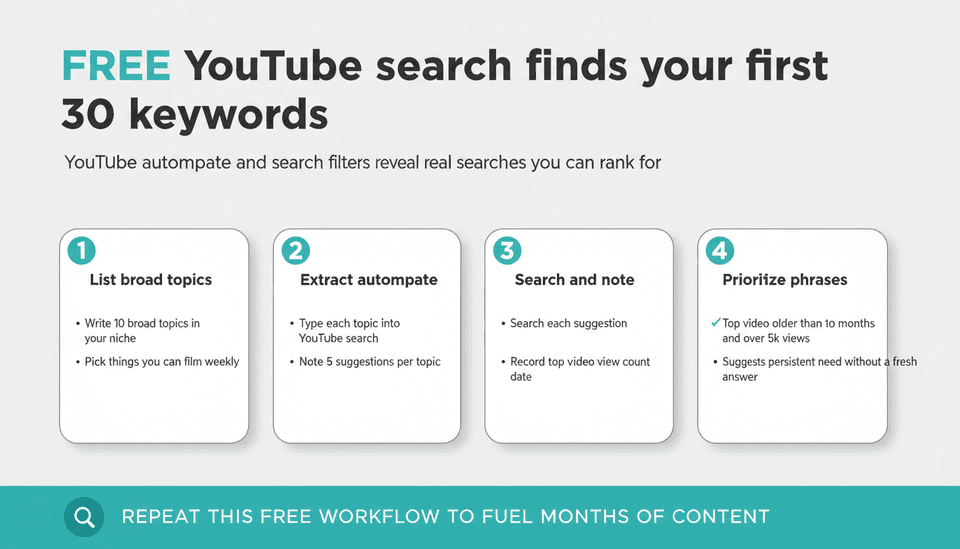
The standard advice—use TubeBuddy, vidIQ, or Ahrefs—often leads beginners to waste time on tools they don’t need yet. The YouTube platform itself holds enough data to build a solid keyword list for your first 30 videos.
YouTube autocomplete and search filters
Start with your niche’s broad topic, like “how to start a vegetable garden.” Type it into YouTube’s search bar but don’t press enter. Note the autocomplete suggestions; these are real queries people are searching right now. The phrases that appear are often long-tail keywords with less competition. For example, “how to start a vegetable garden in an apartment balcony” is a specific query with clear intent.
Now press enter and use the search filters. Click the “Filters” button and set Upload Date to “This year” and Type to “Video.” This shows recent content. Scan the results: are there videos with low views but solid production? That indicates underserved demand. You can also filter by View Count to see the most popular recent videos and analyze what they covered—and what they didn’t.
Reading competitor gaps and underserved queries
Pick 3–5 competitor channels in your niche that are slightly ahead (1k–10k subscribers, not 1 million). Open their video lists sorted by “Most popular.” Look for videos that have unusually high views relative to their average. That signals a high-demand topic. Then watch those videos and note any questions in the comments that went unanswered. Those questions are your next keyword list. This method alone can fuel months of content. For a deeper dive into systematic YouTube keyword research for beginners, you can explore guides that expand on the thinking, but the autocomplete workflow is self-sufficient.
How do I find keywords with no paid tools?
A free, repeatable workflow:
- List 10 broad topics in your niche.
- For each, extract 5 autocomplete suggestions from YouTube.
- Search each suggestion and note the top video’s view count and publish date.
- Prioritize phrases where the top video is older than 6 months and has over 5k views—that suggests a persistent need without a fresh answer.
If you want to slightly upgrade, free YouTube SEO tools like the free tiers of vidIQ or TubeBuddy can display approximate search volume ranges in your browser (see free SEO tools), but they’re optional. The core of your keyword strategy never needs a credit card.
Step 3: Optimize Your Video Before You Publish
You’ve chosen your topic and recorded your video. Now you need to package it so that YouTube’s algorithm understands what it’s about from the moment it goes live. This is where a YouTube video optimization checklist is helpful—but I’ll distill the few things that actually move the needle for a beginner.
Title, description, chapters, and thumbnail basics
- Title: Include the exact keyword phrase you targeted, preferably at the beginning. Keep it under 60 characters so it doesn’t get truncated in mobile search. Make it compelling: “How to Start a Vegetable Garden on an Apartment Balcony (No Tools Needed)” works better than “Apartment Balcony Gardening Tips.”
- Description: The first 2–3 lines are visible above the fold and should summarize the video using your main keyword and a related phrase naturally. The rest can be a few paragraphs providing context, including links to any resources mentioned. Never stuff keywords; a 200-word description with the main keyword appearing 2–3 times is plenty.
- Chapters: If your video has clear segments, add timestamps in the description (0:00 Intro, 1:20 Step 1, etc.). YouTube will auto-generate chapters from these, which appear in search results as key moments—improving CTR and user experience.
- Thumbnail: You don’t need Photoshop. Use a free tool like Canva to create a high-contrast image with a large, readable text overlay (3–4 words) that reinforces the title’s promise. Avoid clutter. Ensure the thumbnail is readable at 240px wide. Test with a friend: show only the thumbnail and ask what the video is about. If they hesitate, simplify. Good YouTube thumbnail CTR best practices apply the same principle: clarity over cleverness.
What to do with tags in 2026 and what to ignore
Do YouTube tags still matter in 2026?
Tags matter, but they are no longer a ranking lever. YouTube’s own guidance indicates that tags are primarily used to understand content context, especially for common misspellings. So, add a handful of relevant tags (5–10) that include your main keyword, a few variations, and broad category terms. Don’t waste time pasting 30 tags or copying competitor tags. Ignore the myth that tags will boost your video’s reach. Focus your optimization time on the title, description, and thumbnail.
Step 4: The First 48 Hours After Publishing
The first two days after publish are when YouTube’s system evaluates early engagement to decide how broadly to distribute your video. This period is critical for a channel with no subscriber base to lean on.
Sharing, playlist placement, and getting early watch time
Immediately after publishing (or as soon as it’s processed), place your video into a relevant public playlist you’ve created on your channel. This makes it part of a series and increases session watch time. Next, share the video link in a few targeted online communities where you’ve already established presence (Reddit, Discord, niche forums)—never spam. The goal is to get a pulse of genuine, high-retention views from people interested in the topic.
Don’t rely on family and friends who don’t care about the subject; their low retention can signal disinterest and hurt your video’s performance. Instead, send the link to 2–3 people you know who are in your target audience and ask for honest feedback, not just a view.
A simple 10-point publish-day checklist
Here’s a concrete, first-48-hours checklist that covers everything a beginner needs to do—and nothing more.
- Verify metadata: Title contains exact keyword, description first paragraph summarizes with keyword, tags are minimal and relevant.
- Set a custom thumbnail: High-contrast, easy to read, matches the title’s promise.
- Add to a public playlist: Create a thematic playlist before publish and drop the video in as the first or latest entry.
- Enable Chapters: If applicable, ensure timestamps are correct in the description.
- Share in a targeted community: One or two relevant subreddits, Facebook groups, or Discord servers (where allowed) with a genuine comment about the problem it solves.
- Ask a trusted viewer: Send to one person who matches your audience and ask for retention feedback.
- Check video preview on mobile: Make sure title and thumbnail aren’t cut off; adjust if necessary.
- Pin a comment: Ask a question that prompts discussion—comments boost engagement signals.
- Check Analytics after 24 hours: Don’t obsess, but note CTR and retention in the first day to flag if something is broken (CTR under 2%).
- Don’t panic if views are under 50: In the first 48 hours, YouTube is testing; low views are normal unless you have subscribers. Focus on whether early viewers are watching at least 50% of the video.
Step 5: Read YouTube Studio Analytics as a Beginner
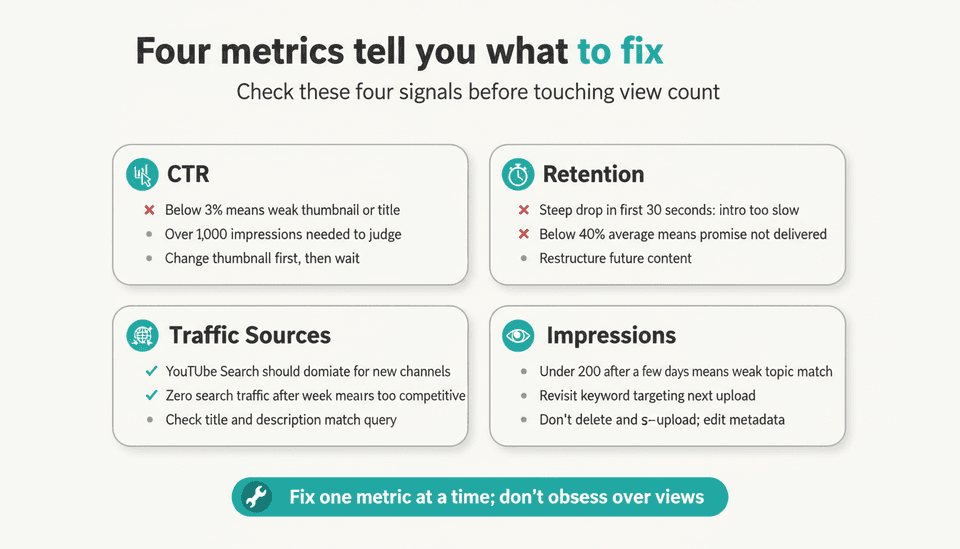
Most beginners open Analytics and stare at the view count, then close it. This guide tells you which numbers actually trigger changes and when.
The four metrics to check first
1. Click-Through Rate (CTR): Check under Reach. If your video has over 1,000 impressions and CTR is below 3%, your thumbnail or title isn’t compelling enough. Change one element (usually thumbnail) and leave everything else alone to test.
2. Average View Duration / Retention: Under Engagement, look at the retention graph. If a steep drop occurs in the first 30 seconds, your intro is too slow. If the drop is gradual but retention is below 40%, the video didn’t deliver on the title’s promise. You’ll need to restructure future content.
3. Traffic Source Types: Under Reach, see where views are coming from. For a new channel, YouTube Search should dominate. If you’re getting zero search traffic after a week, your keywords are either too competitive or your video isn’t being indexed for the intended query. Check your title and description to ensure they clearly match the phrase.
4. Impressions: This shows how often YouTube showed your thumbnail. If impressions are very low (<200 after a few days), your video likely didn’t match any popular query well enough. You may need to revisit your keyword targeting or learn from it for the next upload (don’t delete and re-upload the same video—YouTube may flag it as duplicate; instead, edit metadata and move on).
When to change a thumbnail or title versus re-record
If CTR is low but impressions are decent (>500), change the thumbnail and/or title (one at a time), then give it 3–5 days to gather new data. If retention is poor but CTR is good, the video content is the issue. Don’t re-upload the same topic; instead, create a new video that addresses why viewers bounced. For example, if you made a “10-minute beginner yoga routine” and retention tanks after 2 minutes, you might create a 5-minute version with a clearer beginner focus.
The full YouTube Studio analytics guide walks through how to interpret these signals over the long term, but for now, these four metrics will keep you moving.
YouTube SEO Myths, Mistakes, and Limitations
Many beginner advice posts recycle myths. Here’s what to ignore and what to realistically expect.
Myths that waste beginner time
- Myth: You need to upload daily to rank. Consistency helps, but quality and topic relevance matter more. One well-optimized video per week beats five rushed videos.
- Myth: Tags are critical for ranking. As stated, they’re a minor signal. Focus on title and description.
- Myth: Longer videos always rank better. Retention matters more than length. A 6-minute video with 70% retention beats a 20-minute video with 20% retention.
- Myth: You must buy views or use “YouTube SEO services.” Never pay for views; they harm your channel. The algorithm rewards organic engagement.
Honest expectations for how long ranking takes
How soon should I expect results from YouTube SEO?
For a channel starting from zero, expect 3 to 6 months of consistent weekly publishing before seeing meaningful organic search traffic. Early videos might sit at a few hundred views for weeks, then suddenly gain traction once the algorithm finds the right audience. This isn’t failure; it’s the system’s learning phase. The key is to treat each video as a permanent asset that can accumulate views over years, not a lottery ticket.
Next Steps: From Beginner Playbook to Repeatable System
After you’ve published 10–15 videos using this framework, you’ll have enough data to refine your process.
Building a repeatable weekly process
Block two hours each week: 30 minutes for keyword research (using the free method above), 60 minutes to record (no retakes, just get it done), and 30 minutes to optimize and schedule for publish. Consistency is more about cadence than perfection. This rhythm makes beginner YouTube channel growth sustainable rather than a burst of effort that fizzles.
When to add tools, outsourcing, or automation
Once you’ve proven a topic works (a video exceeding 1k views with solid retention), you can consider upgrading to a free tier of a keyword research tool like vidIQ for deeper insights. But beware of tool overload. Only add complexity when you’ve hit a ceiling you can’t break with manual methods. Outsourcing editing or using AI-assisted scripting can come later, but not before you’ve mastered the basics.
If your YouTube channel is part of a broader content strategy—say you also run a website—tools like Joyrise can automate the blog side while you focus on video. Joyrise plans, writes, and publishes daily SEO-optimized articles to your Webflow site, which can supplement your channel’s discoverability on Google without additional effort. It’s one way to spread your SEO efforts across both text and video without burning out.
Key Takeaways
- Pick a niche you can produce 50 videos in without quitting; validation comes from existing search demand and low-friction recording, not keyword tools.
- Free keyword research using YouTube autocomplete, filters, and competitor gaps gets you enough signal for the first 30 videos—don’t pay for tools yet.
- Optimize your title, description, and thumbnail before publish; use tags sparingly and never expect them to drive ranking.
- The first 48 hours matter: use a publish-day checklist and target genuine interest from small communities to seed early watch time signals.
- Read YouTube Studio Analytics through CTR, retention, traffic sources, and impressions, then decide whether to change a thumbnail or the content itself—not just stare at view counts.
Start building your audience today—let Joyrise handle your blog’s SEO while you create videos: get started with a free trial.