 Joyrise
Can You Do SEO on YouTube? (Yes, and Here’s How)
 By Alexi · · 10 min read

On this page
- What Is YouTube SEO and How Does It Work?
- Essential YouTube Ranking Factors That Influence Your Search Performance
- YouTube Views Troubleshooting: Why Are My Videos Not Getting Views?
- YouTube Shorts SEO: How It Works
- YouTube SEO Tools and Automation: Scaling Without Burnout
- Avoiding the “IKEA Effect”: How Creators Sabotage Their Own Reach
- Measuring YouTube SEO Success: Beyond Views and Watch Time
- Key Takeaways
Can you do SEO on YouTube? Yes, you can—and it’s not about stuffing keywords into a title. YouTube SEO is a legitimate practice that combines audience psychology, technical signals, and content strategy to get your videos surfaced in search and recommended feeds. If you’ve ever watched a polished video stall at 42 views while a grainy competitor racks up thousands, the gap often comes down to how well each creator executed on the search signals YouTube actually cares about. This article walks through the mechanics that matter, the common pitfalls that sabotage reach, and what YouTube Shorts SEO adds to the equation—so you can stop guessing and start ranking.
What Is YouTube SEO and How Does It Work?
YouTube SEO is the process of optimizing your video’s metadata, content, and engagement signals so the platform’s ranking system sees it as a relevant, satisfying result for a viewer’s query or interest. Unlike Google, YouTube’s goal isn’t just finding the right answer; it’s maximizing total viewer watch time across a session. That means it rewards videos that keep people on the platform—not just the ones that match a keyword.
The algorithm weighs a mix of signals: watch time, viewer retention, click-through rate (CTR), likes, shares, comments, and how your video influences the viewer’s subsequent watching behavior (often called “session signals”). A video that earns high CTR but loses 80% of viewers in the first 30 seconds sends a strong dissatisfaction signal, even if the title and thumbnail were clickable. Conversely, a video with lower CTR but exceptional retention can still climb because it demonstrated value to the people who watched it. Backlinko’s comprehensive YouTube SEO: How to Optimize and Rank Videos in 2026 guide reinforces that retention and session watch time are the true heavyweights, with user satisfaction surveys (those “like this video” prompts) playing a growing role as well. In its 2026 update, Backlinko noted that YouTube now uses more granular viewer satisfaction feedback, making retention even more critical.
Keyword intent differs fundamentally from Google SEO. On Google, most searches are transactional or informational—users come seeking an answer. On YouTube, discovery is often “lean back”: viewers are browsing or following recommendations. Still, YouTube is the world’s second-largest search engine, and millions of queries are direct searches. A video optimized for “how to install a sink drain” will behave more like a Google article, while one targeting “satisfying organization hacks” must win via browse features and suggested video placement. Effective YouTube video optimization means balancing search-driven topics with content designed for session watch-time accumulation.
External signals like backlinks can help indirectly—an embedded video on a high-traffic site can drive views and signal authority—but they are not a primary ranking factor. YouTube’s system primarily evaluates behavior on its own platform: if external traffic leads to high watch time and positive session signals, the video gets a boost, but the link itself doesn’t transfer SEO juice the way it does on Google.
Essential YouTube Ranking Factors That Influence Your Search Performance
Title, thumbnail, and video optimization: which one truly drives clicks?
The thumbnail and title work as a unit: the thumbnail stops the scroll, the title confirms relevance. People click based on the thumbnail, but the title must match what they searched for. A clickbait title paired with a misleading thumbnail generates high CTR initially, then rapid drop-offs tank the watch-time signal, ultimately hurting rankings. Optimize both together, using primary keywords in the title naturally without sacrificing emotional pull.
Description and tags: what still works in 2026 (and what doesn’t)
YouTube’s official guidance states that tags are primarily useful for common misspellings and minor contextual clues—they’re not a primary ranking lever. While many YouTube SEO tips still treat tags as make-or-break, the platform itself has downplayed them for years. Treat them as a hygiene factor: include core terms, a few variations, and common misspellings, but don’t invest more than a minute on them.
For descriptions, the first 2–3 lines (above the “show more” fold) should be human-readable, containing your primary and secondary keywords in sentences that tell the viewer what the video covers. Longer descriptions can add value by embedding timestamps, links, and additional context, but keyword-stuffed paragraphs harm readability and don’t fool the algorithm. Write for the viewer scanning the description, not a bot.
Closed captions and transcripts: the hidden SEO workhorse
Accurate captions (especially human-verified or high-quality auto-generated) feed YouTube’s speech-to-text indexing, allowing your video to rank for terms said in the video that may not appear in the title or description. Many creators overlook this, but it’s one of the strongest levers for long-tail discovery—particularly for tutorial, explainer, and educational content. Services like 3PlayMedia have demonstrated that captions improve both accessibility and search visibility, as detailed in their YouTube SEO Strategy: Tips to Boost Your Search Ranking.
Engagement signals: how comments, likes, and shares feed the algorithm
Likes and comments are weaker signals than watch time, but they function as confirmation that the video satisfied viewers. Shares are particularly potent because they imply high value and can bring external traffic. A video with steady, genuine engagement signals community and relevance, which can push it into the suggested video stream. Sprout Social’s YouTube SEO guide highlights that consistent, authentic interactions can nudge content into broader recommendation feeds.
YouTube Views Troubleshooting: Why Are My Videos Not Getting Views?
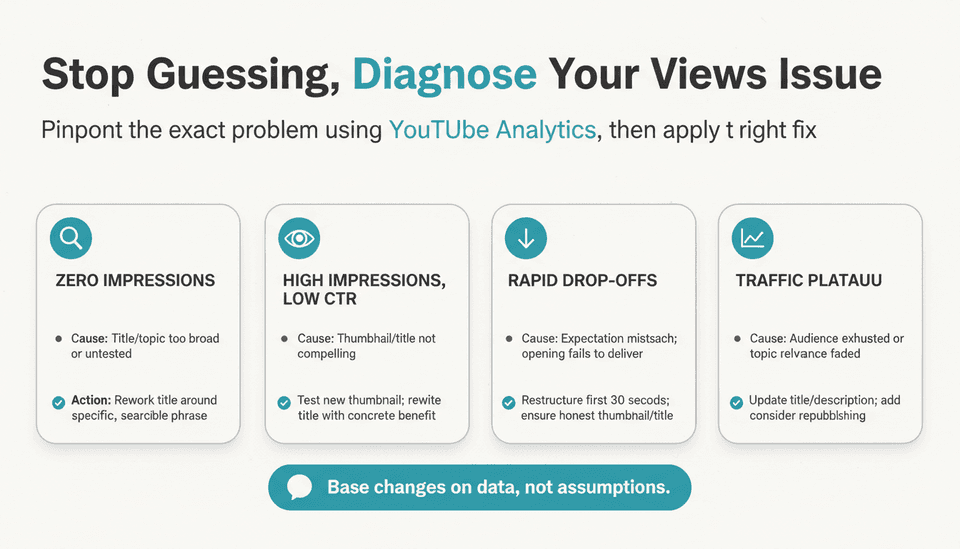
This is the most common question creators ask, and the answer is almost never “the algorithm hates me.” Here’s how to diagnose the problem based on what you see in YouTube Analytics.
| Symptom | Likely Cause | Action |
|---|---|---|
| Video is indexed but receives zero impressions | YouTube isn’t confident enough to show it to anyone; title/topic too broad or untested | Rework title around a specific, searchable phrase; check Search Console for any impressions and adjust. |
| High impressions but low click-through rate (CTR) | Thumbnail or title isn’t compelling for the audience being shown | Test a new thumbnail; rewrite title to emphasize a concrete benefit or number. Monitor CTR improvement over 48 hours. |
| High CTR but rapid drop-offs in average view duration | Viewer expectation doesn’t match content; video opening fails to deliver on the promise | Restructure the first 30 seconds to clearly state what the video will show; remove fluff intro; ensure title and thumbnail are honest. |
| Old video traffic plateaus or declines | The video has exhausted its audience or topic relevance faded | Update the title and description for current search trends; add new cards or end screens; sometimes, republishing with edits (using the same URL) can re-engage the algorithm. |
These symptoms often persist because creators fall into the IKEA effect—overvaluing their own work and resisting changes they fear would “ruin” the video. Recognizing that bias is half the battle; we’ll cover it in depth later.
YouTube Shorts SEO: How It Works
YouTube Shorts uses a separate discovery surface, more akin to TikTok’s For You page. The Shorts feed prioritizes high swipe-through rates and strong watch percentage, not keyword matches. While hashtags and on-screen text do provide topic signals, the algorithm relies heavily on viewer behavior within the Shorts ecosystem.
Quick wins without cannibalizing your long-form content:
- Start with a hook in the first 1–2 seconds that identifies the topic visually or audibly.
- Use 1–3 relevant hashtags in the description (#shorts plus topic tags).
- Include clear, searchable keywords in the on-screen text (since speech recognition may be less reliable on short clips).
- Test repurposing a key insight from a long-form video as a 15-second preview that directs viewers to the full video via linking (if eligible) or a pinned comment.
Can heavy Shorts posting hurt your channel SEO? It’s a legitimate concern. Shorts viewers often don’t convert to long-form watchers, and a channel that floods subscribers’ feeds with Shorts can see diluted watch-time signals for its main content. However, Shorts remain a powerful subscriber magnet if you treat them as a top-of-funnel tool, not a replacement. The trade-off is manageable if you keep your long-form publishing cadence strong and periodically prune low-performing Shorts that don’t attract the right audience.
YouTube SEO Tools and Automation: Scaling Without Burnout
Manual optimization—handcrafting titles, descriptions, and tags while analyzing retention graphs—builds intuition that no tool can replace. But once you’re shipping multiple videos a week, automation becomes essential.
YouTube SEO tools like TubeBuddy and vidIQ remain the standards for YouTube-specific research and bulk editing. They suggest keyword opportunities, show real-time rank tracking, and help with A/B thumbnail tests. For AI writing assistance, tools like ChatGPT can generate description drafts and suggest title variations, but they require a human to inject nuance and avoid templated language. As Backlinko noted in a November 5, 2026 report on Chrome extensions for SEO, Leigh McKenzie, head of SEO at Backlinko, uses a curated stack of browser tools to speed up daily tasks without sacrificing quality. Pairing TubeBuddy or vidIQ with a lightweight keyword research extension can cut optimization time by 30–50% once you’ve built a repeatable workflow.
If you maintain a blog alongside your YouTube channel, writing articles that target the same keywords can strengthen topical authority. Joyrise’s automated platform handles that side—planning, writing, and publishing daily illustrated SEO articles to a Webflow blog—so you can focus video energy where it counts. For video optimization, your core stack remains TubeBuddy, vidIQ, and a good spreadsheet.
Avoiding the “IKEA Effect”: How Creators Sabotage Their Own Reach
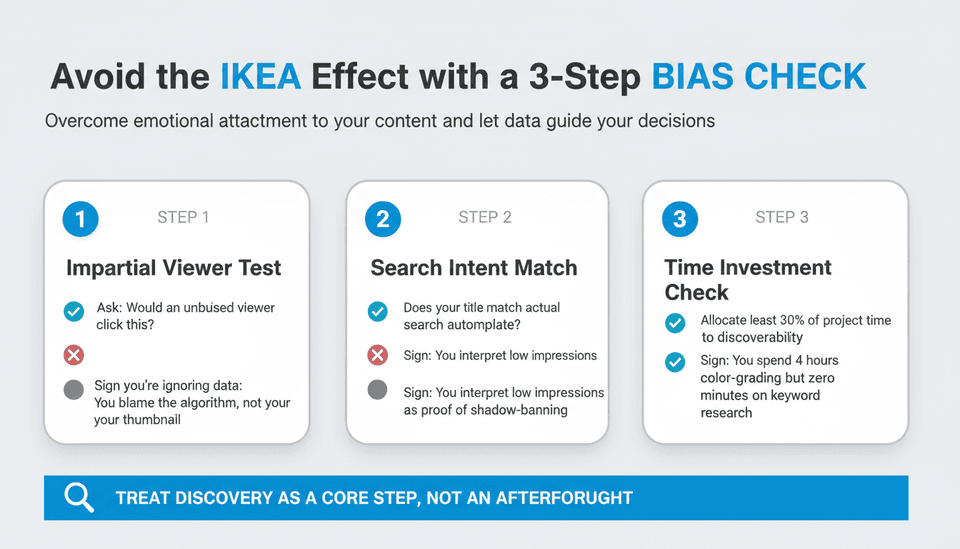
As Search Engine Land reported on November 11, 2026, the IKEA effect—a cognitive bias where people overvalue objects they’ve assembled themselves—applies directly to content creation. Creators pour hours into scripting, filming, and editing, then feel an emotional attachment that makes them resist data-driven changes. You might love your video’s original title or thumbnail because you spent 20 minutes on it, but if the CTR is below 3% for your niche, that attachment is costing you views.
Signs you’re ignoring data:
- You blame the algorithm rather than examining retention graphs and traffic sources.
- You refuse to change a thumbnail that “captures the essence” even though a split test shows a 40% lift with a different one.
- You spend 4 hours color-grading footage but zero minutes researching whether anyone searches for your topic.
- You interpret low impressions as proof of shadow-banning instead of weak keyword targeting.
A three-step bias check before your next upload:
- Would an impartial viewer click this if they saw it in their feed? Remove yourself; judge purely on emotional response and promise.
- Does the title match what my target audience actually types into search? Open a private browser window and look at autocomplete. If your phrasing doesn’t appear, rework it.
- Am I spending more on production than on discoverability? A beautiful video nobody finds is wasted effort. Allocate at least 30% of your total project time to research, title optimization, and thumbnail design.
Many solo creators burn out because they treat YouTube SEO as an afterthought—the same reason why DIY SEO often fails. Making discovery a core step, not a cleanup task, is the difference between a channel that grows and one that spins its wheels.
Measuring YouTube SEO Success: Beyond Views and Watch Time
Views and watch time are lagging indicators. YouTube analytics SEO data provides leading indicators that tell you whether your optimization is working:
- Traffic source types: A steady increase in YouTube search and suggested video traffic means your content is surfacing in places people actively browse or query. External traffic may spike but is often inconsistent.
- Subscriber conversion rate: How many viewers who watched a video then subscribed? High search traffic with low subscriber gain suggests your content is useful but not compelling enough to build a following—may need stronger calls to action.
- Revenue per thousand views (RPM): If RPM is climbing for a particular topic, the algorithm is serving your video to a more monetizable audience, a subtle validation of optimization.
Use YouTube Analytics’ “Traffic source: YouTube search” report to identify which videos are ranking for what terms. If a video from six months ago is getting consistent search traffic, re-optimize it by adding a fresh pinned comment, updating the description with current links, or even swapping the thumbnail if CTR has dipped.
When to stop optimizing: You’ve reached the point of diminishing returns when A/B testing a 0.2% CTR lift consumes more time than producing slightly better content would. Spend your optimization minutes on assets that still have room to grow—a video with 5,000 monthly views deserves more attention than one with 50.
Key Takeaways
- YouTube SEO is the systematic optimization of watch time, session signals, and viewer satisfaction—not a keyword checklist.
- Diagnose before you change: Use symptom-based troubleshooting (impressions, CTR, retention) to fix what’s actually stuck, not what you assume.
- YouTube Shorts SEO operates on swipe and retention signals, not traditional search; use it as a top-of-funnel tool without allowing it to cannibalize long-form watch time.
- Automate routine tasks with YouTube SEO tools like TubeBuddy or vidIQ, but keep human judgment for titles, thumbnails, and narrative structure—the IKEA effect will sabotage you otherwise.
- Re-optimize older videos that have search traction; incremental improvements there often outperform chasing new topics.
Ready to stop burning hours on blog posts while your YouTube channel grows? Joyrise writes and publishes daily SEO articles directly to your Webflow blog so your content engine works in parallel with your video strategy.