 Joyrise
SE Ranking: A No‑Fluff Definitive Guide for 2026 and Beyond
 By Alexi · · 13 min read

On this page
- SE Ranking features: an overview
- How does SE Ranking work?
- SE Ranking pricing: how much does it cost?
- SE Ranking trial: what you get with the free 14‑day trial
- How do I set up my first project?
- How accurate is SE Ranking’s rank tracking?
- How does SE Ranking compare to Ahrefs and SEMrush?
- What should I do when rankings drop during a Google update?
- Key Takeaways
SE Ranking is an all‑in‑one SEO platform bundling rank tracking, site auditing, backlink monitoring, competitor analysis, and reporting. It launched over a decade ago and has since grown into a credible alternative to larger suites like Ahrefs and SEMrush—especially for small‑to‑midsize agencies and in‑house SEO teams who want 90% of the functionality without the enterprise price tag.
The platform’s real promise is simplicity: you log in, add a domain, and within minutes you see where your keywords sit on Google, what technical health issues your site has, and which competitors are eating your lunch. It doesn’t replace a dedicated content creation engine, but if your core job is monitoring and improving organic search performance, SE Ranking delivers a polished, actionable command center.
The All‑in‑One Promise: What SE Ranking Covers
SE Ranking’s toolset spans the daily workflow of an SEO practitioner:
- Rank tracking for desktop and mobile, across any Google locale, Bing, Yahoo, YouTube, and even local map packs.
- Competitor research that uncovers paid and organic keywords, ads, and traffic estimates.
- A technical site auditor that crawls your domain and flags issues like broken links, missing meta tags, and page‑speed problems.
- Backlink monitoring with a historical index, anchor‑text analysis, and toxic-link detection.
- Reporting, lead‑generation widgets, and white‑label options so agencies can brand the insights and sell them to clients.
Who Should Use SE Ranking (and Who Should Skip It)
Use it if you’re a founder, finance lead, or agency operator who needs a single source of truth for SEO performance without stitching together five different tools. It’s also ideal for SEO managers who want to delegate rank‑tracking routines while keeping an eye on the bottom line.
Skip it if your priority is generating dozens of long‑form articles every month, or if you require a link index as massive as Ahrefs’ for advanced content‑gap analysis. For heavy content production, a specialized platform like Joyrise can automate publishing while SE Ranking handles performance measurement; the two can complement each other rather than compete.
SE Ranking features: an overview
The platform is built around five core functions, each with enough depth to be a standalone tool but integrated so data flows between them.
Rank Tracking – The Central Nervous System
SE Ranking’s core strength is its SEO rank tracker. You can monitor daily or on‑demand keyword positions on Google, Bing, Yahoo, YouTube, and local map results. The tool reports not only position but also search volume, estimated traffic, visibility percentage, and historical trends. Advanced options let you target specific ZIP codes, language layers, and device types (desktop, mobile, tablet). A dedicated “SERP Features” breakdown shows which SERP elements (featured snippets, videos, local packs) occupy the top spots, so you know if your “#1” is actually a clickable blue link or a snippet that captures zero clicks.
Competitive Research – Spying with Precision
SE Ranking’s competitor analysis tool lets you enter any domain and instantly see organic and paid keywords, estimated traffic, and top‑ranking pages. The competitive landscape view groups your immediate rivals and highlights keyword overlaps, gaps, and newly discovered competitors. Paid‑search data includes ad copy examples, landing‑page URLs, and a rough ad‑budget estimate—useful when you’re pitching a CFO on why you need a bigger content budget.
Site Audit – Your Site’s Health Check
The site auditor crawls your domain like a search‑engine bot, producing a detailed health score and a prioritized list of issues. Categories cover technical SEO (crawl errors, canonical conflicts), on‑page factors (duplicate title tags, thin content), and performance metrics. It also includes a page‑change monitor that alerts you when critical pages are modified, which is handy if developers accidentally remove a canonical tag on launch night.
Backlink Monitoring – Who Links to You
SE Ranking maintains a proprietary backlink index. You can monitor your domain’s backlink profile, see anchor‑text distribution, identify new and lost links, and run a toxicity check that flags potentially harmful domains. The historical data goes back several years, so you can spot unnatural link patterns before they trigger a manual penalty.
Reporting & Lead Gen – Proving Your Value
Agency users lean heavily on the white‑label reporting engine, which lets you create branded PDF reports with your own logo, domain, and color scheme. Automated email deliveries schedule reports to clients every week. The built‑in lead‑generation widget embeds a live site‑audit score or SEO checker on your website, capturing potential client information.
One newer addition is SE Ranking’s AI agent layer, which—like many platforms in 2026—attempts to automate parts of the workflow. The AI can auto‑generate meta descriptions for pages with missing tags and suggest fixes for audit issues. However, it still requires manual review; the suggestions are a starting point, not a final draft. If you’re curious about the broader landscape of AI‑driven SEO, What Is AI SEO? A No‑Nonsense FAQ for 2026 separates hype from reality.
How does SE Ranking work?
Behind the dashboard, SE Ranking operates a distributed network of proxies and browser instances that simulate real user searches in the locations and on the devices you specify. When you add a keyword, the system fires off a search query to Google (or another engine) from a proxy assigned to the target city, parses the SERP, and records the ranking URL. The process repeats at the frequency you choose—daily, every 3 days, weekly, or on‑demand.
The Data Collection Methodology
Unlike tools that rely solely on scraped third‑party data, SE Ranking builds its own SERP database by running live checks. This means rank data reflects what a user in Atlanta on a Chrome browser would actually see, down to the localized map pack and carousel results. The platform also pulls in metrics from SEO data providers for search volume and competition, blending live checks with external estimates.
Why Rank Data Can Be Flawed Right Now (Google’s Recent Tracking Quirks)
Even a sound methodology hits reality. On November 7, 2026, Search Engine Journal reported that Google’s rank data may contain one‑word results and redirect URLs, making raw tracking numbers less dependable than they were a year ago. If your target keyword triggers a featured snippet that instantly redirects a click, an automated tracker might still count that as “position 1,” even though the user experience is entirely different. Similarly, knowledge panels and answer boxes that display information without a link can inflate visibility metrics.
This matters because the rank‑tracking number you see in SE Ranking is a machine‑friendly proxy, not ground truth. Treat it as a directional signal, always pair it with Google Search Console click‑through data, and never panic over a one‑day spike or dip.
Location‑ and Device‑Based Nuances
SE Ranking supports ZIP‑code‑level targeting, but the accuracy of hyper‑local queries (like “plumber near me”) depends on the availability of proxies in that exact area. In practice, results for a specific suburb might differ slightly from a manual search on your phone. Desktop vs. mobile rankings can also diverge, so always track both if a significant share of your traffic comes from smartphones.
SE Ranking pricing: how much does it cost?
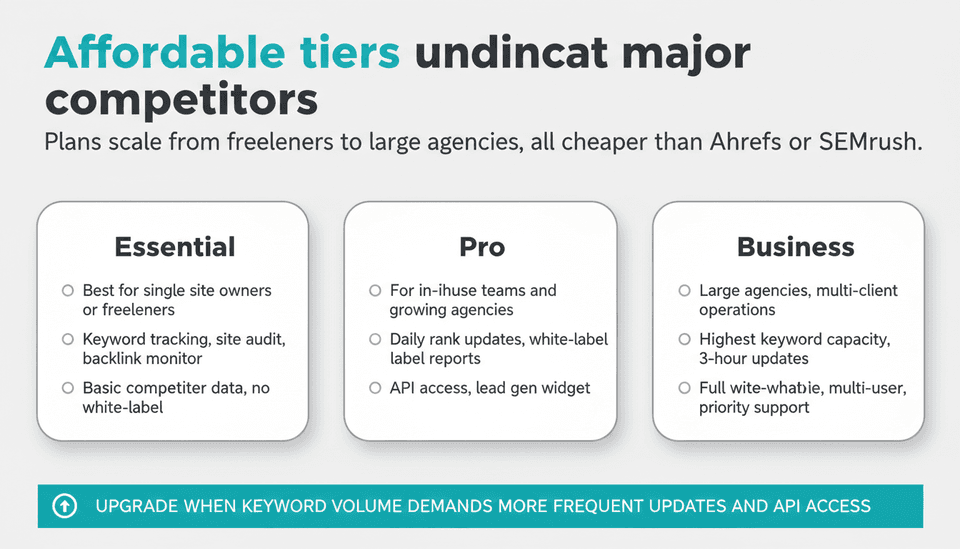
SE Ranking offers three main subscription plans: Essential, Pro, and Business. Pricing is tiered, and generally lands well below Ahrefs or SEMrush for the same feature set. (The exact dollar amounts change periodically; check the official site for current rates.)
| Plan | Best For | Keywords Tracked | Rank Update Frequency | White‑Label & API | Key Features |
|---|---|---|---|---|---|
| Essential | Single site owner or freelancer | Varies; enough for a modest domain | Weekly or on‑demand | No | Rank tracking, site audit, backlink monitor, basic competitor data |
| Pro | In‑house teams, growing agencies | Higher keyword cap; daily updates | Daily, on‑demand | White‑label reports, API access | Historical data exports, lead gen widget, advanced competitor research |
| Business | Large agencies, multi‑client operations | Highest keyword capacity | 3‑hour updates available | Full white‑label, API, multi‑user | Agency dashboard, extended client management, priority support |
When to Jump to a Higher Tier
The tipping point is keyword volume. If you find yourself cycling pages to make room for new keywords, or if clients demand near‑real‑time daily updates, moving to Pro or Business instantly reduces friction. API access on the higher plans also lets you pipe rank data into your own dashboards—critical if you’re combining SE Ranking with a tool like Joyrise that operates on automated content workflows.
SE Ranking trial: what you get with the free 14‑day trial
SE Ranking offers a 14‑day free trial with no credit card required. During the trial, you get full access to most features—rank tracking, site audit, competitor research, and reporting—but within a limited quota. You can typically set up one project, track a modest number of keywords, and run a site crawl once. It’s enough to evaluate whether the workflow fits your team before you commit.
How do I set up my first project?
Here’s a click‑by‑click walkthrough that neither the official help page nor most review articles provide. Do this on day one to avoid the “I set it up wrong” messages that plague new users.
- Sign up at seranking.com and verify your email.
- From the main dashboard, click “Add Project.”
- Enter your domain name and pick a folder (optional). Leave the “Add competitors” field blank for now; you can add them later.
- Select your search engine (Google, in most cases) and the country/region you want to track. If you need a specific city, use the ZIP‑code field.
- Choose your device type: Desktop or Mobile. I recommend creating separate projects for each if both matter.
- On the next screen, paste your initial keyword list or use the “Suggest Keywords” button to pull ideas from your site’s content. Start with 25‑50 core keywords; you can always add more.
- Set the check frequency. For a new project, “Every 3 days” strikes a balance between fresh data and token consumption.
- Click “Start Tracking.” The system will run its first batch of checks, which can take a few minutes.
- While it runs, head to the Site Audit tab and click “Launch audit.” This crawl will pick up technical issues in parallel.
- As soon as the first rank check finishes, your dashboard populates with a Visibility Trend graph. Ignore individual position swings and look at the overall visibility line—that’s your leading indicator.
Reading the Dashboard During a Core Update (November 2026 Rollout)
A Google core update began rolling out on November 13, 2026, as reported by PPC Land. Such updates reshuffle rankings for up to two weeks. When you load SE Ranking during this period, expect daily volatility, even among pages you haven’t touched. The visibility graph will likely show a sawtooth pattern. Do not make tactical changes based on a single day’s drop. Instead:
- Filter the rank‑tracking table to show the last 7 days and identify pages that lost more than 10 positions consistently, not just one blip.
- Cross‑reference with the “SERP Features” column: a drop from position 1 to 3 might just mean Google moved a featured snippet above you, not that your page got worse.
- Use the Competitors tab to see if rivals gained during the same period; their gains might reveal a content‑quality gap.
Building Your First Weekly Report
From any project, click “Reports” → “Create Report.” Select a template (start with “Full SEO Report” to get the broad view). Choose the date range, modules to include (rankings, audit, backlinks, competitors), and your own branding if you’re on a white‑label plan. Schedule it to run every Monday morning and deliver to your inbox. This single habit forces you to step back and interpret trends instead of chasing daily noise.
How accurate is SE Ranking’s rank tracking?
Accuracy is where most SE Ranking reviews fall short. Yes, the tool is widely regarded as one of the better rank trackers—user feedback on G2 and Trustpilot consistently rates it high for reliability. But “accurate” does not mean “infallible.”
The “Rank 1” Mirage: Why Tracking Numbers Lie
Three forces conspire to make your SE Ranking #1 not quite what it seems:
- SERP features dilute click‑through. A top placement inside a featured snippet may earn zero visits because Google answers the query on the results page. SE Ranking counts the position correctly, but the traffic impact is invisible in the rank number.
- One‑word results and redirects – per the Search Engine Journal report of November 7, 2026, Google sometimes returns results that are essentially a single word or a redirect URL. Automated parsers can misinterpret those, recording a rank that doesn’t match what a human would see.
- Localization inconsistency. For ultra‑local keywords, the proxy’s simulated location may not perfectly mirror the precise ZIP code. A ranking that shows #3 in the tool could be #5 on a real smartphone in that neighborhood.
The fix: Always pair rank data with Google Search Console queries filtered by that keyword. If SE Ranking says you’re #1 but Search Console shows zero clicks, you’re likely occupying a zero‑click SERP feature.
What SE Ranking Isn’t: The Tools You’ll Still Need
SE Ranking does not produce original, long‑form content. It won’t write your articles, generate infographics, or automatically publish to your CMS. For that, you’ll need a separate content platform. Joyrise, for example, automates daily SEO‑optimized article writing and publishing to Webflow, while SE Ranking tracks how those articles perform—two halves of a complete SEO system.
SE Ranking also lacks the kind of advanced machine‑learning forecasting some enterprise tools offer, and its backlink index is smaller than Ahrefs’. If you rely on backlinks as a primary growth channel, you’ll probably still need a dedicated link intelligence tool.
Common User Errors and How to Sidestep Them
- Tracking too few keywords. Monitoring only 10 “money” keywords gives a dangerously narrow view. Include long‑tail variants and question‑based queries that reflect actual search behavior.
- Ignoring mobile rankings. Even if your site is responsive, Google may rank pages differently on mobile. Create a separate project for mobile tracking or toggle the device filter.
- Overreacting to a single data point. Daily rank positions are noisy. Use the 7‑ or 30‑day moving average in the dashboard to spot true trends.
- Setting the wrong location. If your business serves a city, set the ZIP code. If you leave it at the country level, local competitors may look artificially weak.
How does SE Ranking compare to Ahrefs and SEMrush?
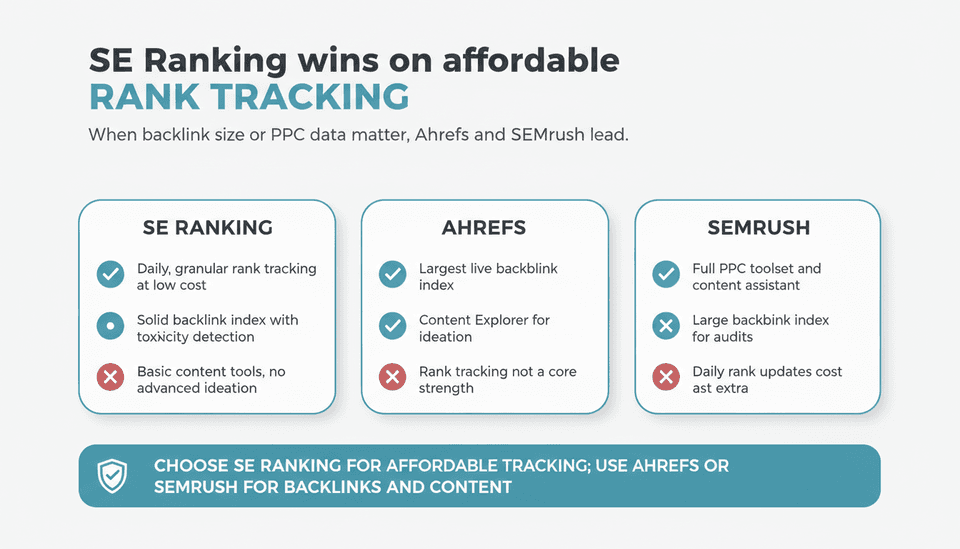
This is the inevitable SE Ranking vs debate. The honest answer: SE Ranking wins on rank‑tracking depth and affordability; Ahrefs and SEMrush win on link index size and content‑ideation tools.
| Dimension | SE Ranking | Ahrefs | SEMrush |
|---|---|---|---|
| Rank tracking | Granular local, daily, on‑demand; affordable per keyword | Tracks keywords but not its core strength; bulk analysis is limited | Strong, but daily updates cost extra in higher tiers |
| Backlink data | Solid default index; toxicity detection | Largest live link index; fresh data | Large index, great for audit but less frequent updates than Ahrefs |
| Content tools | Basic AI writer, meta‑tag generator | Content Explorer for ideation; no built‑in writing | SEO Writing Assistant, topic research, content audit |
| PPC intelligence | Competitor ads, budget estimates | Minimal PPC data | Full‑fledged PPC toolset, keyword bid estimates |
| Price for similar usage | Lower total cost; more keywords per dollar | Higher starting price; rank tracking seats limited | Mid‑range, but advanced features add up |
When SE Ranking wins: You need a daily rank tracker for many keywords across multiple locations, without the budget bloat. The site auditor is also surprisingly deep, rivaling tools that cost twice as much. When Ahrefs or SEMrush wins: If backlink research and content gap analysis drive your strategy, or if you manage paid search alongside organic.
For a broader look at how AI‑heavy tools stack up across the SEO landscape, What Are the Best AI SEO Companies? Platforms vs. Agencies provides a framework to decide whether a platform, agency, or hybrid approach fits your business.
What should I do when rankings drop during a Google update?
The November 2026 core update (PPC Land, November 13, 2026) is a live‑fire reminder: rankings will swing. Here’s a decision framework to follow when SE Ranking shows red across your dashboard.
- Stop and wait. Most core updates take 1‑2 weeks to fully roll out. Any position change you see on day two could reverse by day ten. Don’t touch a thing.
- Pull a 30‑day report in SE Ranking and focus on pages that lost more than 20% visibility and stayed down for over a week. Ignore the blips.
- Open the SERP Features column for those keywords. If you dropped because Google inserted a featured snippet or a local pack, the drop may be structural, not a quality issue on your page.
- Check your competitors’ gains within the same keyword set. The competitor tab inside SE Ranking will show who climbed when you fell. Study their content. Did they add expert quotes? Better visual elements? A faster page? Model your next update on what Google rewarded.
- Review the Site Audit for any technical debt that crept in during the chaos—broken internal links, slow load times, or accidentally noindexed pages.
- Improve content quality, not metadata. Tweaking title tags during an update is a classic knee‑jerk error. Instead, use the update as a prompt to upgrade the substantive quality of your content. If you need to refresh dozens of pages quickly, an automated platform like Joyrise can handle the content production while you focus on strategy.
The core lesson: SE Ranking is a diagnostic tool, not a panic button. Use its historical trends to distinguish a temporary storm from a permanent shift, and then act on the latter.
Key Takeaways
- SE Ranking is the most cost‑effective all‑in‑one SEO suite for agencies and in‑house teams that prioritize practical rank tracking over sprawling data indexes.
- Raw rank numbers are less reliable in late 2026 because Google’s SERPs can return one‑word results and redirect URLs—always cross‑check with Google Search Console clicks.
- During a core update, lock down changes. Wait the full two weeks, then analyze sustained losses, competitor gains, and SERP feature shifts before making any move.
- SE Ranking’s AI features save time but don’t replace judgment—auto‑generated meta descriptions and audit suggestions still need manual review.
- Pair SE Ranking with a dedicated content engine (like Joyrise) if you need to scale article production while tracking performance in one place.
Ready to turn your SEO insights into published content without the manual grind? Start your free article trial with Joyrise today.