 Joyrise
Google SEO Tools: A 2026 Guide to What to Trust
 By Alexi · · Updated · 22 min read

On this page
- Executive summary: what ‘Google SEO tools’ actually covers
- Definition and scope: three kinds of Google SEO tool
- Commonly confused terms, resolved
- How the measurement loop actually works
- The free Google stack, tool by tool: authoritative for what, and where it stops
- Where Google’s tools stop and paid tools start
- Adjudicating the 2026 tool‑data problem: poisoned results and volatility spikes
- Adding AI‑answer visibility to the same stack
- Options and tradeoffs: free stack, paid platform, agency, automated publishing
- Implementation framework: a 30‑day setup that produces a decision, not a dashboard
- Mistakes, myths, and limitations
- Next steps: the checklist
- What is an SEO tool?
- Which free Google SEO tools are actually worth using?
- What is the difference between Google Search Console and Google Analytics?
- Is SEO still worth it in 2026?
- How important are backlinks for SEO, and is link building still worth it?
- How do I know whether my rank-tracking tool is accurate?
- How do I check visibility in AI Overviews and AI assistants without buying another tool?
- Do I need paid SEO tools if I already use Google's free ones?
- Where do I start with Google SEO tools if I have never set any up?
- Key Takeaways
Executive summary: what ‘Google SEO tools’ actually covers
The short answer (the stack in one paragraph)
The phrase “Google SEO tools” means two things at once — the free instruments Google supplies for your own site, and the broader set of tools that measure Google’s search results. The stack you actually need every week is small: Google Search Console for indexing, queries, and Core Web Vitals field data; Google Analytics 4 for on-site behaviour; Google Keyword Planner for directional demand; Google Trends for demand direction; and PageSpeed Insights for diagnostic performance. That free stack tells you what is happening on your property. It cannot tell you what competitors rank for, how much traffic they get, or how the SERP shifts across thousands of keywords. For those jobs, you add paid third-party tools — but you add them only after you know which weekly decision each one informs.
What changed in 2026 — and why a tool list is no longer enough
On October 27, 2026, the search volatility sensors lit up again (Search Engine Roundtable, six days ago). A few days earlier, Semrush confirmed something operators suspected: Google is returning inaccurate, “poisoned” results to some automated ranking tools (Search Engine Land, six days ago; ALM Corp, five hours ago). When the third-party data you pay for is sometimes wrong at the margin, and free first-party data is silent on competitors, a flat list of tools becomes a liability. The missing skill is provenance — knowing whether a number in your dashboard came from Google’s own measurement of your site or from a bot sampling a SERP that might have been fed garbage. This guide builds that skill, then gives you a two-source validation rule to resolve conflicts.
How to read this guide (which sections are reference, which are decisions)
The first half (tool definitions, confusion resolutions, measurement loop) is reference material. The second half — the 2026 data-credibility problem, the build‑vs‑buy‑vs‑automate tradeoff, the 30‑day setup, and the FAQ verdicts — is where you make decisions. Skip to “Options and tradeoffs” if you are holding an invoice, or to “Adjudicating the 2026 tool‑data problem” if your rank tracker just panicked your finance lead.
Definition and scope: three kinds of Google SEO tool
Google’s own tools (Search Console, Analytics, Keyword Planner, Trends, PageSpeed Insights, Business Profile, Search Central)
These are first‑party instruments, owned by Google, that report data about your own website or about aggregate user behaviour on Google properties. They are the only sources that give you ground‑truth measurement for your own property — impressions, clicks, average position, index coverage, Core Web Vitals from real Chrome users, and query volumes displayed as ranges. They never expose competitor‑level data.
Third‑party tools that measure Google (rank trackers, audit crawlers, keyword databases)
These tools simulate searches, scrape or sample SERPs, and model the rest. They give you competitor visibility, share‑of‑voice estimates, backlink graphs, and keyword difficulty scores. Every number they report about a SERP is an estimate, never an observation of Google’s internal state. Even the best ones are vulnerable to sampling gaps and, as 2026 proved, to poisoned results.
The layer most guides skip: automation and publishing (planning, writing, shipping pages)
Measurement means nothing unless pages get published. This layer includes content planning, drafting, optimization, and CMS integration. It is where most teams stall: they have dashboards full of keywords but no production cadence. Tools in this category (from AI writing assistants to full‑stack platforms like Joyrise that plan, write, and publish illustrated articles directly to Webflow) replace the hours between insight and live page.
What this guide deliberately excludes (social, ads‑only, and non‑Google search engines)
Tools built solely for social media, paid search (Google Ads dashboard, bid managers), or engines like Bing and DuckDuckGo sit outside this scope. The focus is tools that help you earn visibility in Google organic search and in AI answers that draw from Google’s index.
Commonly confused terms, resolved
Search Console vs. Google Analytics: queries vs. sessions
Google Search Console reports what happened before the click: which search queries showed your page, how many impressions, clicks, average position, and click‑through rate. Google Analytics 4 reports what happened after the click: sessions, engaged sessions, conversions, and user behaviour on the site. GA4 is blind to the query that brought the visitor; Search Console is blind to what the visitor did afterward. You need both to connect search demand to business outcomes.
Keyword Planner vs. Google Trends: demand volume vs. demand direction
Keyword Planner gives monthly search volume ranges (e.g., 1k–10k). It is a demand‑size estimate, useful for prioritizing topics. Google Trends gives a relative interest index (0–100) over time. It tells you whether a topic is rising or falling, but never how many people search it. A keyword with 1k volume that is trending down is a worse bet than one with 500 volume that is accelerating.
Search Central documentation vs. Search Central tools — one is a rulebook, one is a console
Search Central (formerly Webmaster Central) is Google’s official documentation for how search works, technical guidelines, and policies. It is not a tool you log into; it is the primary source for claims about crawling, indexing, and ranking. The “Search Central tools” some roundups mention are the same Search Console, testing tools, and rich‑result validators already in the stack — the docs just live alongside them.
Lab performance scores vs. field data: two different questions about speed
Lighthouse and PageSpeed Insights’ “lab data” simulate a page load in controlled conditions. They answer, “could this page be fast?” Core Web Vitals field data (in Search Console and the real‑user section of PageSpeed Insights) answers, “was this page fast for actual visitors?” Lab scores are diagnostic; field data is fact. A perfect Lighthouse score with failing Core Web Vitals means your real users are on slow devices or networks — optimize for the field data, not the lab badge.
‘Google SEO tools’ vs. ‘tools for Google SEO’ — the phrase means both, and the SERP splits accordingly
Search for “Google SEO tools” and you will get pages listing Google’s own free instruments. Search for “SEO tools for Google” and you get paid all‑in‑one platforms. This guide uses the phrase to mean the whole landscape, then separates instruments by data provenance so you stop confusing the two.
How the measurement loop actually works
Crawl and index: the only data Google gives you about your own site for free
Before any ranking, Google must crawl your pages. Search Console’s Index Coverage report shows which URLs are indexed, which are excluded, and why. That is the only authoritative source for your site’s index status. All other index checks from crawlers are third‑party guesses.
Query and click reporting: what Search Console knows and what it samples
Search Console stores up to 16 months of query data (re‑check the current retention window against Google’s official documentation — policies change). It anonymizes and samples rare queries, so long‑tail data can appear incomplete. Still, for the queries you rank for, it is the only dataset that is not modeled.
SERP sampling: why every rank tracker is estimating, not observing
Rank trackers simulate queries from specific locations and devices, often against a rotating set of IP addresses. Google personalizes results, runs experiments, and, as 2026 showed, can serve deliberately inaccurate content to automated bots. What a tracker records is one sample of a dynamic, distributed system — it might be correct for that moment, but it is never a fixed “rank.”
Production: the step where most teams stall, and where tool choice stops mattering
The best measurement in the world does not move traffic if no new pages go live. Production — content planning, writing, publishing — is the only step that converts keyword research into ranking pages. This is where automation (like an automated publishing platform) directly changes output, while adding one more audit tool changes nothing.
Why provenance, not dashboard design, decides whether a number is safe to act on
Every number in your SEO stack traces back to one of two buckets: first‑party measurement of your own property (safe to act on) or modeled estimate of the SERP (directionally useful, must be validated). When a dashboard shows an alarming rank drop, first check Search Console’s average position for the same query. If they disagree, believe Search Console.
The free Google stack, tool by tool: authoritative for what, and where it stops
Google Search Console — authoritative for your impressions, clicks, indexing, and Core Web Vitals field data
This is the single most important free Google SEO tool. It tells you which queries drive traffic, how often you appear, your average position, which pages are indexed, and whether real users experience slow Largest Contentful Paint, Interaction to Next Paint, or Cumulative Layout Shift. It cannot tell you anything about a competitor.
Google Analytics 4 — authoritative for on‑site behaviour and conversions, blind to queries
GA4 reports sessions, engaged sessions, conversions, and user paths. With the Search Console integration, it can show Search Console metrics alongside landing page behaviour, but the connection is page‑level, not query‑level. Use it to measure the business outcome of organic traffic, not to diagnose ranking changes.
Google Keyword Planner — directional demand only; treat ranges as ranges
Keyword Planner’s volume figures come as ranges (100–1k, 1k–10k). They are reliable enough for ad planning but should be read as “this keyword cluster has reasonable volume” rather than “this keyword gets 1,300 searches a month.” Never use them as exact targets.
Google Trends — relative interest over time, not absolute volume
Trends indices let you compare up to five terms or a single term over time. They are invaluable for spotting seasonality and rising topics, but they do not replace keyword volume tools. The Semrush free‑tools roundup (Semrush, six days ago) correctly noted that free keyword research starts with Keyword Planner and Trends, but the roundups often collapse the distinction between volume and trend — keep them separate.
PageSpeed Insights and Lighthouse — diagnostic, not a ranking score
Both report lab and field metrics. Field data (Core Web Vitals) is a ranking signal; lab scores are not. Diagnose performance bottlenecks with Lighthouse, then measure real‑user improvement in Search Console’s Core Web Vitals report. Chasing a 100 Lighthouse score on a page that already passes field thresholds is wasted effort.
Google Business Profile — the only Google tool that changes local results directly
A verified, complete Business Profile directly influences the local pack. It is the one Google surface where your inputs (categories, hours, posts, replies) visibly change your presence. It is also a source of local‑query impressions and clicks, visible in the Performance section.
Search Central — the primary source for every claim in this section
When in doubt about sampling behaviour, retention windows, or a metric’s definition, go to Search Central. The documentation is updated more frequently than any third‑party guide. Do not repeat retention figures from memory; check the current date in the docs.
Where Google’s tools stop and paid tools start
The boundary map: what you can never learn from first‑party data
Competitor queries, competitor traffic estimates, share of voice, keyword difficulty models, backlink profiles of other sites, and SERP feature presence at scale — none of this lives in Search Console, GA4, or Trends. If a decision requires knowing what the market is doing, you must cross the boundary into paid tools.
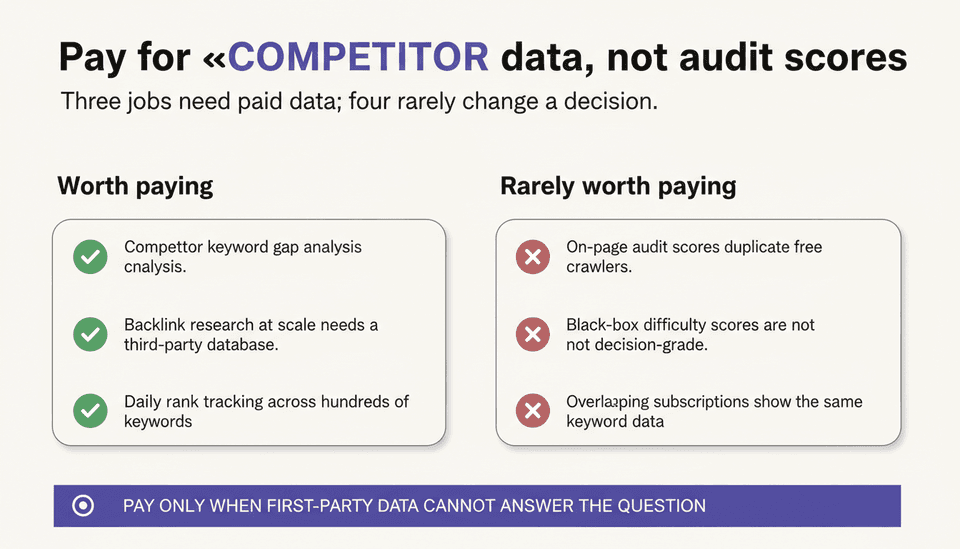
The three jobs worth paying for, and the four that rarely are
Worth paying for:
- Competitor keyword and content gap analysis (you need a third‑party database).
- Backlink research at scale (Google’s link report in Search Console is incomplete and only covers your site).
- Rank tracking across hundreds of keywords with daily updates (mechanically impossible with Search Console’s sampled, delayed data).
Rarely worth paying for:
– On‑page audit scores (dozens of free crawlers exist, and you can spot a missing title tag yourself).
– “SEO difficulty” scores that are black‑box composites (directional but not decision‑grade).
– Content graders that rewrite your brief in a slightly different tone — editorial judgment cannot be fully outsourced to a tool.
– Overlapping subscriptions that show the same keyword data in three dashboards.
Overlap audit: how to find the subscriptions your team opens less than once a week
Export the last 90 days of logins from each paid SEO tool. If a tool is opened less than once a week across the whole team, it is a cost line, not a capability. Cut it before the next renewal date, and reallocate the budget to a tool or person that produces pages.
Adjudicating the 2026 tool‑data problem: poisoned results and volatility spikes
What Semrush confirmed, and what it does not mean
In late October 2026, Semrush confirmed that Google is returning inaccurate search results to some automated ranking tools (Search Engine Land, Oct 28, 2026). Several other platforms reported the same behaviour (ALM Corp, Nov 3, 2026). The poisoned data affects SERP‑level measurements — the positions, features, and competitor snapshots captured by third‑party crawlers. Your first‑party Search Console data is not affected, because it is sourced from Google’s own query logs, not from external sampling.
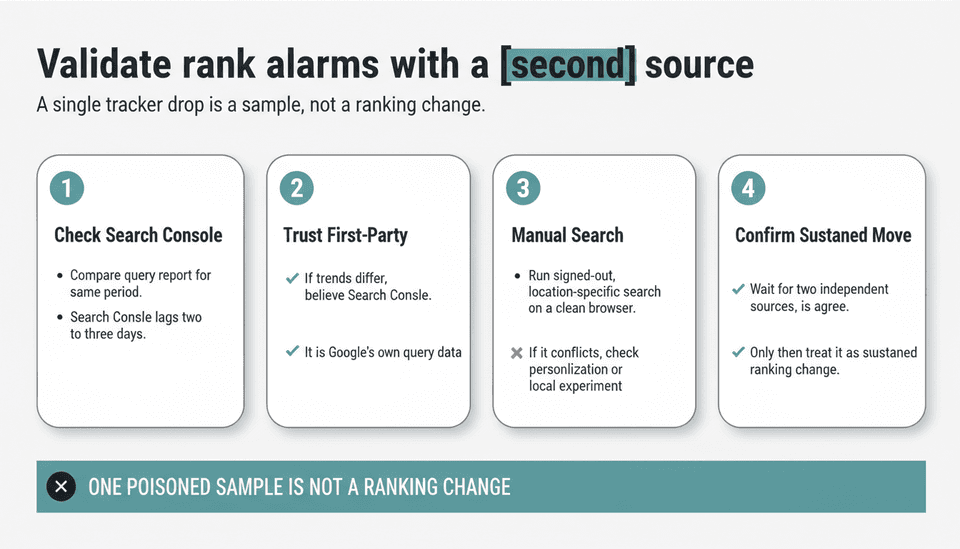
The two‑source rule: never act on a SERP claim that only one automated system reports
If your rank tracker reports a 20‑position drop for a keyword, and no other system — including your backup tracker, a manual incognito search, or your Search Console average‑position trend — corroborates the shift, treat it as a sampling artifact. A single poisoned sample is not a ranking change. Wait for a second data source before you change content, update links, or redirect budget.
What to do when your tracker and Search Console disagree — a resolution order
- Check Search Console’s query report for the same period (it lags by 2–3 days).
- If Search Console shows a different trend, trust Search Console.
- Run a manual, signed‑out, location‑specific search on a clean browser to check what a real user sees.
- If the manual result matches your tracker and conflicts with Search Console, the disagreement may reflect personalization or a local experiment.
- Only if two independent sources agree on a sustained move do you treat it as a real ranking change.
Reading a volatility spike without panicking: separate ranking noise from content and technical causes
The October 27, 2026 spike (Search Engine Roundtable, Oct 28, 2026) followed an unconfirmed update on October 24. Volatility sensors lit up across the industry. Before assuming your site was hit, check three things:
– Did your index coverage drop (Search Console)? If no, it is likely ranking noise, not a penalty.
– Did your average position shift across a broad set of queries or only a few? Broad shifts suggest an algorithm update; narrow shifts suggest content or intent mismatches.
– Did you publish, change, or remove anything in the prior week? A self‑inflicted change is easier to fix than a Google core update.
What to tell your finance lead or board in one paragraph
“The ranking‑tool volatility you saw does not mean our site was penalized. Our actual clicks and impressions in Search Console are stable. The discrepancy is because automated tools sample the SERP, and in October 2026 Google served some of those tools inaccurate results. We now validate every ranking alarm against Search Console before we act. We are not exposed to the poisoned data on our own property.”
Adding AI‑answer visibility to the same stack
What Search Console and Analytics can show you about AI assistant referrals
Search Console’s Performance report does not yet break out AI Overviews or ChatGPT Search referrals directly, but it does show queries that appeared in AI‑generated answers when Google includes an impression for the source link. In GA4, you can segment traffic by source/medium. AI‑assistant referrals often appear under “ChatGPT / referral” or from google.com / organic when part of an AI Overview. The data is partial, but it is the cheapest way to see direction.
A manual check you can run in ten minutes without buying another subscription
Pick your top 10 commercial‑intent pages. Search their target query in an incognito browser, plus “in ChatGPT” or “in Google AI Studio” to see if the model cites your domain. Repeat once a month. Log which pages get cited and which do not. This manual sampling, described in our ChatGPT GEO: A Practical Guide to AI Answer Visibility, costs nothing and gives you a trend line that no free dashboard yet provides.
Why citation in AI answers still traces back to the same inputs: crawlable content, technical health, authority
AI Overviews and ChatGPT Search pull from the same index and authority signals as organic search. A page that is well‑structured, fast, and linked to is more likely to be cited. Semrush’s free‑tools roundup (Oct 27) made the same point: AI visibility and organic visibility start from the same inputs. You do not need a separate AI‑visibility tool; you need the fundamentals measured by the free Google stack.
Options and tradeoffs: free stack, paid platform, agency, automated publishing
Comparison on four axes only: monthly cost, hours per week, coverage, and who owns the output
| Option | Monthly cost | Hours/week | Coverage | Who owns the output |
|---|---|---|---|---|
| Free Google stack | $0 | 15–25 (manual) | Your site only | You |
| Paid all‑in‑one platform | $100–$500 | 10–15 | Your site + SERP estimates | You, but data is rented |
| Agency | $2,000–$10,000+ | 2–5 (your oversight) | Strategy, production, SERP | Agency owns the process; you own the pages if contract stipulates |
| Automated publishing (e.g., Joyrise) | $199–$999 | 3–8 (editorial review) | Content production + Search Console tracking | You own the articles and the data |
Free stack — cheapest, highest time cost, no production capacity
You get first‑party measurement, but you still have to write, optimize, and publish every page. This is a fine starting point, but it scales only as fast as your team’s available hours. Most teams hit a ceiling at 4–8 articles per month.
Paid all‑in‑one platform — broad coverage, real overlap risk, still no writing capacity
Platforms bundle rank tracking, competitor research, and site auditing. The coverage gap widens when the data poisoned in October 2026 flows into these dashboards. And you still need a writer. You are paying for SERP intelligence that you must validate, not for output.
Agency — buys judgement and capacity, rents the asset, hardest to audit
A good agency solves production and strategy together. The cost per ranking article is high, and you are one contract away from losing the institutional knowledge. Business.com’s examination of AI SEO agencies (Nov 3, 2026) noted that delivery on AI‑visibility promises varies widely — some agencies are legitimate, others sell dashboards instead of results. Demand to see published pages, not projections.
Automated publishing (where a tool like Joyrise fits) — buys article volume and consistency, still needs a human editorial standard
Platforms like Joyrise plan keywords, write full‑length articles, and publish them directly to Webflow. They absorb the production step that otherwise stalls weekly output. At $199–$999/month, they cost less than a junior content hire and produce daily illustrated posts. The tradeoff is that an AI writes the draft — you add the human editorial check, tone alignment, and final authority. The output is yours; the capacity is rented.
What each option is openly bad at
Free stack: cannot see competitors; production depends on you. Paid platform: data can be poisoned; no writing capacity. Agency: cost asymmetry — you pay for strategic insight even when you only need production. Automated publishing: editorial voice requires oversight; not a substitute for high‑stakes thought‑leadership pieces.
Implementation framework: a 30‑day setup that produces a decision, not a dashboard
Week 1 — verify and baseline (Search Console, Analytics, Business Profile, one export you keep)
- Verify your site in Search Console (domain property recommended).
- Connect GA4 and enable the Search Console integration.
- Claim and fully complete your Google Business Profile.
- Export a snapshot of your current organic clicks, impressions, and average position from Search Console — this is your baseline.
Week 2 — demand (Keyword Planner and Trends pass, shortlist of 10–20 topics tied to products)
- Use Keyword Planner to find the query clusters with volume ranges aligned to your products.
- Run those same queries through Google Trends to identify upward‑ or downward‑trending terms.
- Shortlist 10–20 topics where demand is non‑zero and the trend is flat or rising. Do not filter by imagined difficulty; filter by product relevance.
Week 3 — technical (PageSpeed Insights on the three pages that matter, fix the top blocker)
- Run PageSpeed Insights on your homepage, your top‑performing organic landing page, and your highest‑converting product page.
- Identify the single fix (e.g., image sizing, server response time) that moves Core Web Vitals from “Needs Improvement” to “Good” on the worst‑performing page.
- Fix only that item; do not redesign the site.
Week 4 — production cadence (who writes, how often, what gets published vs. drafted)
- Decide: in‑house writer, freelancer, or an automated publishing tool.
- Set a weekly minimum: two published articles per week is a practical starting cadence for a small team.
- Publish the first article from your Week 2 shortlist. Send it to Search Console’s URL Inspection tool for indexing.
Worked example: a small B2B team on Webflow running this loop with two people
A two‑person marketing team at a SaaS company on Webflow verified Search Console and GA4 in Week 1. Week 2 yielded 15 keyword clusters from Planner; Trends filtered out three declining terms. Week 3 revealed a server response time delay, fixed by adjusting their Webflow hosting configuration. In Week 4, they configured an automated publishing tool (Joyrise) to produce three articles per week directly into their Webflow blog, reviewed them on Monday mornings, and hit the publish button. After 90 days, organic clicks rose 40% from the baseline.
The one‑page scorecard to keep after day 30
| Metric | Source | Baseline (Day 30) | Reviewed |
|---|---|---|---|
| Indexed pages | Search Console | Monthly | |
| Organic clicks (30 days) | Search Console | Weekly | |
| Organic impressions (30 days) | Search Console | Weekly | |
| Average position (overall) | Search Console | Weekly | |
| Core Web Vitals (field) | Search Console | Monthly | |
| Pages published this month | CMS or production log | Monthly | |
| AI citation instances (manual count) | Manual check | Monthly |
Mistakes, myths, and limitations
Myth: free Google tools are all you need — true for your own site, false for the SERP
Free tools give you truth about your property. They do not tell you what a competitor is ranking for or how large the opportunity is relative to the market. For that, you must cross into paid territory, or remain blind.
Myth: a rank tracker reports facts — it reports a sample, sometimes a poisoned one
The 2026 poisoned‑results episode made this concrete. A rank tracker number is a data point from a sampled environment, not an observed ranking from the index.
Mistake: treating Lighthouse scores as a ranking target
Lighthouse lab scores are diagnostic. Field data (Core Web Vitals) determines whether the page meets Google’s thresholds. Chasing a perfect lab score wastes time.
Limitation: modeled estimates (volume ranges, difficulty scores) are directional by construction
Keyword Planner volume ranges, Trends indices, and third‑party difficulty scores are all reductions of complex systems. Use them to prioritize, never to forecast exact traffic.
Limitation: your first‑party history is finite; archive exports before old data ages out
Search Console retains query data for a limited window. Download a full export at least once a quarter and store it outside Google’s ecosystem. If you lose historical queries, you lose the ability to compare year‑over‑year.
Mistake: buying tools before defining the weekly decision each one informs
A tool that generates a report no one reads is overhead. Before subscribing, write down the specific weekly decision it will change. If you cannot, do not buy it.
Next steps: the checklist
Seven actions in order, with the tool each one uses
- Verify your domain in Search Console and connect it to GA4.
- Bookmark the Search Central documentation and note the current data retention dates.
- Export a baseline organic report from Search Console.
- Run your product‑related queries through Keyword Planner and Trends; save a shortlist.
- Test your three highest‑value pages with PageSpeed Insights; fix the top Core Web Vitals blocker.
- Set a published‑article target per week and assign production (you, a writer, or an automated publishing platform).
- Add a two‑source validation rule to any ranking alert: confirm with Search Console or a manual search before acting.
What to re‑check quarterly (tool accuracy, overlap, Search Console coverage)
- Audit paid tool usage: cancel any subscription not used weekly.
- Validate your rank tracker against Search Console trends for 10 high‑priority queries.
- Review Search Console’s Index Coverage for new exclusions.
- Re‑run the manual AI citation check and log the domains that cited you.
What is an SEO tool?
An SEO tool is any software that helps you measure, improve, or produce content for organic search visibility on Google. It can be a free instrument from Google itself, a paid third‑party crawler, or a publishing platform that automates part of the SEO workflow. The key distinction is whether it reports first‑party data (your own site) or modeled estimates about the wider search results.
Which free Google SEO tools are actually worth using?
Google Search Console, Google Analytics 4, Google Keyword Planner, Google Trends for SEO, PageSpeed Insights, and Google Business Profile are the only six you need. They cover indexing, query performance, on‑site behaviour, demand sizing, trend direction, speed diagnostics, and local presence. Everything else free either duplicates one of these or adds cosmetic features that do not change decisions.
What is the difference between Google Search Console and Google Analytics?
Search Console reports what happened before the click — the queries, impressions, clicks, and average position. Google Analytics reports what happened after the click — sessions, conversions, and user behaviour. They are complementary; you need both to connect search demand to business results.
Is SEO still worth it in 2026?
Yes, if you treat it as a channel‑economics question, not a faith question. If the cost of producing a page that ranks (whether by writer, agency, or automated publishing) is lower than the lifetime value of the visits it earns, it is worth it. The core requirement — relevant content, technical health, and authority — has not changed, and the measurement tools are free. What changed in 2026 is that you must validate SERP data more carefully, not abandon the channel. For a deeper breakdown, see our Is SEO Dead or Evolving in 2026? FAQ.
How important are backlinks for SEO, and is link building still worth it?
Backlinks remain a foundational ranking signal. The worth‑it question depends on how you earn them. Buying links is high‑risk; earning links through content that is cite‑worthy is still, in 2026, the most durable off‑page investment. Paid tools that monitor backlink profiles are useful, but only if you act on the data — disavowing toxic links or identifying unlinked brand mentions.
How do I know whether my rank-tracking tool is accurate?
Apply the two‑source rule: never accept a single automated SERP report as truth. Verify any significant move against Search Console’s average‑position trend for the same query, or a manual signed‑out search. If the tracker is frequently contradicted by first‑party data, its sampling methodology is the likely issue — and in 2026, poisoned results are an added variable. This is the core of rank tracking accuracy in practice.
How do I check visibility in AI Overviews and AI assistants without buying another tool?
Run a manual check of your top 10 pages once a month: query each from a clean browser and record whether your domain is cited in AI Overviews (Google) or in ChatGPT Search (via a ChatGPT search query). In GA4, add a segment for referral traffic from “ChatGPT” or inspect your Search Console query data for queries that trigger AI Overviews — though no dedicated free filter exists yet, manual sampling gives a baseline. More detail in our guide on ChatGPT GEO.
Do I need paid SEO tools if I already use Google's free ones?
Only if you need competitor visibility, backlink analysis at scale, or daily rank tracking across hundreds of keywords. For your own site’s health and performance, the free stack is sufficient. The decision rule: pay only when the data you need is impossible to derive from first‑party sources, and you will check the tool at least once a week.
Where do I start with Google SEO tools if I have never set any up?
Start with Search Console. Create a domain property, verify it via DNS or your existing Analytics tag, and let the data collect for a week. Then add GA4, connect the two, and claim your Business Profile. These three steps give you the minimum viable measurement stack. After that, use Keyword Planner and Trends to build a topic shortlist before you touch any paid tool.
Key Takeaways
- Google SEO tools split into two worlds: first‑party measurement of your own site (authoritative) and modeled estimates of the SERP (directionally useful, must be validated).
- The 2026 poisoned‑results incident does not affect your Search Console data, but it makes a two‑source validation rule essential for every third‑party ranking alarm.
- A free stack of Search Console, GA4, Keyword Planner, Trends, PageSpeed Insights, and Business Profile covers your own property fully; paid tools become necessary only for competitor‑level insight and scaled rank tracking.
- Production — turning keyword research into published pages — is the step where most teams stall, and it is the only one that directly increases traffic, making automation a legitimate resourcing option.
- Do not buy a tool until you define the weekly decision it will change; audit existing subscriptions quarterly and cut overlaps.
For a daily publishing workflow that keeps your Webflow blog fed and your Search Console trends moving, try Joyrise and read your first article before you pay.