 Joyrise
What Is the Typical Workflow Process for SEO?
 By Alexi · · 14 min read

On this page
- A Short Definition and the Core Goal of an SEO Workflow
- Why a Structured Process Beats Ad‑Hoc Efforts
- What Are the Core Stages of a Traditional SEO Workflow?
- How Is SEO Automation Changing the Typical Workflow?
- Should Content and SEO Be a Single Workflow or Separate Processes?
- How to Set Up an SEO Workflow for a Webflow Site?
- How Do You Measure SEO Success?
- What Are Common SEO Workflow Problems and How Do You Troubleshoot Them?
- A Practical Decision Framework: How Automated Should Your SEO Workflow Be?
- Frequently Asked Questions About SEO Workflows
- Key Takeaways
What is the typical workflow process for SEO? The typical workflow process for SEO is a repeatable sequence of steps—research, audit, planning, creation, promotion, measurement—that turns an underperforming website into a source of consistent organic traffic. It is not a single checklist but a cadence: the best teams run these steps continuously, feeding new data back into the next round of work. Below you’ll find a modern, no-hype breakdown of what that process looks like today, how SEO automation is reshaping it, and exactly where a human still needs to make the call.
A Short Definition and the Core Goal of an SEO Workflow
An SEO workflow is a defined set of SEO process steps that moves a site from diagnosis to execution. The core goal is to reliably increase qualified organic traffic at a predictable pace—not to “rank #1” for a vanity term, but to connect searchers with the content or products that satisfy their intent. A workflow turns ad‑hoc guesses into a system you can measure and improve.
Why a Structured Process Beats Ad‑Hoc Efforts
Without a workflow, teams jump from “let’s write a blog post” to “let’s build links” without knowing why. A 2024 Search Engine Land piece showed that a structured 120‑minute weekly SEO routine can outperform chaotic, reactionary efforts because it forces prioritization and prevents task duplication. The discipline of a workflow also makes it possible to scale—especially when you introduce SEO automation later. Ad‑hoc SEO fails because it treats the work as a series of disconnected sprints instead of a product line.
What Are the Core Stages of a Traditional SEO Workflow?
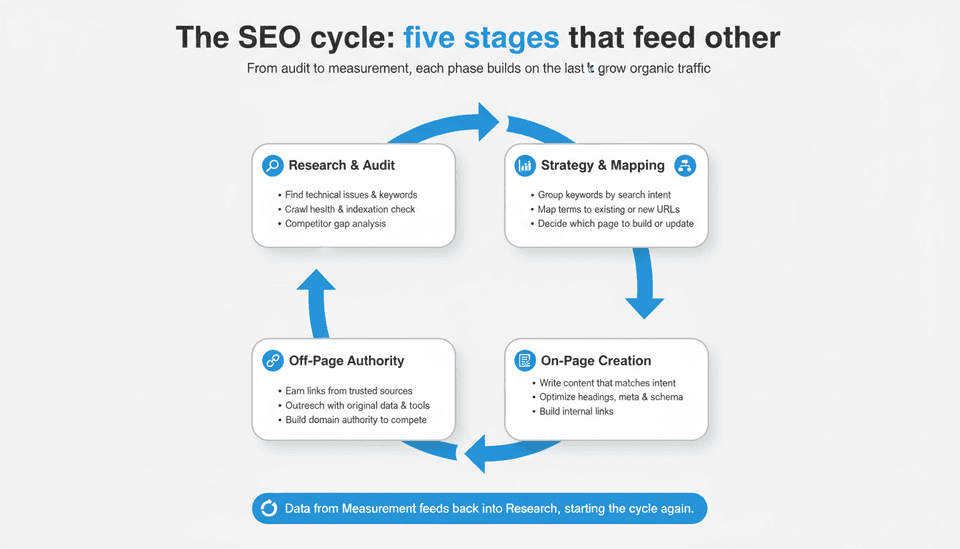
Even the most automated modern workflow still rests on these five stages. The tools change, but the logic of each stage doesn’t.
SEO Research and Audit
Start with a technical site audit (crawl health, indexation, Core Web Vitals) to find what’s broken. Following these site audit steps ensures you catch issues early. Then layer in the keyword research process: identify terms your audience actually searches for, not just what you think they search. Competitor gap analysis shows where you’re absent. Google’s SEO Starter Guide remains the reference point: if search engines can’t find, crawl, and render your pages, nothing else matters.
Strategy, Keyword Mapping, and Planning
Group keywords by intent—informational, commercial, transactional, navigational—and map each group to a specific URL or content asset. This is where you decide which pages to create, which to update, and which to consolidate. Without this map, you’ll produce content that competes with itself.
On‑Page Content Creation and Optimization
Write, optimize, and publish content that matches the intent behind every mapped keyword. This means more than adding a keyword to a title tag; it means delivering the answer, the comparison, or the tool the searcher expects. On‑page elements like headings, internal links, meta descriptions, and schema markup are still non‑negotiable.
Off‑Page Link Building and Outreach
Earn links from trusted, relevant sources. The most defensible approach today ties outreach to assets that deserve attention: original data, tools, deep guides. Ignoring this stage severely limits the authority you need to rank in competitive spaces.
Measurement, Reporting, and Iteration
Close the loop by tracking clicks, impressions, average position, and conversions in Google Search Console and your analytics platform. Set a monthly review cadence. The data from this stage resets the audit, starting the cycle again.
How Is SEO Automation Changing the Typical Workflow?
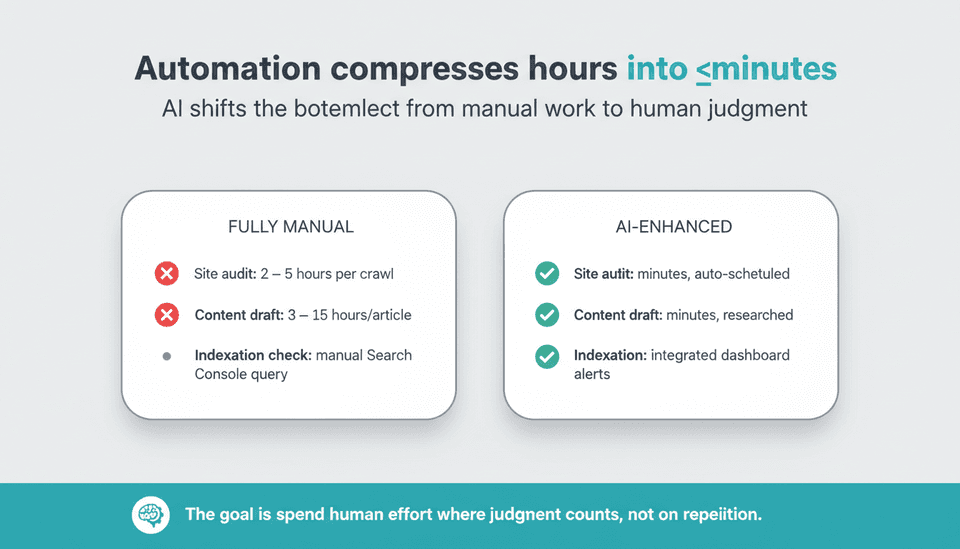
Automation isn’t replacing the workflow—it’s compressing stages that used to consume 80 % of the time, freeing practitioners to focus on judgment calls that can’t be scripted.
Automated Site Scans and Competitor Gap Analysis
Modern tools (including several on MarketerMilk’s 2026 automation tools list) can crawl a site, identify technical issues, and surface competitor keyword gaps in minutes. This used to be a multi‑day manual effort. You still need a human to validate findings, but the grunt work of data collection is gone.
AI‑Powered Content Briefs, Drafting, and Optimization
AI now generates full article drafts—structured, researched, and on‑brand—when given the right input. This isn’t about spinning articles; it’s about using a model that’s been fine‑tuned on your site’s voice, audience, and product data. The output is good enough that the bottleneck shifts from writing to strategic review. For a deeper understanding of what today’s AI can truly handle, our reality check on AI for SEO separates fact from hype.
AI Content Publishing, Indexing, and Search Console Monitoring Without Manual Steps
Platforms now exist that automatically generate, format, and publish content directly to a CMS like Webflow, then push the new URL to Search Console for indexing—all without a human clicking “save”. This AI content publishing shrinks the “creation to crawling” gap from days to minutes. Built‑in dashboards then surface immediate indexation status. The manual step of checking if a page is indexed disappears.
Where Human Review Still Fits in the Loop
The biggest risk of AI automation is publishing content that sounds authoritative but contains factual errors or misses brand nuance. The smartest workflows insert a human review gate after drafting—ideally a 15‑minute per‑article check for accuracy, tone, and legal compliance—before anything goes live. The goal is not to remove humans; it’s to make their time count for what only they can do.
| Traditional Step | Fully Manual | AI‑Enhanced / Automated |
|---|---|---|
| Site audit & gap analysis | 2‑5 hours per crawl | Minutes; auto‑scheduled crawls + gap identification |
| Keyword mapping | Spreadsheet + editorial calendar | AI‑generated clusters, mapped to existing pages |
| Content drafting & images | 3‑15 hours per article | Minutes; researched draft + custom images generated |
| Publishing & technical setup | Manual CMS entry, alt text, schema | Auto‑publish with built‑in meta, alt text, schema |
| Indexation check | Manual Search Console query | Integrated dashboard; alerts when a page is held up |
| Link outreach | Manual prospecting & emails | Still manual; some list‑building automated |
| Performance review | Weekly manual reporting | Dashboards auto‑pull data; human analyzes causality |
Should Content and SEO Be a Single Workflow or Separate Processes?
This debate has real operational consequences. Slingshot and similar agencies argue content and SEO should run as one unified workflow because SEO‑driven content fails when writers don’t understand intent, and SEO teams fail when they can’t shape the editorial product. On the other side, Authoritas and many traditional guides treat content optimization as a distinct stage—separate from the broader SEO process, handled by a content team after the SEO strategy is set.
Adjudication: For most small and mid‑size businesses, unifying content and SEO into a single workflow is the right call—if one person (or a tight pair) owns both keyword intent and the actual output. The risk of the distinct‑stage approach is that content drifts from strategy, producing articles nobody searches for. But when scale demands dedicated writers and specialized SEO analysts, separating the stages with a rigorous handoff (keyword brief → SEO‑reviewed draft) works better than forcing one team to do everything badly. Choose based on team size and whether the person writing the article can also interpret Search Console data accurately.
The Case for a Unified Content‑Plus‑SEO Workflow
Faster feedback loops: the person writing knows why a page must answer a specific query. No time lost translating between departments.
When It Makes Sense to Keep Content and SEO as Distinct Stages
Organizations with a large content operation where writers can’t be expected to handle technical SEO. Here, the SEO team provides a clear, templated brief, and the content team fills it in; then an SEO check happens before publication.
How to Choose Based on Team Size and Goals
- Solo marketer or founder: Unified workflow. You can’t afford the separation overhead.
- 2‑3 person marketing team: Unified, but with a second set of eyes on drafts for tone.
- Dedicated content team + SEO manager: Keep distinct stages with a tight review loop. The SEO manager must sign off before publication, not after.
How to Set Up an SEO Workflow for a Webflow Site?
Webflow’s built‑in CMS and design flexibility make it a strong platform for SEO—but only if you configure it correctly and then avoid manual publishing bottlenecks.
Using Webflow’s Built‑In SEO Settings and CMS Collections
Webflow allows per‑page control over title tags, meta descriptions, Open Graph settings, and canonical URLs. Use CMS collections to enforce consistent SEO fields across blog posts. Set up automatic URL structures that are clean and keyword‑focused. But these settings are useless if they’re left blank. Every new CMS item must have a custom title and meta description before it goes live—if you’re publishing at volume, this step should be automated, not manual.
Automating Article Publishing and Image Generation via Platforms Like Joyrise
A platform like Joyrise connects directly to your Webflow site, scans your brand voice and competitor content, and then writes, formats, and publishes illustrated articles on your schedule—complete with proper headings, internal links, alt text, and meta data. It pushes the article to your CMS as a draft or goes live automatically, then monitors Search Console for indexation. This removes the most time‑consuming steps from the workflow while still allowing a human to review drafts if needed. For businesses running a Webflow blog that needs daily content without a content team, it’s a viable alternative to a traditional SEO agency (operating at roughly 1/10th the cost). For a step‑by‑step guide to building AI‑focused workflows, see our ChatGPT workflow guide.
Avoiding Common Webflow SEO Pitfalls
Webflow’s performance is generally solid, but three pitfalls trip up new users:
- Canonical tags: Always set the canonical URL to the intended page version—many Webflow sites accidentally serve multiple URLs for the same content.
- ALT text: Core images (especially hero images) must have descriptive alt text. Automated publishing tools can generate these, but a manual spot‑check is wise.
- Page speed: Heavy interactions or uncompressed images can tank Core Web Vitals. Use Webflow’s native image compression and limit custom code where possible.
How Do You Measure SEO Success?
An SEO workflow without a measurement cadence is just noise. The only success metric that matters is whether the workflow reliably produces organic traffic that converts. Beyond that, track leading indicators to catch problems early.
Key Metrics: Clicks, Impressions, Rankings, and Conversions
- Clicks tell you if your pages actually attract visitors from search.
- Impressions show if you’re appearing for relevant queries, even if you’re not getting clicks.
- Rankings (average position) provide a directional signal but are useless without analyzing the specific queries.
- Conversions (form fills, purchases, sign‑ups) close the loop: did the traffic do something for the business?
Connecting Search Console, Analytics, and Internal Dashboards
Pull Search Console data into a Google Data Studio/Looker dashboard that overlays conversion events from Google Analytics or your internal database. This shows, for example, that a page ranking #3 for a commercial term drives 12 leads a month—making it a retention priority.
Setting and Reviewing Performance Milestones
Set 30‑day check‑ins: new content should show impressions within two weeks; if not, investigate indexing. Set quarterly reviews of the top‑20 landing pages: are they maintaining rank? If a page drops, flag it for an update before it loses its spot. The review cadence is as much a part of the workflow as the creation step.
What Are Common SEO Workflow Problems and How Do You Troubleshoot Them?
Problem: Rankings Drop After a Content Update
Do not panic and revert immediately. First, check if the update changed the page’s intent match. A rewrite that removed the exact answer users wanted will cause a drop. Next, check if technical changes (URL, canonical, internal links) broke something. If the old version served intent better, roll back the changes in parts, not wholesale.
Problem: New Pages Aren’t Getting Indexed
Submit the URL in Search Console. If it’s “discovered – currently not indexed,” the content likely doesn’t meet Google’s quality threshold for that query. Improve the page’s depth and originality. If it’s “crawled – currently not indexed,” the site may have a crawling budget issue; consolidate thin pages and ensure your sitemap is submitted.
Problem: Workflow Feels Too Manual and Time‑Consuming
Audit the steps: which can be templated, scheduled, or automated? Basic site audits, keyword gap analysis, and publishing format are prime candidates for automation. For many teams, the ROI of adding a platform like Joyrise comes from eliminating the 10+ hours a week spent on drafting, formatting, and posting.
Problem: Data from Different Tools Doesn’t Align
Search Console impressions vs. Ahrefs traffic estimates will never match because they use different sampling and attribution. Choose one source of truth per metric. Use Search Console for clicks and impressions at the page level, and GA4 for conversions. Third‑party tools are for competitive research, not internal reporting. Stick to primary data when making budget decisions.
A Practical Decision Framework: How Automated Should Your SEO Workflow Be?
Use this table to match your situation to a workflow model.
| Your Resources | Best Workflow Model | What It Looks Like |
|---|---|---|
| Sole founder, no content team | Fully automated (with review) | Platform handles scans, content, images, publishing; founder reviews 2 articles/week for accuracy |
| 1 marketer + 1 writer | Hybrid | Automated research + drafts; writer edits; marketer handles strategy & links |
| In‑house SEO + content team | Human‑led, AI‑assissed | AI for audits and briefs; team creates and reviews; automated monitoring only |
| SEO agency serving clients | Hybrid with custom gates | Automate repetitive tasks; each client has a human sign‑off gate; dashboards drive reporting |
The goal is to spend human effort where judgment matters, not where repetition does.
Frequently Asked Questions About SEO Workflows
What is an SEO workflow?
An SEO workflow is the end‑to‑end process you follow to improve a site’s organic search presence—from identifying opportunities to measuring results and starting again. It includes research, planning, execution, and analysis.
What is an SEO workflow process?
The process is the sequence of those stages applied consistently. For example: site audit → keyword research → content plan → content production → on‑page optimization → publication → link building → performance review → repeat.
How does SEO work step by step?
Step‑by‑step, SEO works by first ensuring search engines can access and understand your site (technical SEO), then matching each page to the right search intent (on‑page and content), then earning signals of trust from other sites (off‑page), and finally monitoring and adjusting based on data. Every step feeds the next.
What are the pillars of an SEO workflow?
The four pillars that underpin any workflow are: technical health, keyword‑intent alignment, content depth and freshness, and authority (links + brand signals). If any pillar is weak, the workflow produces unreliable results.
How long does it take to implement an SEO workflow?
Varies. A basic, repeatable workflow can be built in a week if you already have a site and a clear strategy. Fully integrating automation and dashboards across a team typically takes 3‑6 weeks, depending on the CMS and tools. The real time investment is in the ongoing execution, not the initial setup.
What is the difference between an SEO workflow and a content marketing workflow?
An SEO workflow is search‑focused: it starts with keyword intent and ends with ranking and organic traffic metrics. A content marketing workflow is audience‑focused: it starts with brand storytelling, editorial calenders, and distribution channels beyond organic search. They overlap when content is designed to rank, but an SEO workflow includes technical audits and link building that a pure content marketing workflow often skips.
How do you measure SEO workflow success?
Measure whether the workflow consistently produces content that ranks, attracts organic traffic, and drives conversions. Use Search Console clicks, GA4 conversions, and a dashboard that connects the two. The workflow is successful if it delivers a predictable pipeline of SEO results month over month.
What is SEO workflow software?
Software that helps you manage or automate one or more stages of the workflow. This ranges from All‑in‑One SEO platforms that handle research, rank tracking, and reporting, to specialized content automation platforms like Joyrise that handle the entire creation‑to‑publishing pipeline for a specific CMS. You don’t need a single tool to call it “SEO workflow software”; often a stack of tools connected through APIs does the same thing.
How do you manage SEO projects effectively?
For effective SEO project management, break the work into sprints that map to the workflow stages: Audit Sprints, Build Sprints, and Review Sprints. Assign clear owners per stage, document decisions in a central place, and review progress against leading metrics (not just final rankings). For a deeper project management approach, the 120‑minute weekly SEO workflow model from Search Engine Land is a good template for small teams.
How does SEO workflow connect to marketing analytics?
It connects when you move from reporting “impressions” to reporting “impressions that led to demo requests.” The SEO workflow’s measurement stage must pull data from analytics platforms, not just rank trackers. That link is what justifies the investment to the rest of the business.
What is a content optimization workflow?
A sub‑process within the broader SEO workflow that focuses solely on improving existing content: refreshing statistics, expanding to cover related queries, adding internal links, and updating meta data after a page has already been published. It’s often triggered by a ranking drop or a new competitor.
Is this different from SEO tools like Ahrefs or SEMrush?
Yes. Ahrefs and SEMrush are research and analysis tools that give you data; they don’t execute the publishing or content creation steps. They can inform a workflow but are not a workflow themselves. Many teams use Ahrefs/SEMrush for keyword research and audits, then feed that data into an automation platform that acts on it.
Can this connect to analytics platforms?
Most modern SEO workflow tools offer direct connectors to Google Analytics, Search Console, and Looker Studio. If you’re building a custom workflow, use APIs to pipe Search Console data into your dashboards. The connection is what turns a task list into a metric‑driven system.
Why is it important to have a workflow as an SEO agency?
Without a documented workflow, client results become inconsistent; every account manager works from a different playbook, and scaling is impossible. A shared workflow lets an agency deliver predictable outcomes, onboard new team members faster, and demonstrate value through repeatable processes rather than individual heroics.
Key Takeaways
- A typical SEO workflow is a repeatable cycle of audit, research, content, authority, and measurement—automation shifts where human time is spent, not the need for the cycle.
- For most small to mid‑size businesses, merging content and SEO into one unified workflow prevents strategy drift, but larger teams need a rigorou handoff between the two.
- AI‑powered platforms can now automate the entire content creation‑to‑publishing pipeline for Webflow, removing the manual bottleneck while a human quality gate retains accuracy.
- Measure SEO success by whether it reliably produces organic traffic that converts, using Search Console and analytics data tied together in a single dashboard.
- The right automation level depends on team size: solo founders can lean heavily on AI; growing teams should keep human review for drafts; agencies need hybrid models.
For teams ready to remove the manual work from their SEO workflow, Joyrise automates daily article research, writing, and publishing directly to Webflow.