 Joyrise
Best Cheap SEO Tools 2026: AI-Powered Growth on a Budget
 By Alexi · · 19 min read

On this page
- At a Glance: The 7 Best Cheap SEO Tools in 2026
- How We Picked & Excluded Tools: The $30 Ceiling
- The Tool‑by‑Tool Breakdown
- The Missing Step: How to Turn Cheap Insights into Traffic Using AI Content Automation
- Building a Low‑Cost SEO Stack That Actually Works
- SEO Tool Comparison 2026: Where Cheap Options Shine and Where They Fall Short
- Budget SEO Tools: Your Top Questions Answered
- Tools We Considered but Didn’t Include (and Why)
- Your 5‑Point Buyer’s Checklist for Cheap SEO Tools in 2026
- Final Verdict: When to Scale Up and When to Keep It Lean
- Key Takeaways
The best cheap SEO tools in 2026 combine free technical dashboards with sub‑$30 crawlers and keyword companions—but the real win happens when you feed their insights into an AI publishing engine. This guide picks seven cheap SEO tools that earn their keep, shows you how to wire them into a daily content workflow, and calls out exactly when “cheap” stops being a bargain. Whether you’re looking for the best cheap SEO software to bootstrap a side project or assembling a low‑cost SEO stack for a growing site, the right blend of affordable SEO tools and free SEO tools can deliver rapid, sustainable progress without the enterprise price tag.
At a Glance: The 7 Best Cheap SEO Tools in 2026
| Tool | Monthly Cost (Approx.) | Best For | Key Capability |
|---|---|---|---|
| Google Search Console | Free | Technical & performance dashboards | Real‑time search query, click, and impression data |
| Ahrefs Webmaster Tools | Free | Free backlink & site audit assist | Backlink monitoring, site‑health checks, and the basics of DR |
| Screaming Frog SEO Spider | ~$22/month (paid yearly) | Affordable deep technical crawls | Full crawl audits, on‑page analysis, broken‑link detection |
| Keywords Everywhere | Varies (from $10) | Budget browser‑based keyword research | In‑browser search volume, CPC, competition, and “People Also Search” |
| Ubersuggest | $29/month (individual) | Entry‑level all‑in‑one suite | Keyword ideas, site audits, backlink overviews |
| Ahrefs Starter | $29/month | Light‑touch backlink & keyword discovery | Genuine Ahrefs data for small projects |
| Mangools | $29/month | Polished low‑cost suite for beginners | Intuitive rank tracking, SERP analysis, and keyword research |
Costs reflect publicly listed pricing as of November 2026; Screaming Frog converted from £199/year. Keywords Everywhere credits start at $10 for 100,000 searches—what you spend depends on volume.
This table doubles as a quick SEO tool comparison 2026 for budget buyers. Each tool occupies a distinct niche, and combining two or three creates a powerful, affordable SEO tools stack that covers technical health, keyword research, and backlink monitoring without a single subscription crossing the $30 line.
How We Picked & Excluded Tools: The $30 Ceiling
The inclusion criteria
Every tool on the shortlist had to meet four rules:
- A paid plan (or fully usable free tier) that costs no more than $29 per month.
- Actively maintained and updated in 2026.
- Focused on practical SEO research—not pure AI writing or all‑in‑one marketing suites.
- Accessible on a self‑serve basis, without onboarding calls or long‑term lock‑ins.
We weighted tools that cover the three legs of the SEO stool (technical health, keyword discovery, and backlink monitoring), even if they don’t cover all three equally. As Connor Gillivan’s guide to affordable SEO tools underscores, the right low‑cost set can track rankings and uncover growth opportunities without pushing you beyond a modest budget—exactly the philosophy behind this list.
Tools that didn’t make the shortlist (and why)
Several strong tools missed the cut because of price. Semrush starts at $139.95/month, Moz Pro at $99, SE Ranking at $52, and Sitechecker Pro at $41. Others, like Ahrefs’ full plan or Serpstat, exceed the ceiling by a wide margin. Free‑only tools that gate essential features behind a paid upgrade were evaluated on their usable free tier; if the free tier was too thin to do real work, we passed.
The Ahrefs Starter plan is a deliberate exception: the company built a $29/month tier specifically for low‑budget operators, so it belongs here even though its scope is deliberately narrow. This isn’t about finding the cheapest button on a sales page—it’s about identifying genuinely useful free SEO tools and low‑cost software that can form the backbone of a daily workflow.
The Tool‑by‑Tool Breakdown
Google Search Console – Best free technical & performance dashboard
GSC is the non‑negotiable foundation. It tells you exactly which queries bring traffic, how your pages perform in search, and where Google sees indexing or mobile‑usability problems. For a small site, GSC often replaces half of a paid rank‑tracker. No other free SEO tool offers such direct, unfiltered access to Google’s own view of your site.
You can export performance data to CSV, filter by page or query, and spot quick wins—pages ranking on page two with a solid query volume but a low click‑through rate. That export becomes direct fuel for an AI content brief (more on that below). The feature list hasn’t changed in years, but the value hasn’t either. Entrepreneur’s roundup of low‑cost SEO tools still lists GSC first, and for good reason: it’s the diagnostic instrument every website owner can access from day one.
Beyond the quick wins, GSC’s Index Coverage report is your early warning system for technical decay—pages dropped from the index, crawling anomalies, or mobile‑usability flags that silently erode rankings. Many cheap SEO tools can report on links or keywords, but only GSC tells you how Google actually interprets your pages. When planning a low‑cost SEO stack, start here and build outward.
Ahrefs Webmaster Tools – Best free backlink & site audit assist
AWT gives you a slice of Ahrefs’ data for free: a limited backlink profile, a site audit, and the proprietary Domain Rating (DR) metric. It’s not a competitor research weapon—the backlink index is sampled, not complete—but it’s enough to catch toxic links, spot orphan pages, and track your own progress. This is a classic cheap website analysis tool: you get the essential health metrics without spending a penny.
Use AWT alongside GSC. GSC shows you clicks and impressions; AWT shows you the health of the signals that drive them. Together they form a free, credible technical baseline that many paid tools struggle to match at this price point. If you’re assembling a low-cost SEO stack, GSC + AWT is the starting pair that costs nothing and informs every other investment.
Screaming Frog SEO Spider – Best for affordable deep technical crawls
The free version caps at 500 URLs. The paid license removes the cap and costs £199/year (roughly $22/month). That unlocks full crawl analysis: hreflang tags, duplicate pages, redirect chains, missing meta descriptions, and real‑time on‑page audits. You can crawl any site your browser can reach, including staging environments. It’s the cheapest way to get a true technical SEO audit without sacrificing depth.
For a small site, the free cap is often enough initially. Once you expand past a few hundred pages, the paid upgrade pays for itself in the first chained 301 redirect you fix. Screaming Frog doesn’t do “pretty” and doesn’t hold your hand—but it’s the same tool technical SEO teams run on six‑figure retainers. When businesses look for cheap website analysis tools that can scale with their growth, Screaming Frog consistently tops the list. It’s also invaluable as a pre‑publish QA step in an automated content pipeline, checking that every new page passes basic on‑page checks before it goes live.
Keywords Everywhere – Best budget research companion for browsers
Keywords Everywhere injects search volume, CPC, and competition data directly into Google, YouTube, Amazon, and even ChatGPT. You buy credits; 100,000 keyword credits cost $10 and often last a solo operator months. The extension surfaces “People Also Search For” and related queries right where you’re already researching. It is, without a doubt, one of the best keyword research tools cheap enough to run on a founder’s personal budget.
It won’t replace a dedicated keyword research tool if you need cluster analysis or trend data, but for a founder who needs to gut‑check an idea before writing, it’s a sub‑$10/month workflow upgrade. Because the data appears inline, you spend less time tab‑hopping between tools. The real power emerges when you combine Keywords Everywhere with another low‑cost tool: export your GSC query list, pull volume and related terms through the extension, and you’ve got a nearly free keyword research process that feeds directly into content planning.
Ubersuggest – Best entry‑level all‑in‑one suite
Here’s a clear split in the reviews. One camp sees Ubersuggest as a budget savior—keyword ideas, site audits, and backlink overviews in one dashboard for $29/month. The other camp points out that its data depth can’t match Semrush or Ahrefs and that its backlink index is noisy.
The truth depends on your stage. If you need learning‑wheels—a tool that flags SEO basics, suggests article ideas, and shows you where you stand—Ubersuggest delivers. The interface guides you toward common fixes, and the free Chrome extension makes casual research effortless. As soon as you need competitive intelligence (exact ranking positions across thousands of keywords, granular backlink authority, or detailed SERP features), you’ll outgrow it. Keep Ubersuggest for the audit and the content ideas; bring in something sharper for the heavy lifting later. For sites looking for the best cheap SEO software that covers multiple angles without any learning curve, Ubersuggest remains a popular gateway.
Ahrefs Starter – Best for light‑touch backlink & keyword discovery
The $29/month Ahrefs Starter plan is the real deal—a deliberately slimmed‑down version of the full suite. You get 500 keyword reports per month, a limited backlink checker, rank tracking for up to 750 keywords, and a site audit crawl of 5,000 pages. That’s a thin slice by Ahrefs standards, but the data quality is the same as the professional plan. It’s a rare case where a premium brand offers genuine affordable SEO tools without watering down the data source.
For a bootstrapped SaaS blog or a niche e‑commerce site, Starter answers the two most expensive questions: “Which pages are actually linking here?” and “What terms are my competitors ranking for that I’m not?”. When you hit the limits, upgrading is a button click, not a migration. This plan fits perfectly into a low‑cost SEO stack where you use GSC and AWT for breadth, and Ahrefs Starter for depth on your highest‑value pages.
Mangools – Best polished low‑cost suite for beginners
Mangools bundles KWFinder (keyword research), SERPChecker (SERP analysis), SERPWatcher (rank tracking), and LinkMiner (backlink research) for $29/month. The UI is consistently cited as one of the easiest to adopt, and the data—while not as deep as Ahrefs—is solid for sites under a few hundred pages. Many small business owners point to Mangools as the best cheap SEO software when they need a friendly dashboard that covers all the basic research tasks.
I find Mangools especially useful for the owner who wants to check 10–30 keywords, see competitor positions, and get a clear “where to write next” signal without learning a new operating system. The SERPWatcher rank tracker updates daily and sends email reports, so you don’t have to log in. For a truly affordable SEO tools setup that a team of one can manage without training, Mangools is hard to beat.
The Missing Step: How to Turn Cheap Insights into Traffic Using AI Content Automation
What cheap tools can’t do (and why they still shine)
Cheap SEO tools tell you what’s broken and where the gaps are. They don’t write the content, optimize headings, generate images, or publish. That’s fine—they were never built for that. Their value is in the 100% free or low‑cost signal: the page two query with 800 monthly searches, the broken link on a high‑traffic page, the competitor’s thin‑content page you can beat.
But if you stop at the signal, you’ve bought a to‑do list. The real unlock is piping that signal into something that acts on it. Forward‑thinking site owners are now pairing this affordable SEO tools layer with AI content SEO automation to shrink the gap between insight and published page to hours, not weeks.
Building an AI‑powered content pipeline on a budget
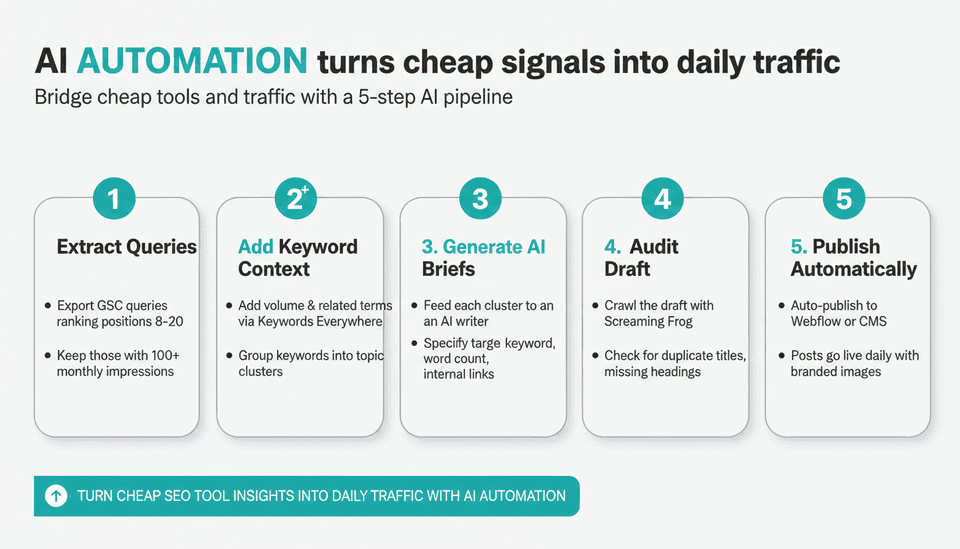
By mid‑November 2026, the AI content creation tools market had grown so fast that pairing cheap research with automated writing and publishing is no longer experimental—it’s just practical (DemandSage, November 15, 2026). A concrete workflow looks like this:
- Extract the list: Pull queries from Google Search Console where your site ranks between positions 8 and 20 and has at least 100 monthly impressions. Export as CSV.
- Add context: Run the queries through Keywords Everywhere to append search volume and related terms, then group them into clusters (by topic or by page you want to strengthen).
- Generate briefs: Feed each cluster into an AI writing tool. You can use a generic large language model directly, or a platform built for SEO‑structured articles. Specify the target keyword, a minimum word count, and the internal links you want included.
- Audit before publish: Run the generated draft through Screaming Frog’s “Crawl Path” analysis (checking for duplicate titles, missing headings) or simply use the built‑in AI re‑readers that platforms like Joyrise offer. Joyrise, for example, runs a second AI quality‑judgment pass that rewrites drafts before they go live—a safety net for automated content.
- Publish automatically: If your site runs on Webflow, tools that push posts directly to your blog eliminate the last manual handoff. Joyrise’s platform does that daily; you wake up to a live post with branded images and internal links.
This approach turns a collection of cheap SEO tools into an AI content SEO automation engine. The tools remain your sensors, but the heavy lifting of research, writing, and formatting happens programmatically. For many small teams, it’s the only way to maintain a consistent publishing cadence without burning out.
This isn’t a theory. The same automated‑insight loop appears in how AI SEO vs Traditional SEO is evolving—the strategic layer is still human, but the execution is now programmatic.
The real cost of DIY: time vs. automation
Here’s the math founders and finance leads rarely run: a stack of five cheap SEO tools that costs $29/month can easily consume 8–12 hours a week if you’re manually researching, crawling, and writing. At a modest $40/hour opportunity cost, that’s $1,280–$1,920 in lost time per month.
Time is the silent budget‑killer. A platform that automates the writing and publishing for $199–$499/month doesn’t just replace the tool cost—it buys back the hours. The cheap tool stack is still the sensor array; AI automation is the engine that turns the signal into daily, optimized content that actually ranks, without the manual grind. No ranking page on cheap SEO tools today addresses that total‑cost‑of‑ownership shift. It’s the difference between having a good toolkit and actually having a website that grows while you sleep.
Building a Low‑Cost SEO Stack That Actually Works
Start with an audit and monitoring layer
Your low‑cost SEO stack should begin with perpetual diagnostics. Use Google Search Console to monitor clicks, impressions, and index status, and Ahrefs Webmaster Tools to watch over your backlink profile and domain health. Together, these free SEO tools give you a running pulse of your site’s technical and authority metrics. Then add Screaming Frog (even the free version) to crawl your pages for on‑page issues, duplicate content, and broken links. This cheap website analysis layer costs you nothing except the time you choose to spend.
Layer in keyword intelligence for content discovery
Once you know what’s healthy and what’s broken, you need to decide what to write next. Build a keyword research layer with Keywords Everywhere for on‑the‑fly volume data and Mangools’ KWFinder or Ahrefs Starter for structured keyword discovery and SERP analysis. These keyword research tools cheap enough for any budget will surface the queries your site can realistically target. Export those clusters into a spreadsheet so they’re ready for your AI content engine.
Connect the sensors to your publishing engine
The final component—and the one most guides skip—is the bridge between cheap insights and published content. Without AI content SEO automation, all that research becomes a backlog that never gets finished. By feeding your keyword clusters and audit findings into an AI publishing platform (one that understands on‑page SEO and can publish directly to your CMS), you close the gap between signal and traffic. Suddenly, your affordable SEO tools become the fuel for a daily content operation, not just a monthly report you look at and forget.
This low‑cost SEO stack—GSC + AWT + Screaming Frog + a cheap keyword tool + an AI publisher—can be assembled for under $50/month in pure tool costs, and it’s capable of driving consistent organic growth for sites with up to several hundred pages. The key is not just owning the tools, but connecting them into a workflow that produces published pages with minimal human drag.
SEO Tool Comparison 2026: Where Cheap Options Shine and Where They Fall Short
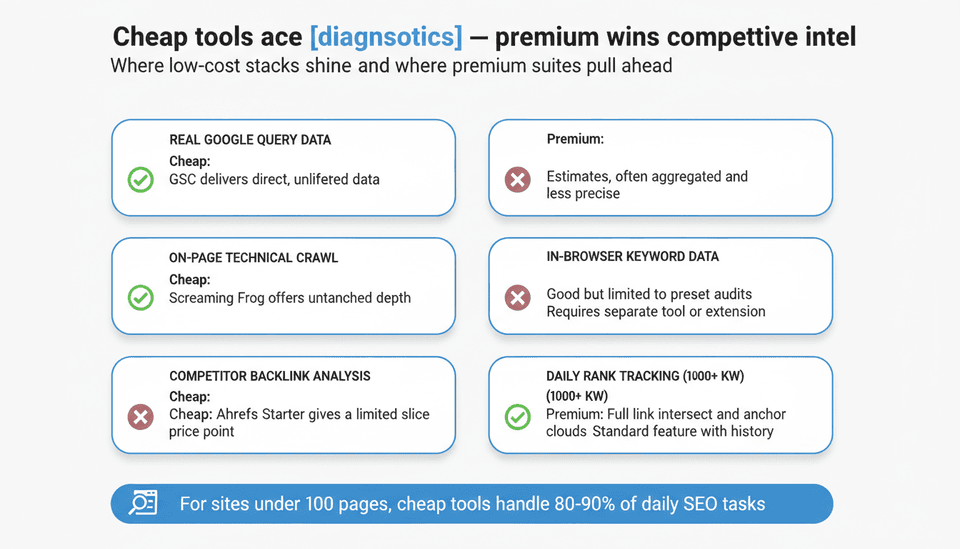
The following SEO tool comparison 2026 pits the cheap SEO tools from this list against the premium suites in the areas that matter most to small‑site operators:
| Capability | Cheap Stack (GSC/AWT/Frog/KE/Mangools/AS) | Premium Suite (Semrush/Ahrefs full) |
|---|---|---|
| Real Google query data | Best: GSC directly from Google | Aggregated estimates, often broader scope |
| On‑page technical crawl | Excellent: Screaming Frog depth unrivalled | Good, but often limited to preset audits |
| In‑browser keyword data | Excellent: Keywords Everywhere inline | Requires dedicated tool or extension |
| Competitor backlink analysis | Limited: Ahrefs Starter gives slice | Deep: full link intersect, anchor clouds |
| Daily rank tracking (1000+ kw) | Not available at this price point | Standard feature with historical data |
| Content gap matrices | Very basic: manual cross‑referencing needed | Automated gap analysis, topic clusters |
| AI content integration | Excellent via third‑party platforms | Some native AI writers, but often expensive |
The pattern is clear: cheap tools dominate at diagnostics, site‑level monitoring, and lightweight research, while premium suites pull ahead when you need large‑scale competitive intelligence, advanced rank tracking, and content‑gap algorithms. For sites under 100 pages, the cheap SEO tools in this guide cover 80–90% of daily tasks. The remaining 10% can be handled by occasional use of a premium trial or a one‑time Ahrefs report.
Budget SEO Tools: Your Top Questions Answered
What is the cheapest SEO tool?
Google Search Console and Ahrefs Webmaster Tools are both free and essential. Among paid tools, Keywords Everywhere’s pay‑as‑you‑go model starts at $10 and can cover several months of light keyword research. Screaming Frog’s free mode handles up to 500 URLs without charge. If you truly need to spend zero, the free SEO tools in this list can still take you surprisingly far.
How much do SEO tools cost?
Cheap SEO tools sit in the $0–$29/month range. Mid‑tier professional tools typically start around $50 and run to $150/month; enterprise platforms exceed $1,000/month. The hidden cost is rarely the dollar amount—it’s the hours you spend switching between them. Even the best cheap SEO software becomes expensive if you sink ten hours a week into manual exports and copy‑pasting.
Is cheap SEO software good enough for a small website?
Yes. A stack of GSC, AWT, and one inexpensive crawler or keyword research companion covers technical health, basic backlink monitoring, and content gap identification for sites under roughly 50–100 pages. You only need to spend more when competitor density or content velocity demands heavier data. Thousands of successful affiliate and SaaS content sites have been built on affordable SEO tools alone.
Do budget SEO tools track AI search?
Not directly. As of late 2026, no budget tool isolates Google AI Overview impressions, ChatGPT‑driven visits, or Perplexity referral traffic in a clean report. Google Search Console aggregates all search traffic, so AI‑generated snippets may inflate impression counts without a way to separate them. You can approximate shifts by watching pages that suddenly gain branded query volume—often a signal an AI answer mentioned you. For precise AI‑search tracking, you still need an analytics stack outside the cheap‑tool universe.
How do I choose between the free SEO tools and a paid plan?
Start with the free dashboards. Once you hit a limit—like the 500‑URL crawl cap in Screaming Frog or the need for competitor keyword data—pay for the single cheapest tool that breaks the wall. For most, that means adding Ahrefs Starter or Mangools at $29/month. Avoid buying a suite until you’ve clearly outgrown the free ones. Building a low-cost SEO stack is about adding only what you’ll actually use that week.
When should I upgrade to a full SEO suite?
Upgrade when you need daily rank tracking across thousands of keywords, deep competitor backlink analysis, content gap matrices beyond five competitors, or when the time you lose stitching together exports from three tools eclipses the cost of a unified platform. For many teams, that tipping point arrives around 100–200 pages or when the marketing team grows past one person. Until then, the best cheap SEO software will often outperform a premium suite in terms of speed and simplicity.
What should a cheap SEO report include?
A useful cheap SEO report must deliver at minimum: a list of current keyword rankings and weekly movements, the top‑performing pages (and the queries driving them), crawl errors and broken pages, a snapshot of your backlink profile (new and lost links), and one concrete, high‑impact content opportunity for the week ahead. Raw data without an action item is just noise. With the right affordable SEO tools, you can pull all of this in under 30 minutes.
Can cheap tools be combined with AI content?
Yes—and in 2026, it’s the highest‑ROI integration a small business can make. The cheap tools become the data layer; the AI content layer turns that data into published articles. Platforms that automate the entire chain (from site scan to publishing) let you treat the cheap tool stack as the cockpit instruments, not the sole source of propulsion. This AI content SEO automation approach is exactly how many founders are building an automated content pipeline without scaling headcount.
Can I rely solely on cheap keyword research tools for content planning?
Cheap keyword research tools like Keywords Everywhere and Mangools KWFinder are more than sufficient for content planning on a site with moderate competition. They’ll give you search volume, related terms, and SERP difficulty estimates. The key is not the tool’s precision but how you act on the data. Even the most expensive keyword database won’t help if you never turn the keywords into published articles. The combination of low-cost keyword research tools and AI content automation turns a light database into a publishing pipeline.
Tools We Considered but Didn’t Include (and Why)
- SE Ranking ($52/month): Solid suite, but sits above the $30 cap. Its AI‑writer integration is interesting, but it’s a mid‑tier tool, not a budget one.
- Serpstat ($59/month): Competitive keyword database, yet the entry price breaks the ceiling.
- Sitechecker Pro ($41/month): Excellent on‑page auditing, still too expensive for this list.
- Wincher ($48/month): A focused rank tracker that didn’t offer enough additional value over the free dashboards and cross‑referencing with $29 tools.
- SEOquake (free browser extension): It’s free and useful for quick SERP overlays, but the data is surface‑level and hasn’t been updated significantly in years; it can’t replace a dedicated keyword tool or audit crawler.
Your 5‑Point Buyer’s Checklist for Cheap SEO Tools in 2026
Buy a tool that makes the pipeline faster, not just cheaper. Before you swipe a card, run these five checks:
- Data export: Can the tool dump its findings as CSV or connect via an API? If you can’t get the data into your AI writing stack or a Google Sheet, you’re building a manual detour.
- Coverage overlap: Map your three need‑to‑monitor signals (technical crawl, keyword research, backlinks). One tool may cover two; don’t pay a third subscription for a gap you can fill with a free dashboard. The best cheap SEO software isn’t always the one with the most features—it’s the one that complements what you already have.
- Time‑to‑insight: Count the clicks from login to the report you actually use. If it takes 20 minutes to produce a list of priority keywords, that cost dwarfs the monthly fee. This is why in‑browser tools like Keywords Everywhere often beat more powerful but slower platforms for day‑to‑day research.
- Publishing integration: Does the tool’s output plug into your CMS? For Webflow shops, platforms like Joyrise bypass the exporter‑to‑editor loop entirely, publishing optimized articles directly. If your cheap tool stack forces you to copy‑paste into WordPress every day, factor that into the real price. Affordable SEO tools only stay affordable when they fit a low‑friction workflow.
- Upgrade path: Will you outgrow the tool in six months? If yes, choose one that shares a parent ecosystem (Ahrefs Starter → Ahrefs Lite) or that exports into a format your next tool can ingest. Avoid orphan subscriptions you’ll have to migrate away from. Building a low‑cost SEO stack isn’t about staying on the cheapest tier forever; it’s about building a foundation that can scale without data loss.
Final Verdict: When to Scale Up and When to Keep It Lean
For a site under 50 pages or a founder‑led blog in a moderate‑competition niche, a lean stack of Google Search Console, Ahrefs Webmaster Tools, Screaming Frog, and Keywords Everywhere—wired into an AI content platform—can produce steady, defensible growth at a total tool cost under $30/month. The real expense is the time you spend running the assembly line; automation slashes that cost.
Scale up when you start needing daily rank monitoring for hundreds of keywords, detailed backlink gap analysis against multiple competitors, or when you’re investing in content that must outperform pages with ten‑year link profiles. At that point, the dollar cost of a full suite is smaller than the opportunity cost of limited data.
The entire game has shifted. Spending less on tools is fine, but the person who combines cheap signals with AI‑driven publishing isn’t just cheaper—they’re faster. And in 2026, speed to publish is the new SEO moat. Whether you call them cheap SEO tools, affordable SEO tools, or simply a low‑cost SEO stack, the ones that integrate with AI content SEO automation are the ones that will define the next wave of organic growth.
Key Takeaways
- Build your core around free dashboards (GSC, AWT) and add one paid crawler or keyword extension—total cost stays comfortably under $30/month. These cheap SEO tools give you the same fundamental data that agencies charge thousands for.
- The missing piece in every cheap‑tool guide is automation: pairing cheap insights with an AI content pipeline sidesteps the manual labor that silently kills ROI. AI content SEO automation turns a research stack into a publishing machine.
- No budget tool tracks AI‑generated search features cleanly, but you can monitor for indirect signals in your Search Console data.
- Upgrade only when the hours you lose to manual stitching cost more than a unified suite, not just when the monthly subscription feels more professional. For most small sites, a low‑cost SEO stack with AI publishing outperforms an expensive suite that sits unused.
- Choose tools that export data easily; an insight you can’t feed into your publishing workflow is dead on arrival. The best cheap SEO software integrates seamlessly into the way you actually work.
Ready to stop manually stitching together cheap tools and start publishing daily SEO‑optimized content that ranks? See how Joyrise turns your keyword gaps into a self‑running blog.